

DOTM to PDF: Share Macro-Enabled Word Templates as Secure, Read-Only Documents
Contents
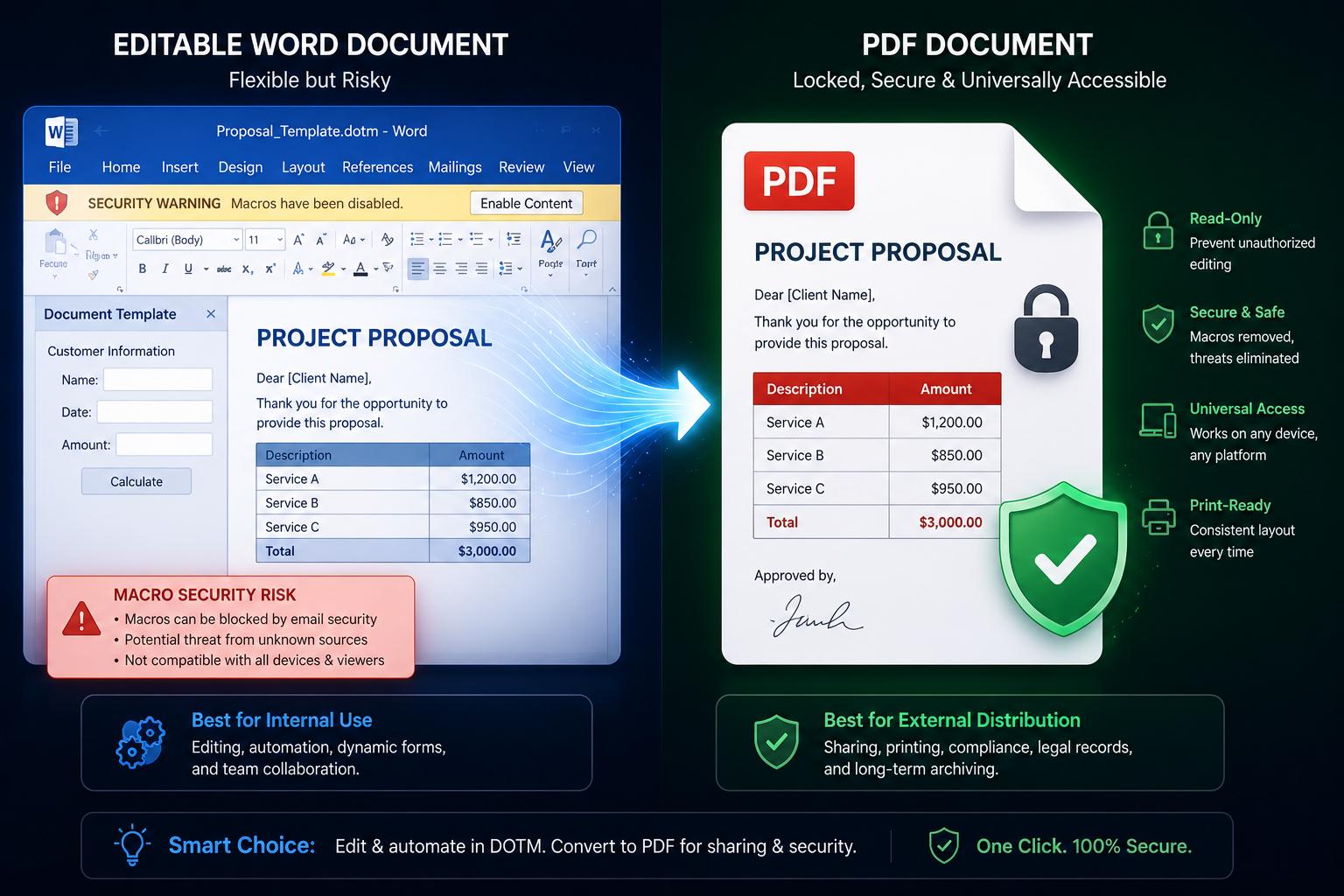
DOTM to PDF: Share Macro-Enabled Word Templates as Secure, Read-Only Documents

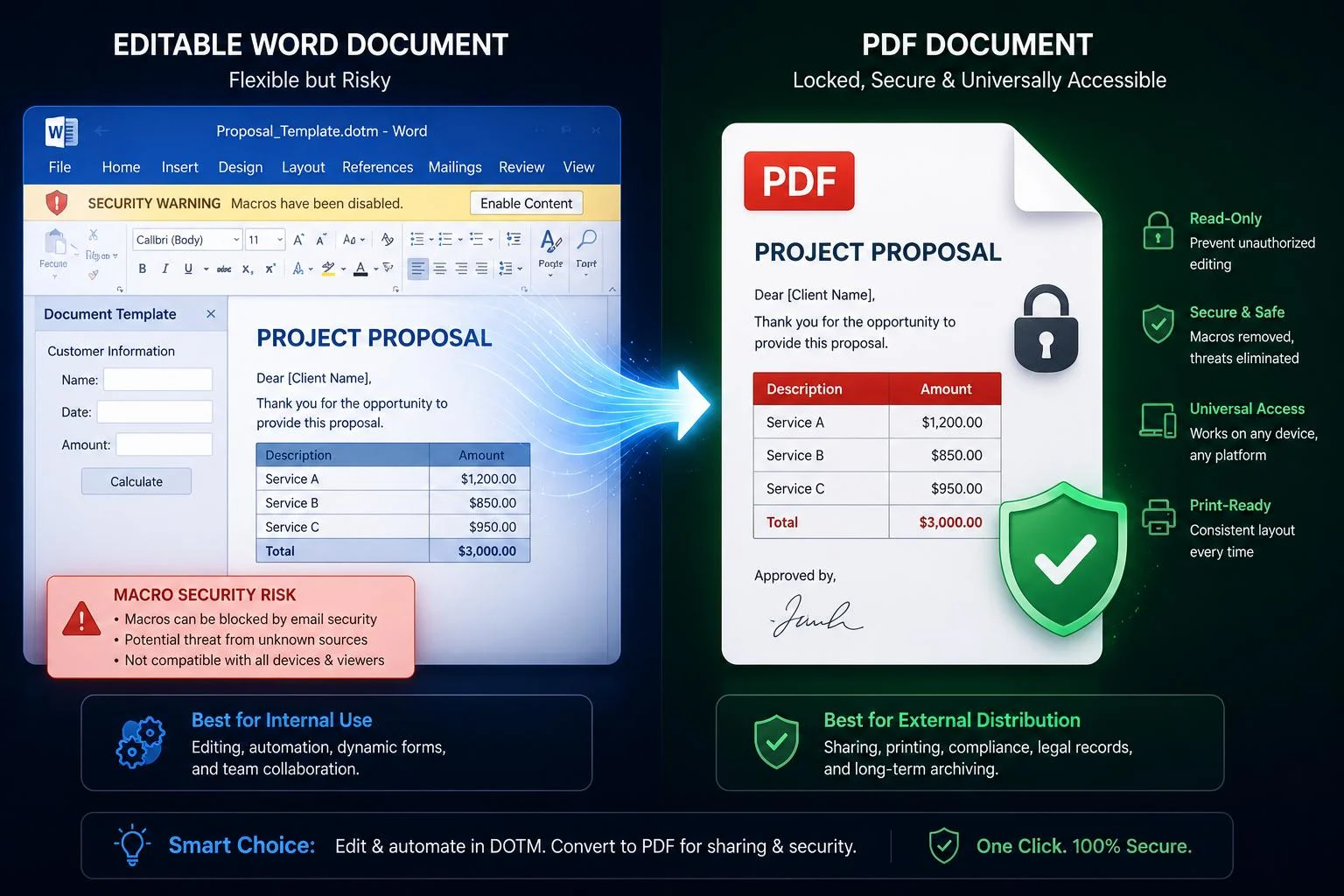

Table of Contents▼
Convert DOTM to PDF online without losing formatting. Remove VBA macro risks, preserve layouts, and share secure, read-only PDF files instantly—no Microsoft Word installation required.
Need to convert a DOTM to PDF online without losing formatting or exposing recipients to untrusted VBA macros? A PDF keeps your document layout intact, removes executable code, and makes the file easier to share across email, mobile devices, and enterprise document management systems without requiring a local installation of Microsoft Word.
“Quick Answer: Converting a DOTM file to PDF transforms an active Microsoft Word macro-enabled template into a static, read-only document. This process locks visual formatting, embeds local fonts, and strips executable Visual Basic for Applications (VBA) code, making the file safe for external sharing and enterprise security gateways.
Quick Summary (TL;DR)
What DOTM files do: Store reusable layouts, formatting rules, and executable VBA macros for automated document generation in Microsoft 365 and Office Open XML systems.
Why conversion is necessary: Enterprise email gateways, antivirus tools, and mobile devices frequently block or break raw .dotm attachments due to strict security policies and macro warnings.
What PDF conversion fixes: Removes active macro execution risks, freezes precise typography and table layouts, and helps ensure consistent cross-platform readability.
Best use case: Exporting final quotes, invoices, legal contracts, and audit reports for external clients, vendors, or compliance archives.
No software required: Using a modern browser-based DOTM converter allows you to save DOTM as PDF instantly without downloading desktop software or print drivers.
What Is a DOTM File and Why Convert DOTM to PDF?
A DOTM file (.dotm) is a macro-enabled template created in Microsoft Word. It serves as a master blueprint containing default document styles, layout structures, and embedded Visual Basic for Applications (VBA) scripts. Organizations use DOTM files internally to automate repetitive tasks—such as auto-populating client metadata, calculating invoice subtotals, or generating standard operating procedures.
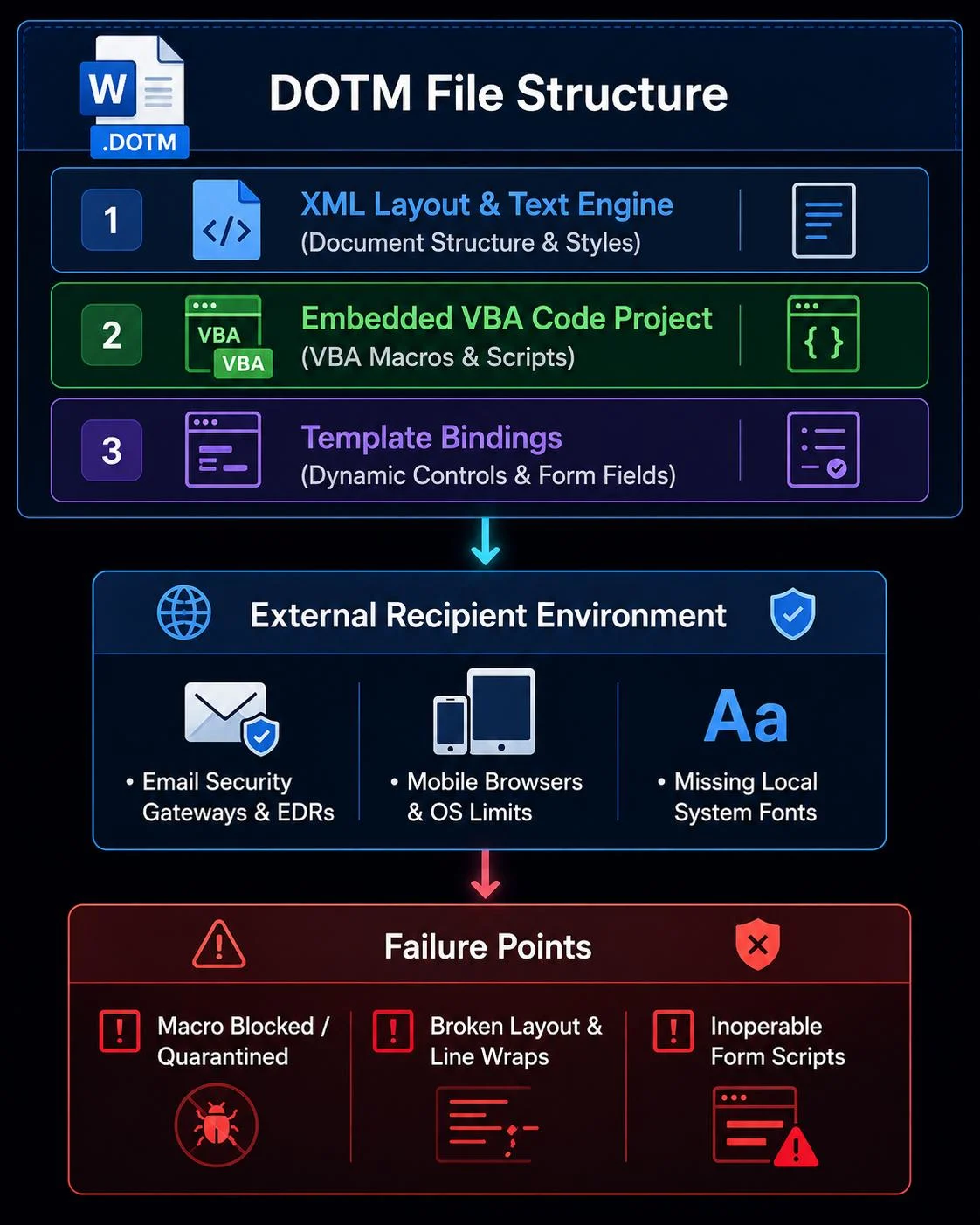
This infographic explains the internal architecture of a DOTM template, how recipient environments can affect macro-enabled documents, and why converting DOTM files to PDF improves compatibility, security, and layout consistency.
Why Convert DOTM to PDF Online Instead of Sharing the Original File?
When you email or upload a raw .dotm file, recipients often run into friction that prevents them from opening or reading it correctly:
Enterprise email gateways and security platforms may flag, warn about, or quarantine .dotm attachments depending on organizational security policies because they can contain executable VBA macros.
Cross-Platform Layout Shifts: Opening a .dotm template on a macOS device, tablet, or smartphone often alters font spacing, distorts multi-column tables, and breaks alignment when the recipient lacks your exact local system typography.
Incompatible Mobile Browsers: Mobile operating systems do not natively support full desktop VBA macro execution inside word processing apps, leaving interactive scripts non-functional.
Document Integrity & Anti-Tampering: Sharing an active template permits recipients to modify underlying form controls or body text accidentally. A secure file conversion to PDF creates an unalterable, audit-ready record.
Core Technical Differences: DOTM vs. PDF
Understanding the architectural distinction between editable macro templates and static document formats highlights why conversion is the universal standard for external document workflows.
Technical Feature | DOTM (Word Macro Template) | PDF (Portable Document Format) |
Primary Intent | Internal document creation & automation | External distribution, reading, & archiving |
Macro Execution | Executes active VBA code | Strips code entirely (No VBA support) |
Rendering Method | Dynamic (Depends on local fonts & OS) | Static (Fixed vector coordinates per ISO 32000 standard) |
Security Risk Profile | Higher (Flagged by firewalls and EDRs) | Minimal (Standard read-only security profile) |
Cross-Device Display | Variable across platforms and devices | Identical visual appearance on every screen |
Editing Capabilities | Fully editable template structure | Read-only; fixed layout structure |
Quick Comparison: DOTM vs. PDF at a Glance
If you need to... | Use DOTM | Use PDF |
Edit automated VBA macros | ✓ | ✗ |
Share finalized documents with clients | ✗ | ✓ |
Store compliance and audit records | ✗ | ✓ |
Run internal workplace automation | ✓ | ✗ |
Guarantee cross-platform mobile viewing | ✗ | ✓ |
Who Should Convert DOTM to PDF?
Converting Word macro templates into clean PDFs is a core requirement across many specialized document workflows:
HR Teams: Distributing official employment contracts, onboarding packets, and company policy acknowledgments without layout shifts.
Accountants & Finance Teams: Sending final client invoices, quarterly budget reports, and billing schedules that cannot be altered.
Lawyers & Legal Operations: Sharing contract templates, settlement forms, and compliance filings as read-only legal records.
Consultants & Agencies: Delivering final client proposals, audit reports, and technical specifications safely past email spam filters.
Procurement & Operations Managers: Sending standard operating procedures (SOPs), purchase orders, and vendor evaluation forms across enterprise networks.
Decision Guide: When to Keep DOTM vs. When to Convert to PDF
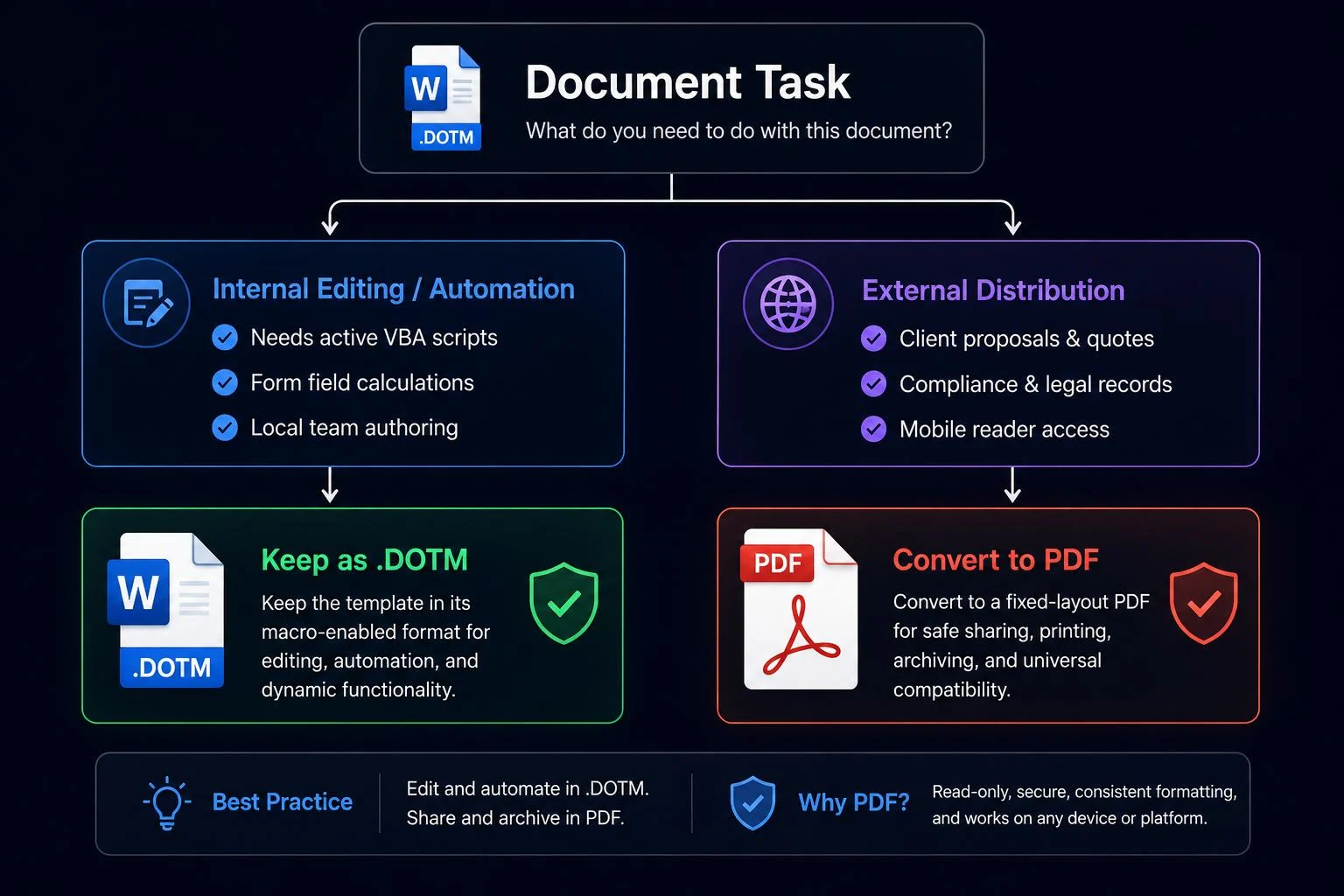
A decision-tree infographic explaining when to use a Microsoft Word DOTM template versus when to convert it to PDF. It compares internal editing, VBA automation, and form calculations with external document sharing, printing, compliance, and cross-platform accessibility.
Keep as DOTM when: You are building or editing a master document internally, require dynamic form logic, or need team members to generate new pre-formatted files in Microsoft Word.
Convert to PDF when: You are emailing final proposals, sharing signed agreements, archiving official company records, or providing files to users on mobile devices or non-Windows operating systems.
Educational Deep Dive: How the Conversion Process Works
A .dotm file is an Office Open XML package containing XML schema files, style sheets, and a binary VBA stream. When you convert DOTM file to PDF using a trusted platform, the rendering engine processes the file according to the ISO 32000 PDF standard—documented on Wikipedia—by executing four critical transformations:
Macro Code Stripping: The conversion software ignores the binary VBA payload, disarming all active macros and eliminating potential security threats.
Font Embedding: Typographic elements are converted into embedded vector glyphs, ensuring missing recipient system fonts won't cause text rewrapping or table distortion.
Coordinate Vector Serialization: Paragraph boundaries, margins, vector shapes, and logos are calculated and locked onto fixed page grids (such as US Letter or A4).
Visual State Flattening: Dynamic fields—such as =TODAY() date stamps or automated subtotal scripts—are frozen at their last saved visual values.
What to Look for in an Online DOTM Converter
When selecting a web tool to convert DOTM to PDF online, prioritize tools that offer high rendering fidelity, strong privacy controls, and fast processing:
Strict Formatting Preservation: The engine must render complex elements like multi-column tables, custom headers, footers, and layered images with absolute precision.
Automatic File Purging: Reliable platforms use encrypted HTTPS/TLS connections during transmission and automatically purge uploaded files from temporary server storage shortly after processing.
Zero Dependency Setup: You should not need local installations of Microsoft Office, third-party printer drivers, or specialized desktop plugins.
Universal Cross-Platform Access: A modern online converter works seamlessly across Linux, macOS, Windows, ChromeOS, and mobile devices without operating system restrictions.
Comparing Conversion Options
Operational Feature | Legacy Online Tools | Traditional Desktop Apps | Modern Web Converters (e.g., Doxbar) |
Setup Overhead | None | High (Requires full desktop installs) | None (Runs directly in browser) |
Security Posture | Variable (Ad tracking, unknown retention) | High (Local file processing) | High (TLS encryption, auto-purge) |
Layout Accuracy | Low–Medium (Frequent font shifts) | High | High (Fidelity rendering engines) |
Cross-Platform Access | Basic | Limited by OS licenses | Universal (Works on any modern OS) |
Macro Handling | Often fails on .dotm extension | Requires Word engine | Safely strips code & renders layout |
How to Convert DOTM to PDF Step-by-Step
Converting a macro-enabled Word template to PDF creates a secure read-only document; a standardized PDF takes less than a minute using a browser-based converter like Doxbar:
Step 1: Finalize Your Master File
Open your template in Microsoft Word, allow all internal VBA scripts or form fields to calculate their final values, and save the file.
Step 2: Upload to the Online Converter
Navigate to the free DOTM to PDF converter in your web browser. Drag and drop your .dotm file into the upload area, or choose it using your system file manager.
Step 3: Run the Conversion
Select PDF as your desired output format and click Convert. The processing engine will strip out executable code layers, embed required typography, and render the static visual output. Note: No Microsoft Word installation is required when using a browser-based converter.
Step 4: Download and Verify
Download the converted PDF file and open it in a browser or standard viewer to confirm that margins, line breaks, tables, and visual formatting match your expectations.
Common Mistakes When Handling DOTM Files
Sending Raw DOTM Files via Email: Attachment filters regularly quarantine or drop macro-enabled templates sent to external clients.
Forgetting to Update Dynamic Fields: Converting a .dotm file before calculating final numbers or auto-populating fields will freeze blank placeholder text into your PDF.
Using Non-Standard Unembedded Fonts: Using custom local typography without converting through an engine that embeds glyph vectors can cause broken layout shifts in the final output.
Using DOTM for Final Distribution: Treating editable, macro-enabled templates as official customer-facing documents leaves your business records open to unintended modifications.
Advantages and Limitations
Key Advantages
Universal Compatibility: Open and read documents instantly on any smartphone, desktop browser, or tablet without needing Microsoft Word.
Firewall Compliance: Eliminates security alerts and spam filter quarantines triggered by attached macro scripts.
Fixed Visual Output: Prevents accidental layout shifts, missing font errors, and altered table dimensions.
Archival Readiness: Creates read-only files suitable for long-term storage and compliance requirements.
Limitations
Loss of Script Execution: Active form controls, dropdown logic, and automated VBA calculations become static text.
Non-Editable Document Body: Recipients cannot edit paragraphs directly without specialized PDF editing software.
Requires Re-Conversion for Updates: If underlying information changes, you must edit the source .dotm file and re-export it to PDF.
When Not to Convert DOTM to PDF
Use PDF only when you're ready to distribute the final version of your document. If your template still requires automation, editing, or ongoing collaboration, keeping it as a .dotm file is usually the better choice.
The VBA macros are still being developed or tested:
If your automation workflow isn't complete, keep the document in DOTM format until all scripts have been finalized.
Team members still need to edit the template:
A PDF locks the document layout and removes executable macros, making further template development difficult.
Dynamic calculations or form fields are not finalized:
Convert only after invoice totals, dates, merge fields, or other automated values have been updated and verified.
The document is still under internal review:
If multiple stakeholders are reviewing or revising the template, continue working with the original DOTM file and create the PDF only after approval.
You expect frequent updates:
If the content will change regularly, maintain the DOTM file as your master copy and export a fresh PDF whenever you need to share the latest version.
Frequently Asked Questions
1. What is a DOTM file?
A .dotm file is a Microsoft Word Macro-Enabled Template. It contains default layout settings, styles, and embedded Visual Basic for Applications (VBA) code designed to automate document generation tasks in Microsoft 365.
2. Can I convert DOTM to PDF without Microsoft Word?
Yes. You can convert DOTM without Word by uploading your file to a privacy-focused online tool like Doxbar. The cloud rendering engine processes the layout, strips macro code, and builds a PDF directly in your browser without requiring Office software.
3. Is there a free DOTM to PDF converter online?
Yes. Modern web converters allow you to convert DOTM to PDF online free without installing desktop applications or paying for software licenses.
4. Why do corporate email systems block DOTM attachments?
Security gateways automatically isolate .dotm files because executable VBA macros can potentially carry unauthorized or malicious scripts. Converting to PDF removes this risk entirely.
5. Does converting DOTM to PDF remove the macros?
Yes. Converting to PDF strips away all active VBA code, leaving only the visual output rendered as a fixed, read-only document.
6. Will my document layout change during conversion?
Using a high-fidelity online DOTM converter preserves your layout—including tables, columns, margins, and embedded images—without unexpected text wrapping.
7. What is the difference between a DOTM and a DOCM file?
A .dotm file is a reusable template used to generate new pre-formatted files. A .docm file is a standard, editable document that contains active macros.
8. What is the difference between DOTM and DOTX files?
Both are Microsoft Word templates, but .dotx files cannot store or execute VBA macros, whereas .dotm files support macro code projects.
9. Can I convert a DOTM file to PDF on a mobile device?
Yes. Because modern online converters process files in the cloud, you can upload .dotm files and download clean PDFs directly on iOS, Android, or tablet devices.
10. Why did my interactive form fields become static after conversion?
PDF documents are designed as read-only visual records. When you convert a dynamic template, dynamic form fields flatten into fixed printable text.
11. How can I ensure custom fonts look correct in the converted PDF?
A quality converter automatically embeds necessary font vector data directly into the resulting PDF file so the typography displays accurately on all screens.
12. Is it safe to convert private business documents using an online tool?
A privacy-focused browser-based converter like Doxbar helps preserve formatting while automatically removing executable macro code. Trusted platforms protect uploads using end-to-end TLS encryption and automatically purge temporary files from servers shortly after processing.
Practical Trust & Security Guidance
To ensure smooth document handling across enterprise environments, keep these practical operational guidelines in mind:
Verify Data Before Export: Ensure all internal dynamic fields, dates, and subtotal calculations are updated in Microsoft Word before converting your document to PDF.
Maintain Master File Backups: Store your original master .dotm templates in secure internal repositories; never rely on exported PDFs as source templates for future editing.
Follow Organizational Governance: Align document processing choices with your internal IT security policies, especially when managing sensitive client records or legally binding contracts.
Key Takeaways
DOTM files are designed for internal automation, while PDFs are built for external distribution.
Converting DOTM to PDF strips active VBA macro scripts, eliminating firewall warnings and security risks for email recipients.
PDF conversion freezes visual elements, locking in margins, tables, and embedded fonts across all operating systems and mobile platforms.
Crucial business records—including quotes, HR forms, and contracts—should always be distributed as read-only PDFs rather than editable templates.
Modern browser-native tools allow you to save DOTM as PDF instantly without downloading software or print drivers.
Related PDF Conversion Tools
If you're working with different Microsoft Word file formats, you may also find these related conversion tools helpful. Each tool is designed to preserve formatting, simplify document sharing, and support secure document workflows across devices.
– Convert macro-enabled Word documents into secure, read-only PDF files while removing executable VBA code.
– Turn standard Microsoft Word documents into professional PDFs without losing formatting or page layout.
– Convert Word template files without macros into fixed PDF documents for easy sharing and archiving.
– Transform editable Word documents into universally compatible PDF files for business, education, and personal use.
– Add password protection and access restrictions to sensitive PDF documents before sharing them externally.
– Reduce PDF file size while maintaining document quality for faster uploads, email attachments, and cloud storage.
Summary and Next Steps
Macro-enabled Word templates remain ideal tools for simplifying internal office workflows, but they present security warnings and compatibility challenges when shared externally. Converting .dotm templates into standard PDFs bridges this gap—allowing you to leverage internal automation while delivering clean, readable, and secure documents to clients and partners.
When you need to share your next proposal, invoice, or audit form safely, use a fast Word macro template converter like Doxbar to turn your .dotm files into professional PDFs in seconds.
Need to Convert Document Formats?
Try our secure, lightning-fast PDF conversion suite. Convert Word, Excel, Images, and more with zero formatting loss.

Doxbar Editorial
Security & Privacy Team
We specialize in secure document architectures, parsing engines, and modern developer utilities. Keeping your files safe, lightweight, and perfectly formatted.
Join the Conversation
Share your thoughts or ask a question about this topic. This is a privacy-first system.