

Convert Go (.go) Source Code to PDF Online Without Losing Formatting
Contents
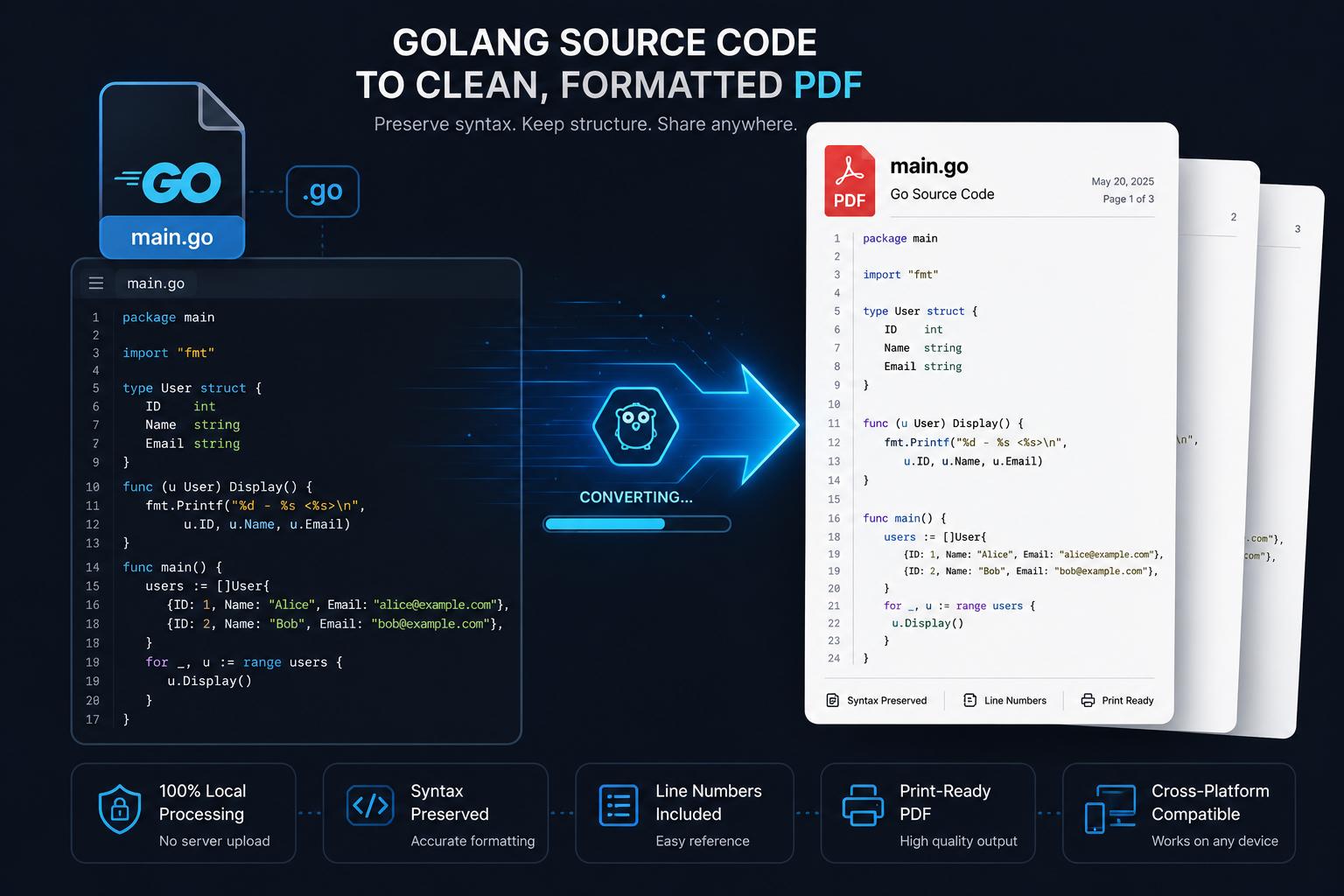
Convert Go (.go) Source Code to PDF Online Without Losing Formatting


Table of Contents▼
Convert Go (.go) source code to PDF online while preserving formatting, indentation, line numbers, and syntax. Ideal for code reviews, documentation, audits, and academic submissions.
Quick Answer
“Need to convert a Go (.go) source code file to PDF? Upload your Go file, convert it to PDF while preserving formatting, indentation, and code structure, then download a clean, printable document in seconds. PDF is ideal for code reviews, technical documentation, compliance audits, academic submissions, and sharing Go source code with anyone—without requiring a code editor or Go development environment.
1. Introduction: The Silent Friction of Sharing Source Code
Picture this common scenario: You’ve spent the afternoon writing a lean, concurrent microservice in Golang. Your channel logic is sharp, your error handling is explicit, and the code runs clean. Now comes the non-coding part: you need to send a core slice of that implementation to a non-engineering stakeholder, submit it for a compliance audit, or print out a clean physical copy for an in-person design review.
So what do you do?
If you copy and paste raw .go files into a standard word processor like Microsoft Word, you end up fighting line wraps, auto-capitalization, stripped indentation, and smart quotes that break syntax logic. If you take screenshots, you lose searchability and clean pagination. Send a raw .go file directly to a client or academic instructor, and they might ping you back asking how to open a GO file because their machine lacks a code editor or modern runtime.
Converting your Go source code into a standardized PDF solves these practical headaches. It freezes your formatting, protects your indentation, preserves line numbers, and makes your work readable on any phone, tablet, or desktop without requiring specialized development environments.
While lightweight online utilities like Doxbar make quick conversions straightforward, understanding why code formatting degrades during file transformations helps you build far better technical documentation.
2. The Mechanics of Code-to-Document Conversion
Converting executable text files into static visual documents isn't just about changing a file extension from .go to .pdf. Source code relies on strict layout conventions that standard document parsers usually ruin.
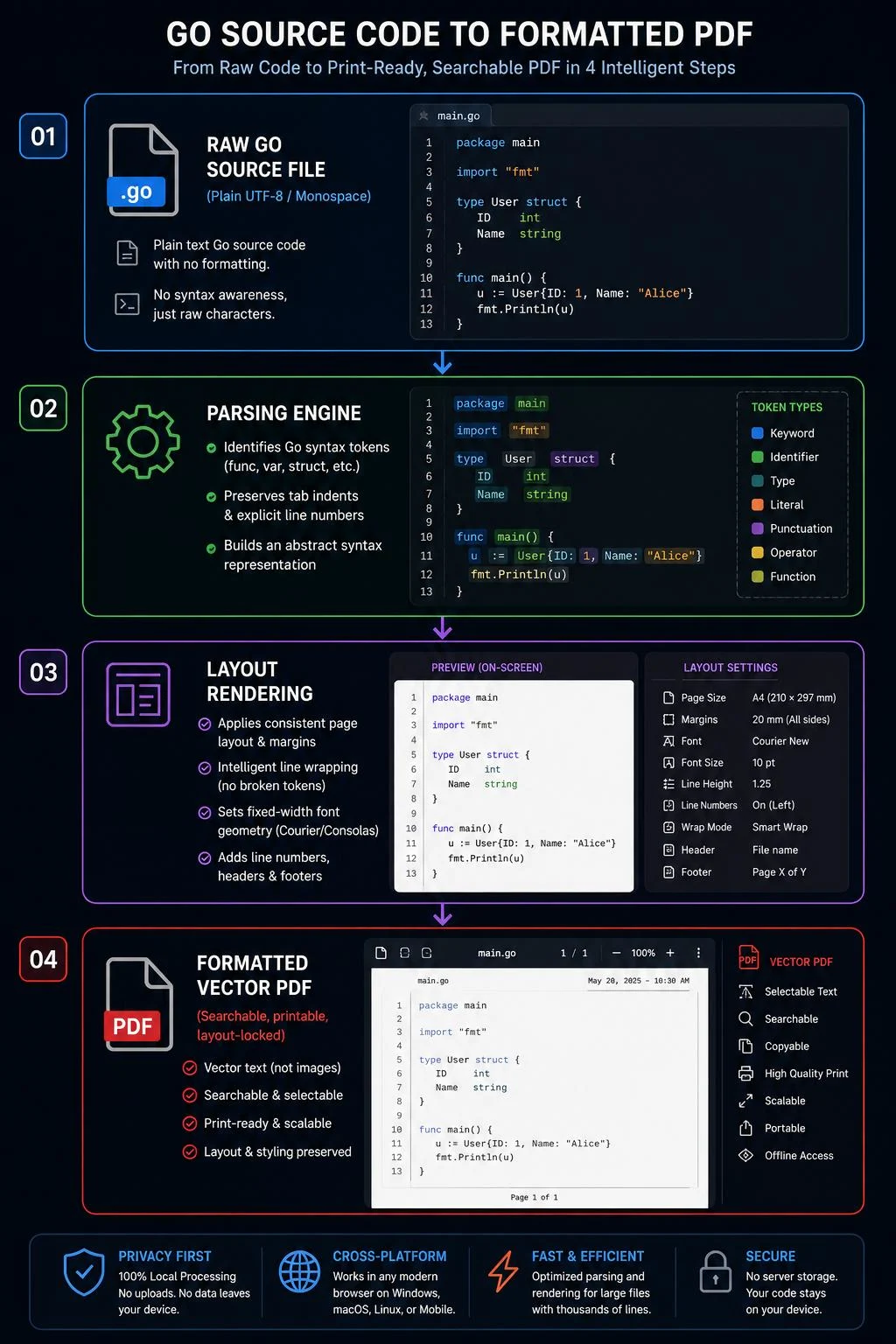
This workflow illustrates how a Go (.go) source code file is parsed, formatted, and rendered into a searchable PDF while preserving indentation, line numbers, and overall code structure.
Why Standard Processors Ruin Code Layouts
Standard word processors operate on variable-width fonts (like Arial or Times New Roman). In those typographies, the letter w is significantly wider than the letter i. Go source code, however, depends entirely on fixed-width (monospace) characters so that tabs, nested loops, and struct alignments stay visually organized.
When a rich-text application imports a raw .go file, it often:
Converts explicit tab stops into variable whitespace characters.
Applies automatic line wrapping that breaks long function signatures across arbitrary words.
Replaces straight quotes ("...") with directional smart quotes (“...”), destroying valid syntax representation.
Removes leading spaces inside nested conditional blocks.
The Math Behind Fixed Geometry
PDF files map content onto fixed two-dimensional coordinate grids based on precise point measurements. Unlike responsive web views or liquid text flow in text editors, a PDF defines exact bounding boxes for characters.
To retain readability when exporting Go code to PDF:
Every character must occupy a uniform bounding box width ($W_c$).
Line height ($H_l$) must remain constant across page breaks.
Tab offsets must evaluate to strict character multiples ($N_{\text{spaces}} \times W_c$) rather than responsive DOM margins.
This geometric precision guarantees that the Go code on your editor screen looks identical on a reviewer's tablet or a physical sheet of paper.
3. Real-World Use Cases for Go PDFs
Why export Go source code into PDF format instead of keeping it in version control? Different workflows require static, portable records.
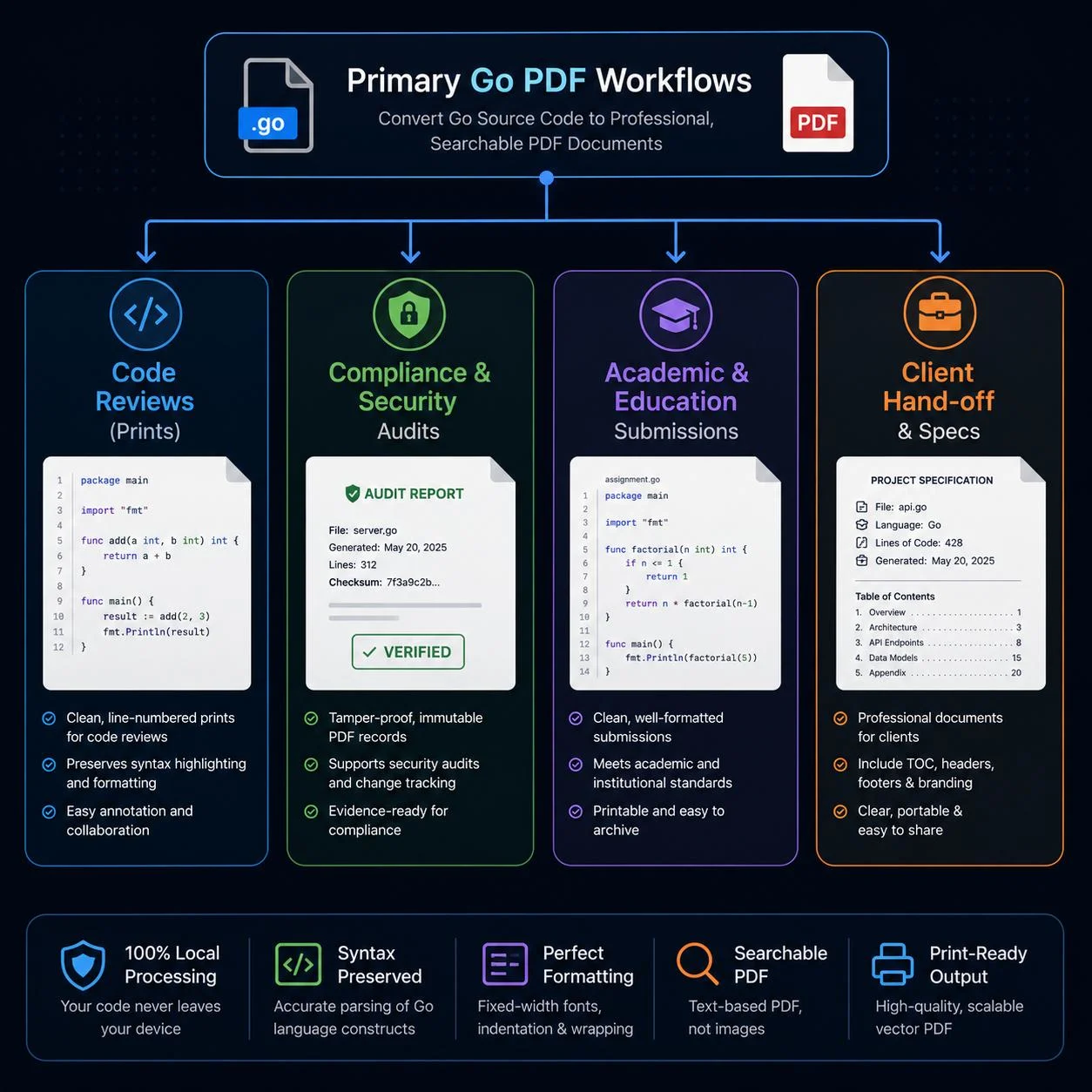
Common workflows where Go source code is converted to PDF for documentation, reviews, audits, education, and client sharing.
Physical Code Reviews & Architecture Boards: Printing code with explicit line numbers allows team members to annotate logic using physical markers during quiet review sessions, avoiding the distraction of live notifications.
Security & Compliance Audits: Third-party cybersecurity firms and financial regulators frequently require immutable source snapshots. PDFs prevent accidental modification during review cycles and preserve precise code state for historic records.
Academic Assignments & Coursework: Universities and bootcamps requiring Golang submissions often mandate single-file PDF uploads to streamline grading inside learning management platforms.
Client Deliverables & Technical Appendices: When attaching implementation logic to technical proposals, service-level agreements, or software handoff contracts, a clean PDF looks professional and prevents non-technical readers from corrupting code snippets.
Practical Experience: Why Developers Prefer PDF for Code Reviews
In many development teams, code reviews don't always happen inside Git repositories or IDEs. Source code is often shared with project managers, security auditors, instructors, clients, or stakeholders who don't use development tools every day. While screenshots may seem convenient, they quickly become difficult to read, impossible to search, and challenging to reference during discussions.
A well-formatted PDF provides a much better experience. It preserves indentation, line numbers, page layout, and code structure, making it easy for reviewers to comment on specific sections without worrying about formatting differences between devices or editors. Because the document looks the same on every screen and in print, it becomes a reliable format for documentation, compliance reviews, technical reports, and long-term project records.
4. Comparing Conversion Workflows
Depending on your security boundaries, offline requirements, and speed needs, different approaches offer distinct trade-offs.
Method | Setup Time | Formatting Preservation | Security Profile | Ideal Use Case |
Browser Converters (e.g., Doxbar) | Instant (0 min) | High (Preserves fonts & margins) | Ephemeral processing, encrypted transfer | Quick sharing, multi-device access, non-CLI users |
CLI Tools (enscript, weasyprint) | 10–30 min setup | High (Requires configuration) | 100% Local / Air-gapped | Automated CI/CD pipelines, offline server scripts |
IDE Print Extensions | 2–5 min setup | Medium to High | 100% Local | Quick personal exports directly from VS Code or JetBrains |
Copy-Paste to Word / Docs | Instant | Low (Requires manual fixing) | Local / Cloud account | Not Recommended due to layout degradation |
5. Converting Go Code to PDF in Browser Workflows
When using browser-based conversion engines like Doxbar, following a clean, predictable workflow keeps your documents crisp and readable.
Step 1: Prepare Your .go File
Before converting, clean up unnecessary whitespace and ensure your code conforms to standard formatting standards. Run go fmt main. locally to ensure standard indentation before exporting.
Step 2: Upload to the Converter
Drag and drop your .go file into the file handling interface. Modern browser-native tools process file buffers securely without installing local background daemons or registry keys.
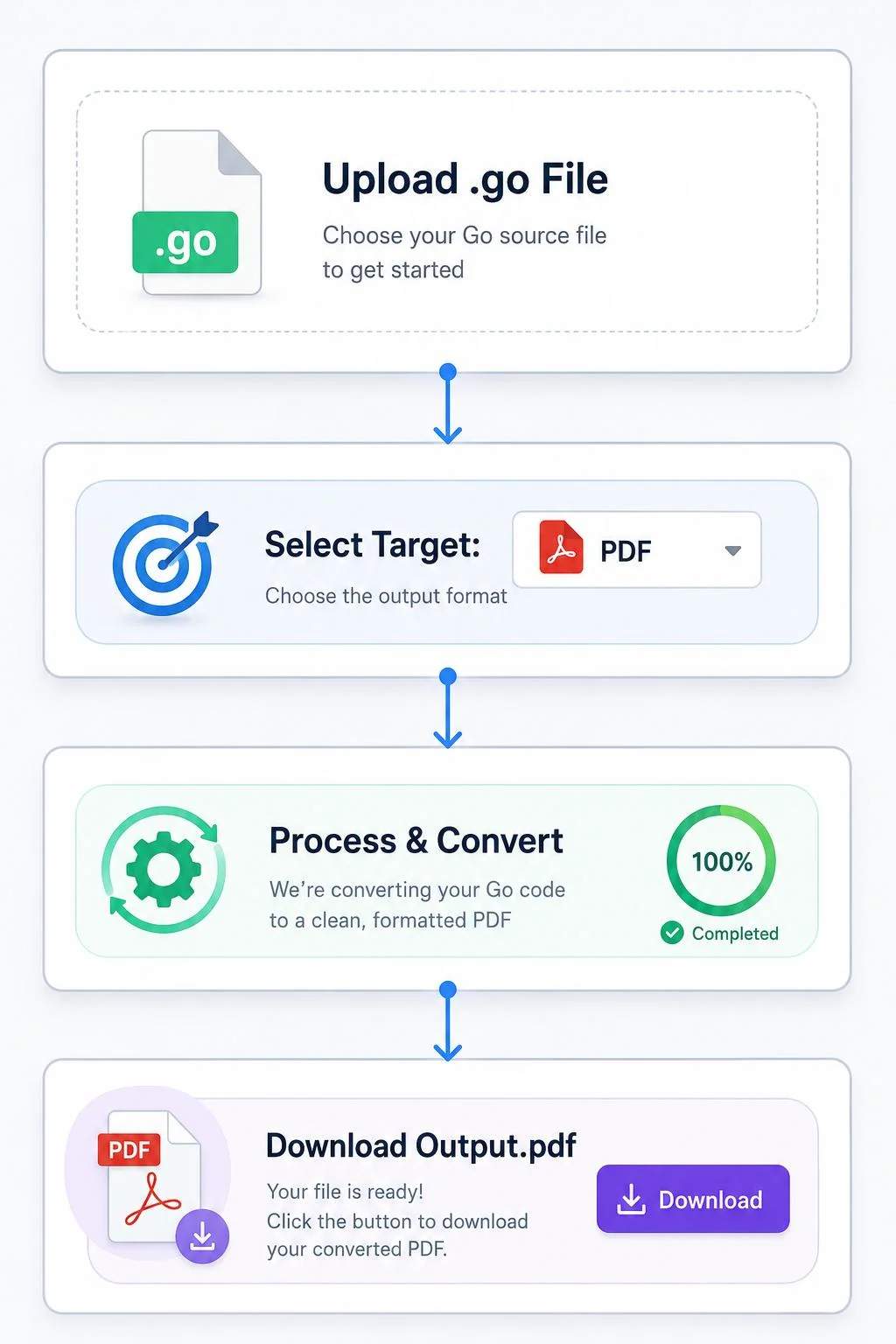
Browser-based workflow for converting a Go (.go) source code file into a clean, printable PDF document.
Step 3: Verify Formatting Post-Export
Open the generated PDF and inspect three critical areas:
Line Wraps: Ensure long struct tags or function parameters haven't wrapped awkwardly across lines.
Tab Alignment: Confirm that nested control blocks (if, for, select) maintain consistent left margins.
Pagination: Verify that individual function blocks aren't awkwardly split across page breaks where possible.
6. Common Mistakes When Converting Go Source Code to PDF
Even a simple Go to PDF conversion can produce poor results if a few important details are overlooked. Avoiding these common mistakes will help ensure your PDF remains clean, readable, and suitable for documentation, code reviews, and professional sharing.
Using Screenshots Instead of PDF
Many developers capture screenshots of their code instead of exporting it as a PDF. While screenshots are quick to create, they are difficult to search, impossible to copy from, and often lose clarity when printed or zoomed. A searchable PDF is a much better choice for documentation and collaboration.
Choosing a Variable-Width Font
Go source code is designed to be read in monospaced fonts where every character occupies the same width. Exporting code with proportional fonts such as Arial or Times New Roman can break alignment and make nested code blocks harder to read. Always use a monospaced font like Consolas, Courier New, or JetBrains Mono.
Omitting Line Numbers
Line numbers make it much easier to review, discuss, and reference code. During team reviews or security audits, reviewers can quickly point to a specific line instead of describing its location. If your converter supports line numbers, consider enabling them.
Ignoring Indentation Problems
Go relies on clean formatting to improve readability. Before exporting, make sure your source code is properly formatted using standard Go formatting tools. Incorrect indentation or inconsistent spacing can make even well-written code appear unprofessional in the final PDF.
Using a Font Size That Is Too Small
Very small text may reduce the number of pages, but it also makes printed code difficult to read. For most documentation, a font size between 9 pt and 11 pt provides a good balance between readability and page count.
Forgetting Page Orientation
Long function names, method signatures, and comments can wrap awkwardly on portrait pages. If your code contains wide lines, consider using landscape orientation to improve readability and reduce unnecessary line wrapping.
Not Reviewing the PDF Before Sharing
Before sending the final document, open the generated PDF and verify that formatting, page breaks, indentation, and line numbers appear correctly. A quick review helps catch layout issues before the document reaches clients, instructors, or reviewers.
7. Balancing Security, Privacy, and Performance
Exporting proprietary source code requires careful handling of intellectual property and sensitive data.
Security Checkpoint: Never upload source files containing hardcoded API keys, database credentials, production secrets, or private environment variables (.env) to any external service. Always sanitize your code before generating shareable documents. Before sharing exported source code, review the document carefully to ensure it doesn't contain API keys, passwords, access tokens, or other sensitive information that should remain private.
What Makes a Converter Safe?
When selecting web-based document processing tools, evaluate these baseline security controls:
Transport Encryption: All file uploads and downloads must occur over HTTPS enforced with modern TLS protocol versions (as documented by the Mozilla Foundation).
Ephemeral Storage Policies: Web servers handling code processing should automatically drop files from memory and temporary disk storage shortly after conversion finishes.
Zero Data Monetization: Ensure the platform's terms explicitly state that user uploads are never mined, analyzed for machine learning datasets, or shared with third parties.
For hyper-sensitive code bases bound by strict non-disclosure agreements, consider air-gapped command-line exports or local build systems using tools hosted via organizations like the Cloud Native Computing Foundation.
8. Frequently Asked Questions
What is a .go file?
A .go file contains source code written in the Go programming language (Golang), created by Google engineers. It is a plain-text file formatted with specific syntax rules for compiling efficient, concurrent software applications.
How do I open a .go file if I don't have a code editor?
Because .go files are plain UTF-8 text, you can open them with basic operating system utilities like Notepad (Windows) or TextEdit (macOS). However, converting the file to PDF allows anyone to view the code with full structure on any device without installing special tools.
Why does my Go code look garbled when copied into Microsoft Word?
Word processors default to proportional fonts, which vary character widths. They also automatically alter straight quotation marks and apply auto-capitalization. Source code requires fixed-width (monospace) fonts like Courier, Consolas, or JetBrains Mono to preserve proper visual alignment.
Will converting a .go file to PDF execute any code?
No. Conversion treats the .go file strictly as plain text data. The code is never compiled or executed during the document generation process.
Can I select and copy text from the generated PDF?
Yes, properly generated PDFs retain vector font character paths, allowing readers to search, highlight, and copy text snippets directly from the document.
How are tab characters handled during PDF export?
Standard converter logic converts tab characters into a uniform set of explicit space characters (typically 4 spaces) to guarantee consistent visual indentation across all PDF reader applications.
Does converting code to PDF alter the original file?
Not at all. The conversion process reads your source file and generates an entirely separate PDF file. Your original .go source code remains completely untouched.
Is PDF a good format for archiving source code?
PDF/A (the ISO-standardized version of PDF for long-term archiving, detailed on Wikipedia) is an excellent format for legal and historical compliance records because it embeds fonts and layout rules directly inside the file, ensuring it remains readable for decades.
How can I make my printed Go code easier to read?
Ensure your code uses a clean monospaced font at 9pt to 11pt size, maintain a high-contrast background (black text on a white page), and include explicit line numbers along the left margin.
What should I do before sharing code externally?
Always strip sensitive data, credentials, internal IP addresses, and private key strings from the code before exporting it to a shareable format.
How do I print Go source code?
You can print Go source code directly from your code editor or convert it to PDF first for a cleaner layout. Exporting to PDF preserves indentation, page formatting, and readability, making it a better option for code reviews, documentation, and printed reports.
Can VS Code export Go to PDF?
Visual Studio Code does not include a built-in feature to export Go source code directly to PDF. You can use an extension that supports printing or save your Go file as a PDF using an online converter while preserving formatting and code structure.
Can I convert multiple Go files into a single PDF?
Yes. Many Go to PDF converters support multiple file uploads or allow you to merge several Go source files into one PDF document. This is useful for project documentation, code audits, and sharing complete modules with teammates or clients.
Can I convert an entire Go project to PDF?
Yes. You can convert multiple Go source files from a project into PDF documents or combine them into a single PDF for easier sharing. Before exporting, organize your files and remove unnecessary build artifacts to keep the documentation clean and easy to navigate.
How do I preserve syntax highlighting when converting Go code to PDF?
To preserve syntax highlighting, use a converter or editor that supports code-aware formatting. If syntax highlighting is unavailable, a clean monospaced font with proper indentation and line numbers still provides excellent readability for reviews and documentation.
Can I convert Go code to PDF on Linux?
Yes. Linux users can convert Go source code to PDF using command-line tools, code editor extensions, or browser-based converters. Command-line utilities are ideal for automated workflows, while online tools offer a faster option for occasional conversions without additional setup.
Can I convert a .go file to PDF without installing software?
Yes. Browser-based Go to PDF converters allow you to upload a .go file and download a formatted PDF without installing any software. This is a convenient option for quick sharing, documentation, and code reviews across different devices.
Will converting a Go file to PDF change my original source code?
No. Converting a Go file to PDF creates a separate document and does not modify the original .go source file. Your code remains unchanged, allowing you to continue editing or compiling it after the conversion.
Related PDF Tools You May Also Need
Converting Go source code to PDF is often just one step in a larger documentation workflow. Depending on your project requirements, you may also need additional PDF tools to organize, optimize, or edit your documents before sharing them with teammates, clients, or reviewers.
If your exported PDF is too large to upload or email, use a Compress PDF tool to reduce the file size while maintaining readability. When working with multiple Go source files, a Merge PDF tool can combine them into a single document for code reviews, technical documentation, or compliance submissions.
Developers often work with other text-based formats as well. If your project includes plain text, web pages, or Markdown documentation, you can also convert TXT to PDF, HTML to PDF, and Markdown to PDF while preserving the original content structure.
Need to document code written in another programming language? Similar workflows are available for Python to PDF, Java to PDF, and C++ to PDF, making it easy to create consistent, professional documentation across different projects.
Finally, if you need to edit or reuse content from an exported document, you can convert it back using a PDF to Word converter for easier editing and collaboration.
These related tools can help you build a complete document workflow, from creating and organizing PDFs to compressing, editing, and sharing them more efficiently.
9. Summary: Clean Code, Clean Documentation
Source code is written for computers, but it also needs to be easy for people to read, review, and maintain. Converting Go (.go) source code to PDF preserves formatting, indentation, line numbers, and overall readability, making it easier to share your work with teammates, clients, auditors, instructors, and other stakeholders.
Whether you're preparing technical documentation, conducting a code review, submitting an academic assignment, or creating compliance records, a well-formatted PDF ensures your source code remains consistent across devices and is ready for printing or long-term archiving.
When you're ready to share your Go code professionally, DoxBar lets you convert Go (.go) files to PDF quickly while preserving the structure and readability of your source code—no software installation required.
Need to Convert Document Formats?
Try our secure, lightning-fast PDF conversion suite. Convert Word, Excel, Images, and more with zero formatting loss.

Doxbar Editorial
Security & Privacy Team
We specialize in secure document architectures, parsing engines, and modern developer utilities. Keeping your files safe, lightweight, and perfectly formatted.
Join the Conversation
Share your thoughts or ask a question about this topic. This is a privacy-first system.