

PDF Background Remover: How to Clean Scanned Documents for Better Reading and Printing
Contents
PDF Background Remover: How to Clean Scanned Documents for Better Reading and Printing

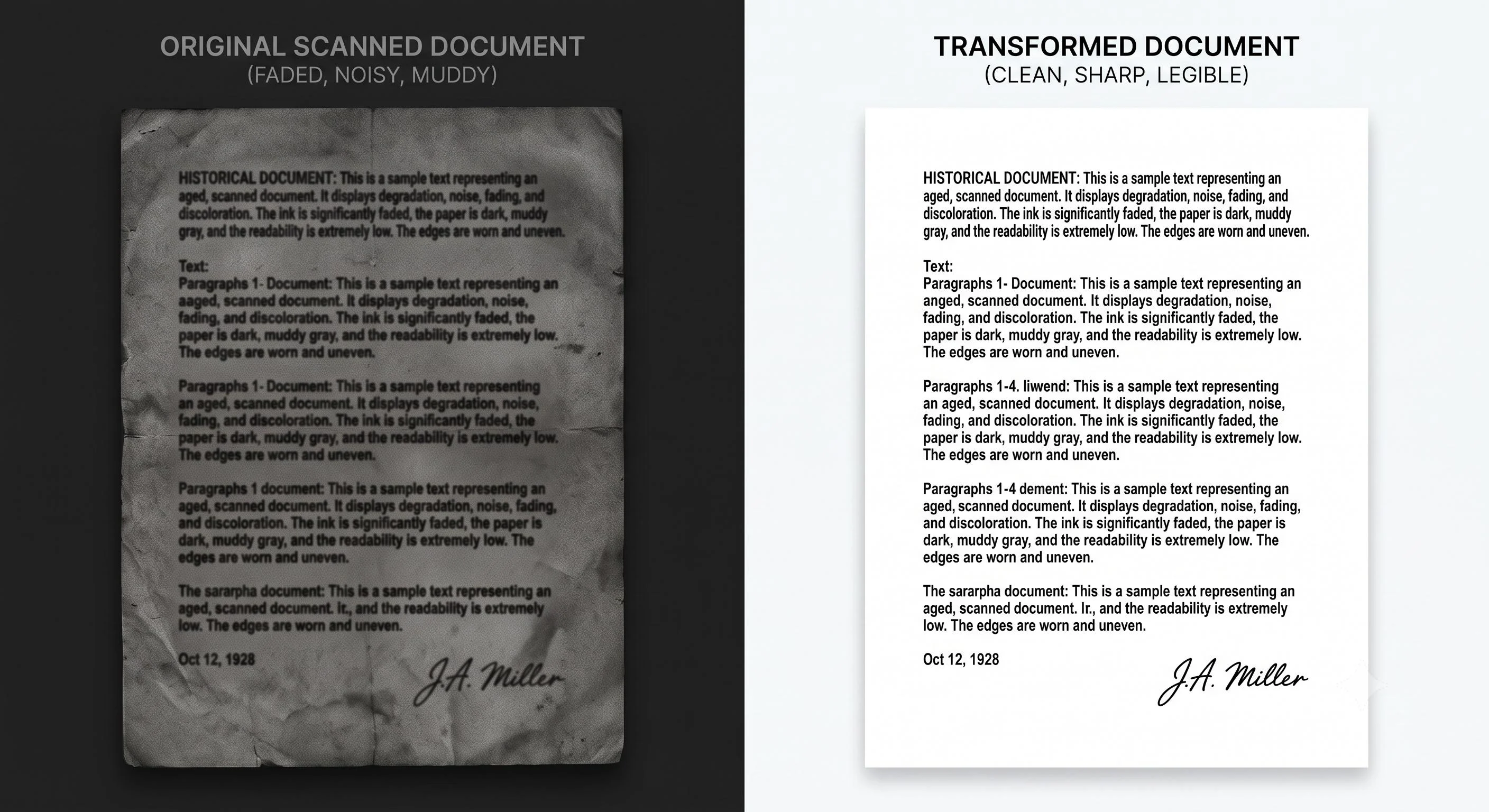

Table of Contents▼
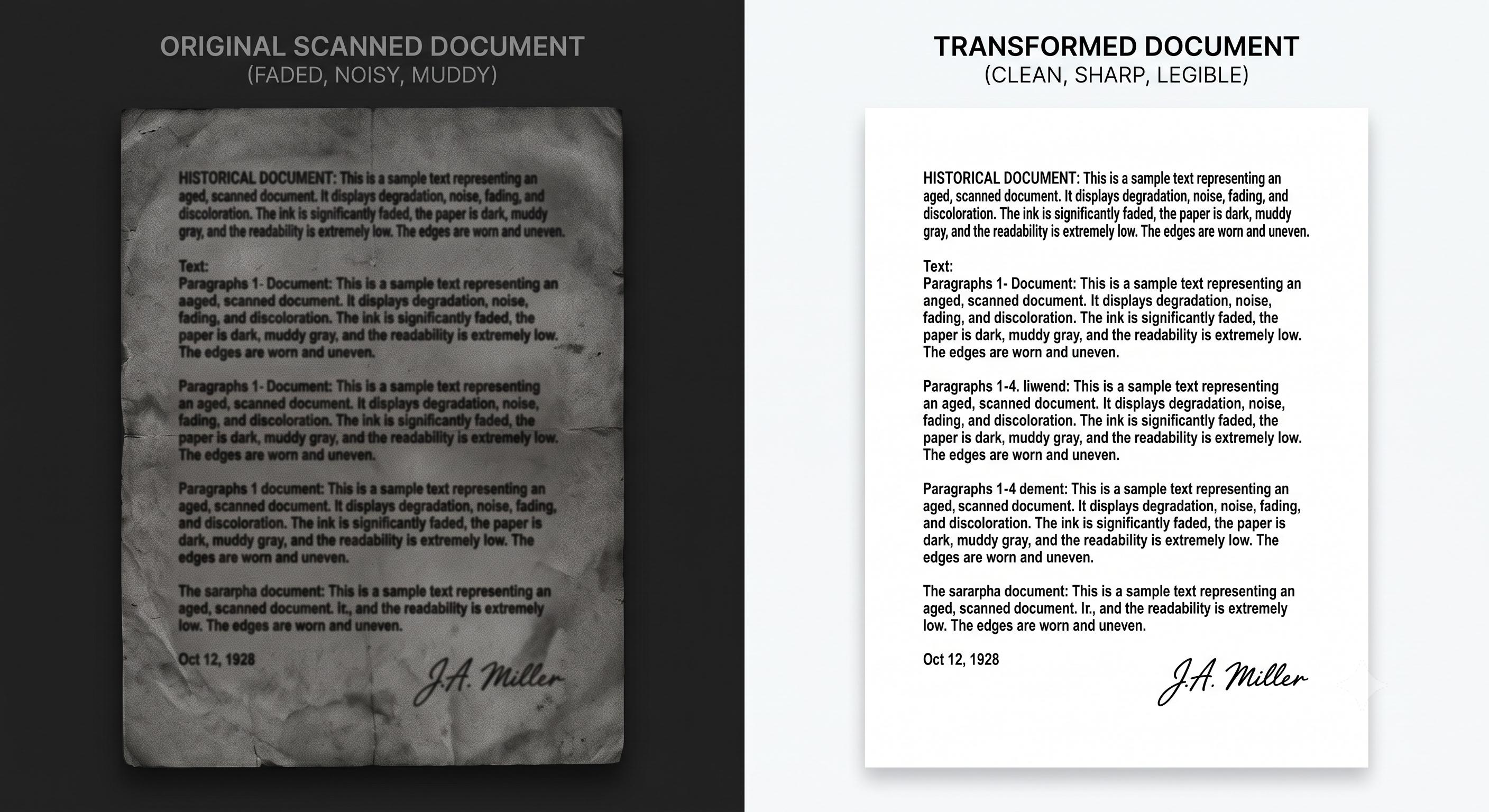
Scanned a document only to get a messy gray background? Learn how online PDF background remover cleans up text, whitens backgrounds, and saves printer ink.
Quick Answer
Upload your scanned PDF to a PDF background remover, choose the cleanup option, and let the tool remove gray backgrounds, scanner shadows, and paper stains while preserving text. Download the cleaned PDF for easier reading and printing.
You place an important contract or an old textbook chapter on the scanner, hit the button, and open the digital file. Instead of a crisp, clean page, you are greeted by a murky, dark gray sheet with barely legible text. To make things worse, you need to print ten copies of this document by tomorrow morning, and you can already hear your office printer screaming as it drains an entire cartridge of black ink just to print a useless background shadow.
Dealing with poor legibility and high ink consumption is a daily headache for students, remote workers, and operations managers alike. Legacy office workflows often force people to choose between squinting at an old scanned PDF with a yellowed background and downloading heavy, expensive desktop suites just to clean up a single page.
Fortunately, modern browser-based web applications have changed the game. Platforms like Doxbar allow you to quickly remove the background from a PDF online, stripping away unwanted artifacts and turning messy scans into print-friendly, high-contrast documents without requiring a master's degree in graphic design.
Why Scanned Documents Turn Into a Mess
When you digitize paper, things rarely go perfectly. If you understand why these visual issues happen, it becomes much easier to pick the right tools to fix them.
The Gray Background Trait: Scanners use bright lights and sensors to capture pages. If the paper is slightly thick, textured, or not pressed completely flat against the glass, the sensor reads the minor shadows as a solid light-gray layer.
Ink-Draining Disasters: Trying to print a document when a scanned PDF has a gray background is a massive waste of resources. Your printer will try to recreate that gray tone by laying down a dense layer of tiny ink droplets across the entire page, warping the paper and wasting expensive toner.
Loss of Text Contrast: When the background turns dark or yellowed, the contrast between the black text and the page drops drastically. This makes the file incredibly difficult to read on mobile devices or under low-light conditions.
Massive File Sizes: A PDF with a clean, white background uses very little data. However, when a document retains thousands of tiny shadows, specks, and gray gradients, the file size balloons, making it hard to email or upload to cloud storage.
The Tech Under the Hood: How Document Cleanup Works
Turning a murky scan into a pixel-perfect digital document requires a surprising amount of engineering. When you upload a file to a PDF background remover online tool, the system processes the file through a few distinct layers.
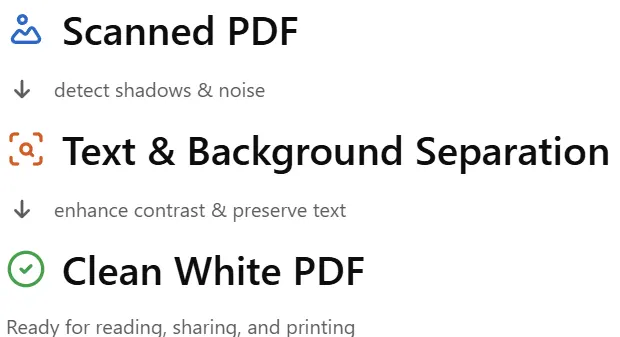
How PDF Background Cleanup Works
Detect Background Noise — The tool identifies gray shadows, stains, and uneven paper tones in the scanned PDF.
Separate Text from Background — Thresholding and image analysis keep the text dark while turning the background close to pure white.
Create a Clean PDF — The cleaned pages are rebuilt into a print-ready PDF with improved readability and lower ink usage.
1. Binarization and Thresholding
At the core of cleaning up a scanned PDF for printing is a process called adaptive thresholding. The software analyzes every single pixel on the page. It evaluates the local brightness of an area and determines whether a pixel belongs to the actual text (foreground) or just noise (background). The algorithm then converts the background pixels to pure white while forcing the text pixels to a solid, high-contrast black.
2. OCR (Optical Character Recognition) Integration
Basic image editors treat your document like a regular photograph, which means compressing the text until it looks blurry and jagged. Advanced processors use basic OCR elements to identify the structure of letters. According to Adobe's Technical Guides, recognizing text shapes allows systems to separate structural text data from underlying background images or stains, ensuring the letters remain sharp even after the background is stripped away.
3. Vector vs. Raster Behavior
A standard PDF created in Microsoft Word uses vector data, meaning the text is stored as mathematical fonts that can scale infinitely. A scanned document, however, is a raster image—a giant grid of colored pixels wrapped inside a PDF container. Because the file behaves like an image, removing a colored background from a PDF requires pixel-level manipulation rather than just clicking and deleting a shape layer.
What to Look For in a Modern Cleanup Tool
Not all online tools handle files the same way. If you are processing sensitive business contracts or large academic chapters, look for tools that prioritize the following features:
Strict Data Privacy: Avoid platforms that keep your files indefinitely. Look for services that process everything over encrypted HTTPS channels and automatically wipe your documents from their servers within an hour of processing.
True Color Preservation: If your document contains colored stamps, signatures, or highlighting, a smart tool should whiten the background of a scanned PDF while leaving those specific colored elements perfectly intact.
Zero Software Installs: You shouldn't have to install unverified executable files on your operating system just to modify a document. Modern tools run entirely within your web browser using secure sandboxed environments.
Layout Fidelity: The system must remove gray backgrounds from PDFs without shifting the positions of paragraphs, margins, images, or signature blocks.
Document Optimization Methods Compared
Feature / Metric | Legacy Web Tools | Desktop Software | Modern Browser-Based (Doxbar) |
Speed to Completion | Slow (Heavy ad load) | Slow (Launch & setup time) | Fast (Seconds to process) |
System Resource Cost | Medium | High (Heavy RAM usage) | Extremely Low |
Output Text Sharpness | Often blurry or pixelated | High | High (Vector-optimized output) |
Accessibility | Desktop only layouts | Requires active licenses | Mobile & Desktop friendly |
Privacy Standards | Vague retention policies | Local but insecure exports | Auto-wipe within 60 minutes |
Step-by-Step: Cleaning Your Scanned Files
Here is how the standard, friction-free workflow operates on modern web platforms:
Upload the File: Drag your target document directly into the browser upload box.
Select the Cleanup Profile: Choose whether you want to completely remove background images from the PDF, flatten gray tones, or convert the entire file to a high-contrast monochrome layout.
Process: Let the server-side algorithms map the pixels, strip out the noise shadows, and render a fresh document layout.
Download and Verify: Save the optimized file to your local drive. Open it up to check that the text remains crisp and the background is a pure, clean white.
The Realistic Balance: Pros and Cons
The Benefits
Massive Ink Savings: Printing a file with a pure white background uses up to 70% less ink or toner than printing an uncleaned scan.
Flawless Screen Reading: High-contrast text eliminates eye strain when reading long documents on tablets or laptops.
Professional Appearance: Cleaned documents look like they were generated digitally from the start, rather than appearing like a sloppy smartphone photo.
The Realities
Highly Degraded Originals: If the text on the original physical paper was faint or physically faded away, a background remover can only do so much to reconstruct the missing letter shapes.
Complex Handwritten Notes: Documents filled with overlapping handwriting, stray pencil marks, and sketches take longer to filter accurately without slightly fading some hand-drawn lines.
Advanced Frequently Asked Questions
How do I remove a gray background from a scanned PDF online?
You can use a specialized document optimization platform like Doxbar. Upload your scanned PDF, select the document cleanup or background removal option, and the system will instantly process the file to output a sharp document with a white background.
Will removing the background from a PDF reduce its file size?
Yes, dramatically. Uncleaned scanned PDFs store thousands of tiny gray color variations and background noise particles as image data. Stripping away this noise and replacing it with a flat white background can drop the total file size by 30% to 70%, making it far easier to share via email.
Can I clean up a scanned PDF for printing without losing my signature?
Yes. Intelligent processing tools recognize the deep contrast profiles of ink signatures and stamps. They remove the ambient gray shadow cast by the scanner light while carefully preserving the darker pixels that make up your signatures, logos, or handwritten notes.
Why do my scanned documents always have a dark or yellow tint?
This is typically caused by a combination of aged, non-alkaline paper, low-end scanner sensor calibrations, or ambient light leaking into the scanner bed because the document cover wasn't closed tightly.
Is it safe to upload confidential business contracts to online PDF tools?
Security depends entirely on the tool you select. Reputable platforms protect your uploads using end-to-end SSL/TLS encryption during transit and enforce strict server policies that automatically delete all user files within an hour of processing. Always check the privacy policy of the utility you choose.
Can I remove a background image from a PDF if it covers the text?
Yes. If a background image or watermark makes the text difficult to read, specialized background cleaners can analyze the distinct color channels and contrast levels to isolate the text layer and drop the background layer completely.
Does Doxbar require registration or a credit card to clean files?
No, you can process your documents completely on-demand without creating an account or providing payment details.
Can I convert a colored background to pure white on my mobile phone?
Yes. Because modern document processing tools operate natively within web browsers, you can open your mobile browser on an iPhone or Android device, upload the document from your local storage, and download the cleaned version instantly.
What is adaptive thresholding in document processing?
Adaptive thresholding is a computational method that calculates a threshold color value for small individual regions of a page. This allows the system to accurately separate text from backgrounds even if the original scan has uneven lighting or dark shadows in one corner.
Why does text sometimes look jagged after removing the background?
This happens when low-quality converters use aggressive binary compression without edge smoothing. Higher-tier tools use smart filtering to keep the outer lines of text smooth and legible.
Can I process password-protected PDFs?
You will need to enter the user password to unlock the document before the background cleanup tool can access the page images and remove the visual noise.
Will this workflow fix blurry text?
It improves readability by increasing contrast, but it cannot magically reconstruct text that was completely out of focus during the original scanning process.
How do I clean up large textbooks or multi-page documents?
You can upload multi-page documents all at once. The processing engine iterates through every single page sequentially, cleaning the background across the entire file before giving you a single compiled download link.
Does removing the background affect embedded links?
For purely scanned documents, there are no embedded links because the file is an image. If you are cleaning a hybrid digital document, advanced systems preserve the underlying structural code, links, and metadata while modifying only the visual background elements.
Can I make the background transparent instead of white?
Most printing and viewing applications require a flat white background for optimal rendering. If you require absolute transparency for graphic design workflows, you would need to export the pages as PNG images and clear the alpha channel using an image editor.
What happens to photos inside the PDF when the background is cleaned?
If a document contains photographs alongside text, high-contrast monochrome filters may posterize the photos. For files with images, use a "Grayscale Optimization" profile rather than a strict black-and-white threshold filter.
Can this software clean up crinkled or folded paper lines?
Yes. Creases and fold marks show up on scans as dark linear shadows. The background remover identifies these lines as non-text artifacts and filters them out, leaving behind a smooth, clean surface.
Is there a limit to the number of pages I can upload?
Standard browser-based workflows easily handle typical document packages, like 20 to 50 pages. For massive archival books, it is best to split the PDF into smaller sections before processing.
Can I use these tools on Linux or ChromeOS?
Yes, absolutely. Because the architecture relies completely on web standards, it functions perfectly across all operating systems, including Ubuntu, ChromeOS, macOS, and Windows, provided you have a modern browser like Firefox or Chrome.
Why does printing a gray PDF ruin my physical printer paper?
When a printer tries to render a solid gray background across a whole page, it saturates the sheet with regular liquid ink. This excessive moisture stretches the paper fibers, causing the page to warp, curl, and occasionally jam the printer gears.
Does whitening the background improve OCR accuracy later on?
Yes. Optical Character Recognition software relies heavily on clean edges to identify letters. By removing gray noise, coffee stains, and scanner shadows, you drastically increase the accuracy of text recognition engines if you decide to convert the document into searchable text later.
The Core Blueprint for Document Security
When optimizing data online, maintenance of digital security is paramount. Never upload files containing unencrypted, sensitive personal information to platforms that lack clear data governance statements. True EEAT compliance means checking that your chosen SaaS platform utilizes isolated data processing nodes.
How Your Files Stay Secure
Secure Upload
— Your PDF is transferred over an encrypted HTTPS connection.
Temporary Processing
— The file is processed in an isolated environment only for the time required to complete the task.
Automatic Deletion
— Once processing is complete, the file is automatically removed according to the platform's retention policy.
By ensuring that tools explicitly utilize automatic deletion schedules, professionals can safely optimize business documents without risking intellectual property exposure or data leaks.
Cleaning Up the Digital Workspace
At the end of the day, you shouldn't have to tolerate sloppy, unreadable documents that drain your resources. Cleaning up your digital files is a simple way to look more professional, save money on printing supplies, and make reading on your devices far more comfortable.
Using browser-based document platforms like Doxbar gives you a fast, reliable, and secure way to transform frustrating document scans into clean, highly legible files. Give your eyes—and your office printer—a much-needed break by making your backgrounds pure white before your next big meeting.
Need to Convert Document Formats?
Try our secure, lightning-fast PDF conversion suite. Convert Word, Excel, Images, and more with zero formatting loss.

Doxbar Editorial
Security & Privacy Team
We specialize in secure document architectures, parsing engines, and modern developer utilities. Keeping your files safe, lightweight, and perfectly formatted.
Join the Conversation
Share your thoughts or ask a question about this topic. This is a privacy-first system.