

PHP to PDF: Export PHP Source Code for Documentation, Code Review, and Sharing
Contents

PHP to PDF: Export PHP Source Code for Documentation, Code Review, and Sharing

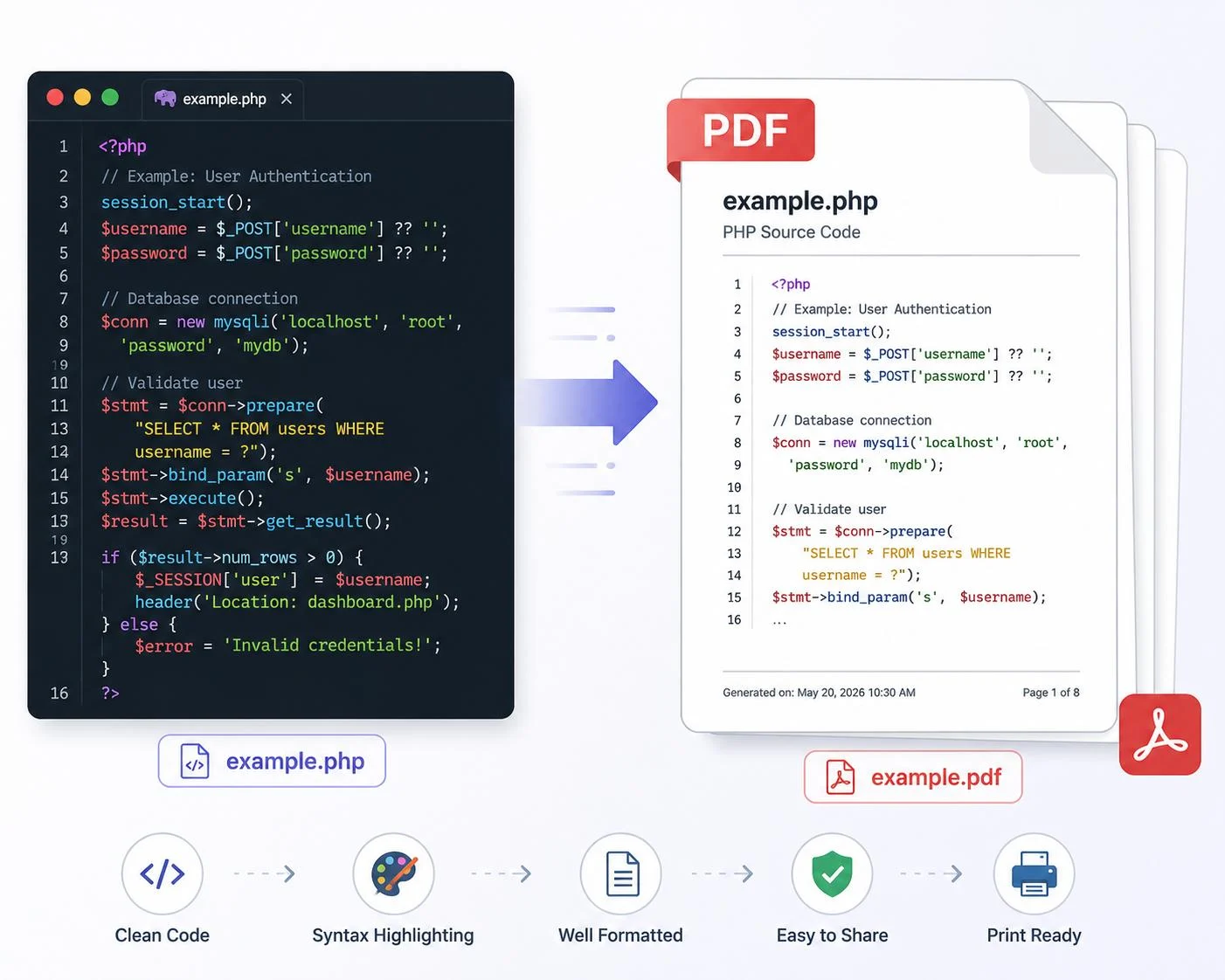

Table of Contents▼
Learn how to convert PHP source code to PDF cleanly. Preserve syntax highlighting, line numbers, and formatting for code reviews and documentation.
Quick Answer: Can You Convert PHP to PDF?
“Yes. You can convert PHP source code into a PDF while preserving formatting, syntax highlighting, indentation, and line numbers. A code-aware PDF conversion workflow makes it easier to share source code for documentation, code reviews, compliance, or academic submissions without modifying the original PHP file.
Key Takeaways
Convert PHP source code into clean, printable PDFs.
Preserve syntax highlighting and indentation.
Share code without requiring an IDE.
Use line numbers for reviews and audits.
Keep your original PHP files unchanged.
The Unexpected Nightmare of Sharing Raw PHP Code
Imagine this scenario: You just finished refactoring a critical authentication module in PHP. You need to send the source code to a senior developer for a security review or submit it as part of a technical compliance document for a client.
You open your code editor, select all, copy, and paste it directly into Microsoft Word or Google Docs.
Suddenly, your carefully indented, color-coded PHP code turns into a chaotic wall of plain, unformatted text. The syntax highlighting vanishes. Line breaks shift unpredictably. Special characters escape or vanish altogether. Indentation disappears.
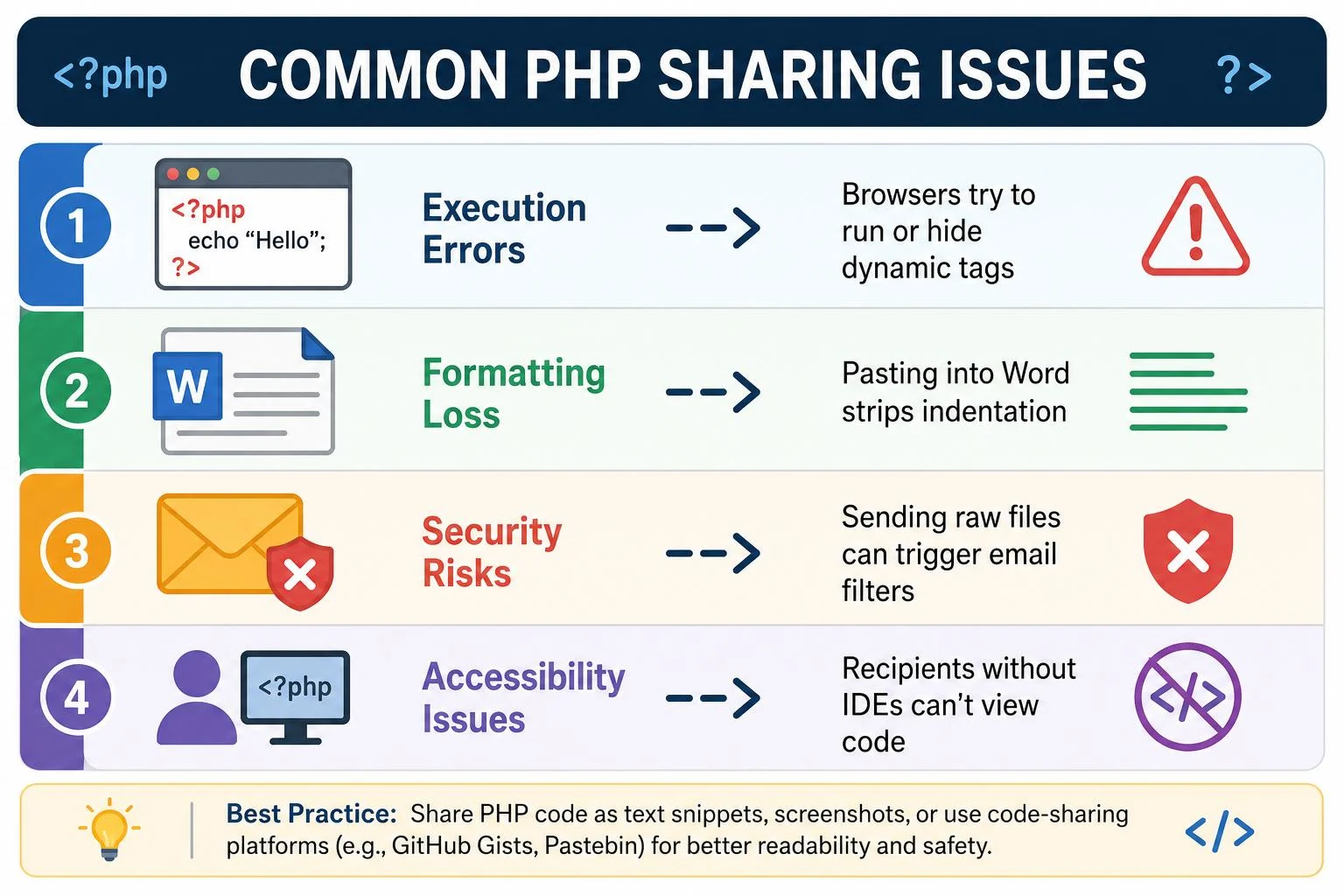
If you have ever tried copying raw .php files into standard word processors or printing them straight from a basic text editor, you know how frustrating it gets. Browsers often try to execute local PHP files or render them as broken HTML, while standard word processors turn structured code into unreadable prose.
Whether you are a developer preparing a project handoff, a student submitting a programming assignment, or a technical lead assembling system documentation, you need a way to export PHP source code to PDF without losing structure, line numbers, or readability. That is where modern conversion workflows come in, giving you a clean, reliable way to turn dynamic script files into crisp, distribution-ready documents.
Why Sharing Raw PHP Files Is Harder Than It Looks
PHP (Hypertext Preprocessor) is a server-side scripting language. Unlike a static HTML file or a plain text document, a .php file contains raw logic, variables, functions, and embedded markup designed to be interpreted by a web server.
When you share raw .php files outside a version control system like GitHub or GitLab, several practical hurdles pop up immediately:
1. File Compatibility and Browser Mismatches
If a non-technical manager, client, or compliance auditor tries to open a raw .php file by double-clicking it, their operating system usually does not know what to do. The file might try to open in a generic web browser. Since there is no web server (like Apache or Nginx) running locally to parse the script, the browser will either show raw, unformatted text or prompt a file download loop.
2. Loss of Syntax Highlighting and Indentation
Source code relies heavily on visual hierarchy. Syntax highlighting—where keywords, variables, strings, and comments are distinguished by color—allows developers to parse complex logic at a glance. Standard document editors strip these style tokens, forcing the code into a single font and breaking block indentations.
3. Security and Email Scanner Blocks
Many corporate email firewalls and mail servers automatically block attachments with executable extensions like .php, .js, or .exe to prevent malware distribution. Even if your file contains nothing more than a harmless script snippet, sending raw code as an email attachment often lands it straight in the spam folder or gets it outright rejected by the mail gateway.
4. Machine-Dependent Rendering
Opening code on different devices often changes how it looks. Tab stops configured for 4 spaces on your IDE might expand to 8 spaces on a colleague's machine, wrapping long lines awkwardly and making complex logic blocks almost impossible to follow.
What Happens Behind the Scenes: Code to PDF Conversion Explained
To understand how to convert PHP code into a PDF successfully, it helps to break down how source code representation actually works under the hood.
Syntax Parsing and Tokenization
Code editors do not just color text randomly. They use lexers and parsers to break code down into distinct semantic units known as tokens.
Keywords (like function, class, if, return) are assigned one token class.
Strings (like "Hello World") get another.
Variables (like $userId) get another.
When converting PHP to PDF, a proper converter engine parses these tokens and embeds concrete color CSS styles or direct PDF visual vector paths so that the syntax colors remain intact regardless of where the PDF is opened.
Raw PHP File --> Lexer / Tokenizer --> CSS / AST Styling --> PDF Layout Engine
The Difference Between Rendered Output and Source Code
A frequent point of confusion for beginners is the difference between converting a rendered PHP page and converting the PHP source code itself:
Rendered Output: What a user sees in the browser after a web server processes the PHP script (HTML, CSS, images).
Source Code: The underlying PHP logic, functions, and logic blocks written inside the .php file itself (including <?php opening tags, logic structures, and database queries).
If you want to document your actual codebase, you need to capture the source code, not the generated HTML output.
The Role of Fixed-Width Fonts (Monospace)
Standard documents use proportional fonts like Arial or Times New Roman, where the letter "w" takes up more horizontal space than the letter "i". Source code, however, depends on fixed-width (monospace) fonts like Courier, Consolas, or Fira Code. In a monospace font, every character occupies the exact same horizontal width. This ensures that aligned columns, ASCII diagrams, nested loops, and stacked variable assignments stay perfectly aligned.
What to Look for in a PHP to PDF Workflow
When selecting a tool or process to export your PHP code to PDF, keep these core criteria in mind:
Syntax Highlighting Preservation: The engine should recognize PHP syntax patterns, including embedded HTML and SQL strings, keeping distinct color coding for functions, variables, and keywords.
Line Numbering: Essential for code reviews and classroom grading. Line numbers allow collaborators to point directly to line 42 rather than saying "that function near the middle of the second page."
Text Selectability: Avoid tools that simply take a raster screenshot of your code and paste it inside a PDF. A quality conversion creates true vector text, allowing readers to highlight, search, and copy code snippets directly from the document.
Privacy and Security: Source code often contains proprietary logic, database schemas, or sensitive application structures. Ensure that any tool you use handles your files securely, encrypts data in transit, and deletes uploads promptly after processing.
Smart Line Wrapping: Code lines can get long. A good tool handles line wrapping gracefully without splitting variables mid-word or breaking statement syntax visually.
Comparing Code Export Methods
Here is a quick look at how common code export approaches stack up:
Export Method | Syntax Highlighting | Line Numbers | Setup Effort | Output Quality | Security & Privacy |
Copy/Paste to Word | Poor / Lost | Manual | Low | Low | High (Local) |
IDE Print Plugins | Excellent | Excellent | Medium | High | High (Local) |
Browser Print (Ctrl+P) | Moderate | Rare | Low | Medium | High (Local) |
Modern Browser-Based Converters | Excellent | Optional/Automated | Zero | High | High (Encrypted/Auto-Delete) |
Step-by-Step: How to Export PHP to PDF Cleanly
Converting your PHP source code into a pristine PDF document does not require installing bulky desktop software or configuring complex command-line toolchains. Here is a streamlined, universally applicable workflow:
Step 1: Clean Up Your Source Code
Before converting, make sure your script is easy to read:
Remove temporary debugging blocks or unused commented code.
Ensure consistent indentation across your script (preferably using standard 2-space or 4-space formatting).
Add header comments explaining the file's purpose, author, and version.
Step 2: Upload or Input Your Code
Navigate to your online document conversion environment (such as Doxbar). Upload your .php source file directly or paste the code snippet into the processing interface.
Step 3: Configure Visual Layout Options
Adjust your desired layout settings:
Select an appropriate page orientation (Portrait for standard code; Landscape for wide scripts with long lines).
Enable line numbers if the document is intended for code reviews or technical grading.
Choose a clean monospace font layout to preserve alignment.
Step 4: Convert and Verify
Initiate the conversion. The converter processes your source code and generates a structured PDF while preserving formatting and readability. It applies syntax color profiles, formats the page breaks, and generates a structured PDF document.
Step 5: Download and Audit
Download your generated PDF and open it in a viewer such as Adobe Acrobat or Mozilla Firefox. Check that:
Syntax coloring is consistent.
Long lines wrap cleanly without obscuring text.
Code remains fully selectable and searchable.
Real-World Use Cases for PHP PDFs
1. Security and Compliance Audits
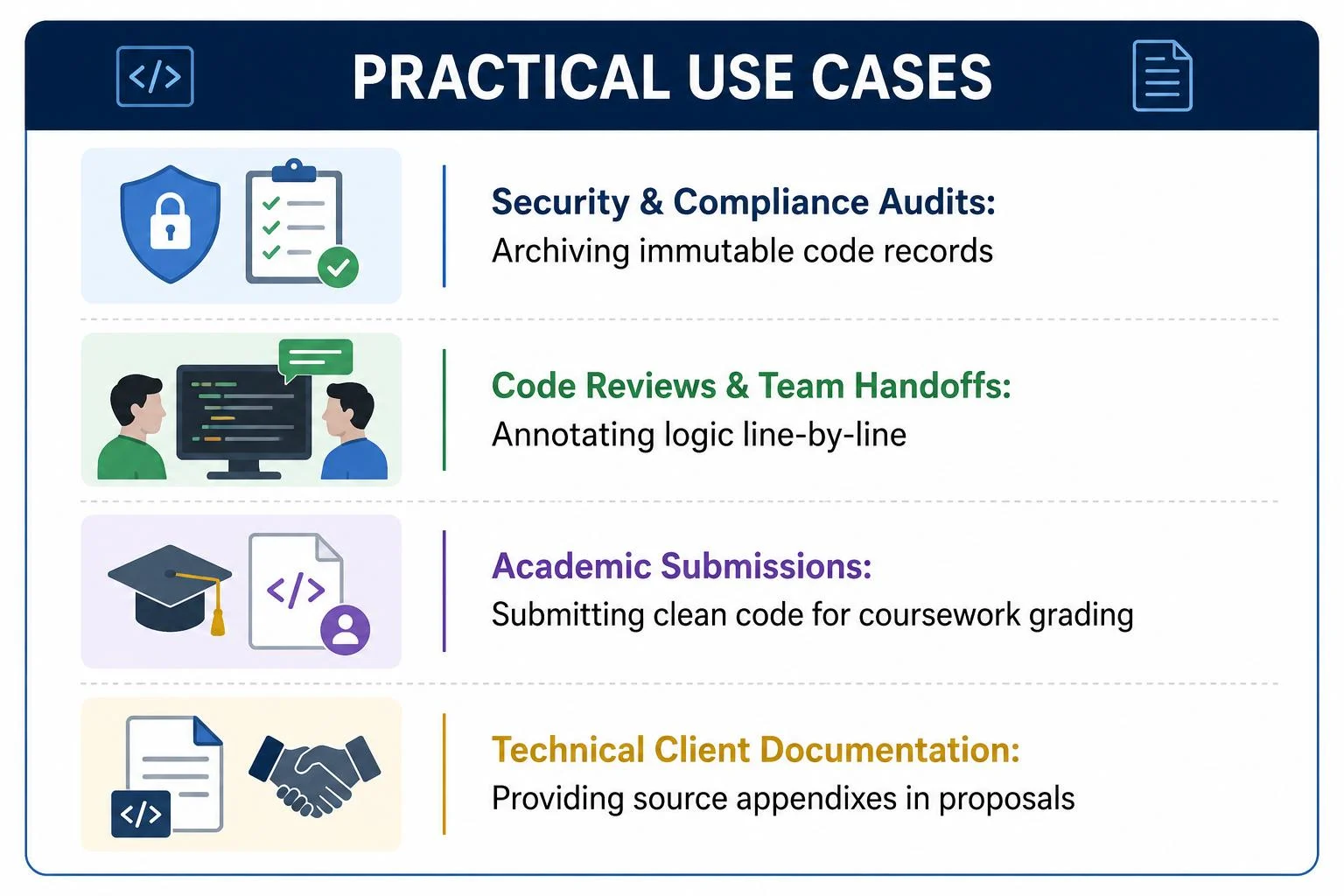
Organizations subject to regulatory frameworks often need to archive point-in-time snapshots of their application logic. Storing raw code in editable text formats leaves room for accidental modification. Exporting source code to signed PDFs provides an immutable record of application logic for compliance record-keeping.
2. Client Deliverables and Proposals
When delivering custom web development projects, agencies often append core architecture samples to user manuals or technical proposals. Presenting code as polished PDF appendices demonstrates professionalism and ensures the client can view the logic on any device, including mobile phones.
3. Academic Assignments and Technical Training
Computer science instructors frequently require students to submit source code alongside execution output. Submitting a PDF guarantees that the instructor views the code exactly as the student wrote it, without syntax formatting getting scrambled by different text editors or learning management systems.
4. Offline Code Reviews
While pull request platforms like GitHub or GitLab are standard for web-based reviews, some high-security environments require offline code reviews. Print-ready or markup-friendly PDF versions allow senior engineers to annotate code snippets using digital stylus tools or PDF commenting features.
Pros and Cons of Converting PHP to PDF
Pros
Universal Readability: PDFs open identically on iOS, Android, Windows, macOS, and Linux without requiring an IDE or local web server.
Security Control: PDFs can be password-protected or restricted to prevent unauthorized text copying and editing.
Preserved Formatting: Color coding, fonts, and layout stay locked in place regardless of system settings.
Easier Archiving: PDF/A standards ensure long-term document preservation that remains readable for decades.
Cons
Static Nature: PDFs are fixed documents. You cannot edit or execute PHP code directly inside a PDF file.
Line-Wrap Challenges: Extremely wide code lines (over 120 characters) can force awkward line breaks if page margins are tight.
File Size: PDF files are slightly larger than raw .php text files due to embedded fonts and structural layout metadata.
Advanced Frequently Asked Questions (FAQs)
1. What is the difference between a PHP file and an HTML file?
A PHP file (.php) contains server-side code that must be executed by a PHP engine on a web server to generate output. An HTML file (.html) contains client-side markup that web browsers render directly into visual web pages.
2. Will converting a PHP file to PDF run the code?
No. Converting a .php file to PDF processes the file as raw text data. It does not execute the script or interact with a web server or database.
3. Can I convert multiple PHP files into a single PDF document?
Yes. Many modern online tools allow you to merge multiple source files or convert batch uploads into a single compiled PDF project document.
4. How do I maintain syntax highlighting when converting code to PDF?
You must use a converter that supports tokenization and syntax parsing. Simply copying code into a basic text converter will strip out color formatting.
5. Why does my PHP code look scrambled when I open it in a browser?
Browsers treat local .php files as plain text or try to parse them as HTML because there is no server running to interpret the PHP logic. To view the source code clearly, open it in a dedicated code editor or convert it to PDF.
6. Is it safe to upload proprietary PHP code to an online converter?
It depends on the platform. Always look for tools like Doxbar that use end-to-end TLS encryption and guarantee automatic file deletion shortly after processing.
7. How do line numbers help in code PDF exports?
Line numbers provide a fixed frame of reference. They make it easy to point out specific lines during code reviews, security audits, or academic grading.
8. Can I edit my PHP code after converting it to PDF?
PDFs are designed to be static, final documents. While you can make minor annotations using PDF editors, code modifications should always be made in your source file before re-exporting.
9. What page orientation works best for code exports?
Portrait works well for standard, modular code written within 80-character line limits. Landscape orientation is better for legacy scripts or data arrays with long lines.
10. Will comments inside my PHP file appear in the PDF?
Yes. All inline (//) and block (/* */) comments are preserved in the conversion, styled in standard comment syntax colors.
11. Can I convert PHP code to PDF on a mobile device?
Yes. Browser-based conversion tools allow you to upload .php files from your smartphone or tablet and download a styled PDF instantly.
12. Does converting PHP to PDF hide database credentials or API keys?
No. Whatever text exists in the source file will appear in the PDF. Always remove or sanitize sensitive environment variables, passwords, and secret keys before exporting source code for sharing.
13. What font is best for code PDFs?
Monospace fonts such as Consolas, Courier New, Fira Code, or Source Code Pro work best because every character shares the same width, keeping indentations aligned.
14. How can I protect my converted PDF from unauthorized access?
You can apply password protection and encryption to the generated PDF to restrict who can open, print, or copy content from the file.
15. What happens to embedded HTML and CSS inside my PHP file during conversion?
A smart PHP converter recognizes mixed syntax, highlighting both the outer PHP logic tags and the inner HTML/CSS elements appropriately.
16. Why are my long lines of code getting cut off in the PDF?
If your converter does not enable automatic line wrapping, text that exceeds page margins will extend off the page. Choose a tool that supports intelligent code-wrapping or switch to landscape layout.
17. Can I copy code back out of a converted PDF?
Yes, as long as the PDF was created using vector text rendering rather than flat image capture.
18. What is PDF/A, and should I use it for code archives?
PDF/A is an ISO-standardized version of PDF designed for long-term digital preservation. It embeds all necessary fonts and metadata, making it ideal for regulatory and compliance archiving.
19. How does line wrapping affect code readability in PDFs?
Intelligent line wrapping breaks long statements onto the next line while preserving indentation indicators, preventing lines from running off the page margins.
20. Can I convert a PHP framework project (like Laravel or Symfony) to PDF?
Yes, though it is usually best to convert key individual controller, model, or service files rather than trying to combine thousands of framework dependency files into one massive document.
References
The technical concepts, PHP language behavior, source code formatting practices, and PDF-related recommendations discussed in this guide are based on publicly available documentation and industry standards.
PHP Documentation – Official documentation covering PHP syntax, language features, functions, and best practices for server-side development.
PHP Manual – Comprehensive reference for PHP language behavior, configuration, extensions, and runtime environments.
PHP-FIG PSR Standards – Community-maintained coding standards and recommendations that promote consistent, readable, and maintainable PHP code.
Adobe Acrobat SDK Documentation – Technical documentation describing the PDF format and best practices for generating portable, consistent, and searchable PDF documents.
Contextual Internal Resources
Working with other programming languages, source code files, or technical documentation? These related Doxbar tools can help you create clean, professional PDF documents for development, review, and collaboration.
HTML to PDF – Convert HTML pages and templates into high-quality PDF documents while preserving layout and structure.
CSS to PDF – Export CSS stylesheets into readable PDFs for design documentation and code reviews.
JavaScript to PDF – Share JavaScript source code with preserved formatting, indentation, and syntax highlighting.
TypeScript to PDF – Convert TypeScript files into searchable PDF documents for documentation and technical collaboration.
JSON to PDF – Transform structured JSON data into organized PDFs for debugging, reporting, and documentation.
XML to PDF – Export XML files into professional PDF documents for configuration reviews and data sharing.
YAML to PDF – Convert YAML configuration files into clean PDFs for DevOps documentation, infrastructure reviews, and team collaboration.
Markdown to PDF – Turn README files, project documentation, and technical notes into polished PDF documents.
TXT to PDF – Convert plain text logs, scripts, and notes into easy-to-share PDF files.
JSX to PDF – Export React JSX components into well-formatted PDFs for code reviews and documentation.
TSX to PDF – Preserve React TypeScript components in searchable PDF documents for technical reviews and knowledge sharing.
Whether you're documenting source code, preparing technical reports, or sharing application logic with clients and teammates, these related tools help you keep your development workflow organized and professional.
Ensuring Security and Trust When Sharing Source Code
When sharing source code in any format, security should always be top of mind.
Before converting and distributing your PHP files:
Sanitize Secrets: Never export files containing active API keys, database passwords, or private encryption keys. Replace real credentials with placeholder values (e.g., DB_PASSWORD=your_secure_password).
Review Environment Files: Keep .env files out of your export packages unless they are sanitized template examples (like .env.example).
Verify Recipient Access: Ensure that documents containing internal business logic are sent only to authorized personnel, preferably secured with document passwords.
Using reliable cloud platforms like Google Workspace or secure document utilities ensures that your workflow remains compliant with modern data protection expectations.
Polished, Readable Code Sharing Made Simple
Dynamic web scripts do not have to turn into a mess of unformatted text when you need to share them. By converting your PHP source code into clean, professionally formatted PDFs, you preserve syntax highlighting, maintain exact indentation, and create readable documents that open anywhere.
Whether you are submitting coursework, preparing for an enterprise security audit, or passing technical documentation to a client, using a structured browser-based converter gives you a fast, reliable, and secure way to present your code at its best.
Need to Convert Document Formats?
Try our secure, lightning-fast PDF conversion suite. Convert Word, Excel, Images, and more with zero formatting loss.

Doxbar Editorial
Security & Privacy Team
We specialize in secure document architectures, parsing engines, and modern developer utilities. Keeping your files safe, lightweight, and perfectly formatted.
Join the Conversation
Share your thoughts or ask a question about this topic. This is a privacy-first system.