

Why SQL Files Aren't Easy to Share With Non-Developers
Contents
Why SQL Files Aren't Easy to Share With Non-Developers


Table of Contents▼
Sharing database scripts with non-technical stakeholders often leads to broken formatting and confusion. Here is how to cleanly convert SQL to PDF.
The Monday Morning Data Request
Imagine this scenario: It is 9:15 AM on a Monday, and a compliance auditor or product manager pings you asking for the exact logic used to calculate last quarter's financial report. You have the clean, well-commented queries sitting right there in your database IDE. You copy the raw .sql file, attach it to an email, and hit send.
Ten minutes later, the follow-up message arrives: "I can't open this file. My computer is asking me to choose an app from the App Store. Can you just paste it into an email or send a screenshot?"
If you copy-paste 400 lines of raw code into an email, the indentation ruins itself, syntax highlighting vanishes, and your beautifully structured logic transforms into an unreadable wall of text. It is a frustrating breakdown in daily office communication. Developers live in terminal windows and text editors, but the rest of the business operates on document readers and web browsers.
Bridging this gap requires converting specialized code into universally readable documents. While tools like Doxbar make simple web-based file conversions straightforward, understanding why these file types clash in the first place can save your team hours of back-and-forth communication.
⚡ Quick Answer
Converting SQL to PDF preserves query formatting, keeps code indentation intact, and allows non-technical stakeholders to perform a query review without installing specialized developer tools. It provides a secure, unalterable snapshot of database logic, perfect for audits, documentation, and cross-departmental reporting.
The Friction Between Code and Corporate Documents
When you hand a raw database script to someone outside the engineering department, you run into several immediate roadblocks.
The Missing IDE Problem
To a data analyst or software engineer, a .sql file is just text. But to a standard operating system like Windows or macOS without development tools installed, it is an unrecognized file extension. Double-clicking it usually triggers a confusing system prompt rather than opening the file.
Visual Chaos and Lost Formatting
Code relies on strict structural formatting to be legible. Monospace fonts, precise indentation, and syntax highlighting turn complex logic into something human brains can parse. When opened in a basic text editor like Notepad or WordPad, tabs collapse, long lines wrap awkwardly, and the visual hierarchy completely disintegrates.
Security and Accidental Changes
If a stakeholder manages to open a script in an editable text editor, there is a lingering risk of accidental edits. A misplaced backtick, a deleted comma, or an omitted WHERE clause can silently break a query. If they pass that modified script back to you later, you waste valuable time debugging their accidental keystrokes.
What Most Articles Miss About SQL Sharing
Most tutorials focus purely on the technical button-clicking aspect of running an online file conversion. They treat it like a simple file utility problem.
What they fail to realize is that the true challenge isn't the file extension—it is enabling cross-team collaboration, data governance, and compliance.
When an internal auditor or product owner asks for a stored procedure or a database schema layout, they don't want a dynamic environment where things can be altered. They want an immutable snapshot of truth. The goal is to provide absolute visibility into your database logic without providing direct database access or risking undocumented changes during the reporting workflow.
Educational Deep Dive: Why Plain Text Code Breaks in Standard Document Viewers
To understand why a simple copy-paste fails, it helps to look under the hood at how different document formats handle text presentation.
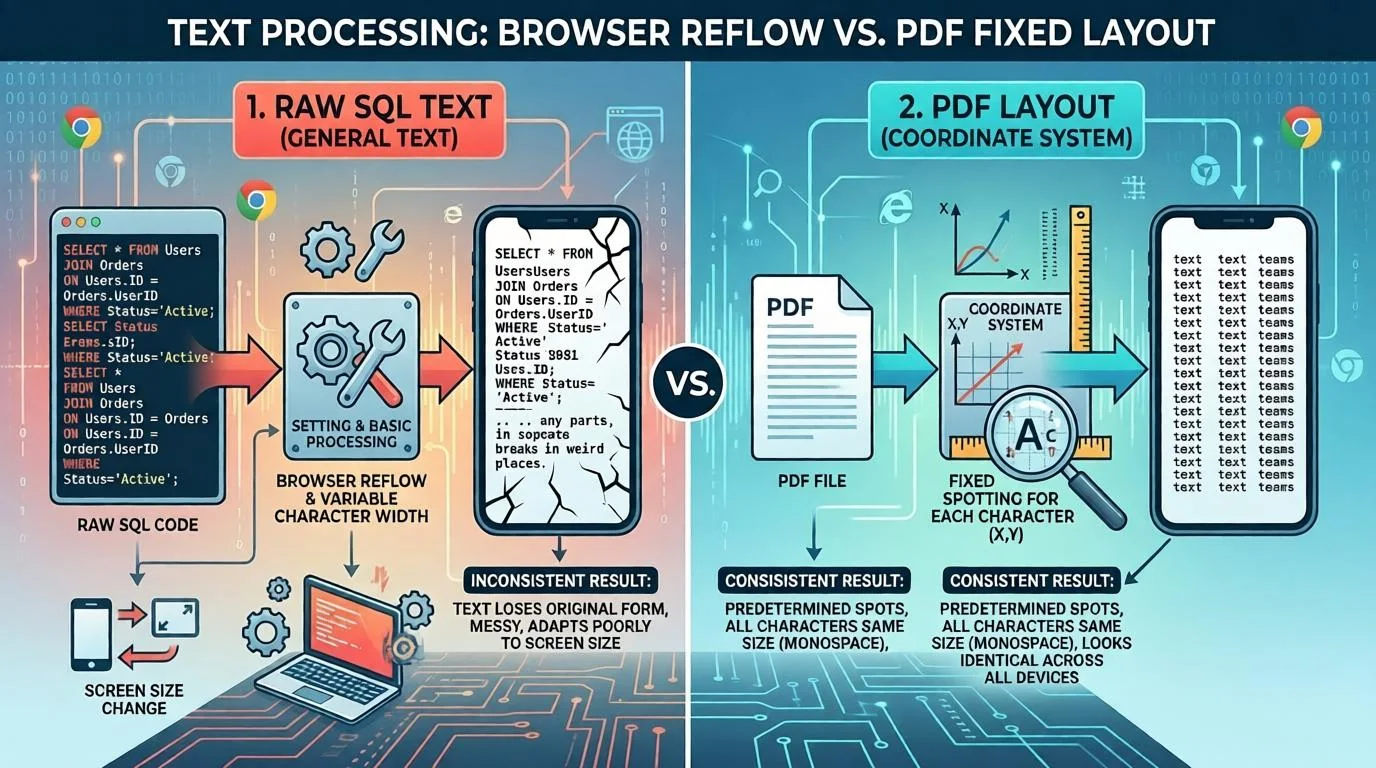
“A side-by-side visual comparison explaining how different systems process text. The left panel illustrates how web browsers use reflow to render raw text (like SQL code), which can lead to broken and messy layouts when screen sizes change. The right panel demonstrates how PDF files use a fixed X/Y coordinate system to lock characters into predetermined spots, ensuring consistent, monospace formatting across mobile phones, tablets, and desktop computers.
When you write code for engines like MySQL, PostgreSQL, or SQL Server, your editor uses a monospace font where every character occupies the same horizontal space. This ensures that columns align perfectly. Standard office applications like Microsoft Word default to proportional fonts, where an "i" takes up less space than a "w".
Furthermore, a database script contains no inherent styling information. It is purely raw text data. The color-coding you see in your editor (blue for keywords, green for comments) is generated dynamically by your local software. When you share the raw file, none of that visual metadata goes with it.
Portable Document Format (PDF) files work on an entirely different principle. A PDF acts like a digital blueprint; it explicitly dictates the exact coordinate where every letter, line, and color block should appear on a page, regardless of the device or operating system being used. This rigid layout architecture makes it the ideal container for code preservation.
Real-World Example: The Compliance Audit
Consider a real-world scenario from a mid-sized fintech platform preparing for a quarterly data compliance review. The financial auditing team needed to verify the platform's user-data deletion algorithms to ensure compliance with strict privacy laws.
Instead of passing raw scripts back and forth—which risked version confusion and accidental edits during email handoffs—the lead platform engineer ran the core MySQL scripts through an SQL-to-PDF pipeline.
The resulting PDF was clean, uneditable, and retained every line comment explaining the system architecture. The audit team attached the PDF directly to their formal compliance report as a permanent, unalterable artifact for change management tracking.
The QUERY Framework for Document Management
To maintain consistency and security when translating technical assets for business reporting, engineering teams can follow the QUERY framework:
Q — Query Preservation: Retain the exact formatting, spacing, and structural layout of the source script without compression or distortion.
U — Universal Access: Ensure the target format can be opened natively on any mobile device or desktop operating system without specialized client software.
E — Error Prevention: Locks the text into a read-only state, eliminating the risk of stakeholders introducing typos into logic blocks.
R — Readability First: Uses predictable typography and clean margins so that complex, multi-line nested joins remain logical to human reviewers.
Y — Your Data Protected: Prioritizes secure processing environments that do not leak internal database schemas or structural layouts to public servers.
Modern Solution Framework
If you are looking for a tool to bridge this communication gap regularly, look for a utility that respects developer workflows and corporate security.
Zero Local Setup: You shouldn't need to run a pip install command or download a bulky desktop executable just to share a file once a week. Browser-native workflows are faster and easier to trust.
Data Ephemerality: Code often contains sensitive business logic, table schemas, or proprietary algorithms. Choose conversion tools that process files completely within the browser or delete data from their servers immediately after processing.
True Formatting Retention: The tool must preserve spaces, tabs, and line breaks exactly as written, ideally using a clean, readable fixed-width font layout.
💡 Quick Tip: Before converting any SQL file to PDF for external presentation, double-check that you have removed any hardcoded database passwords, API keys, or internal staging server connection strings from your comments.
Modern Document Tools Compared
Feature / Capability | Legacy Desktop Tools | Manual Copy-Pasting | Modern Browser Workflows |
Speed | Slow (Requires launching apps) | Fast but messy | Instant |
Formatting Quality | Medium | Low (Collapses indentation) | High (Preserves code structure) |
Security Risk | Low | Low | Variable (Depends on the tool's privacy policy) |
Zero Setup Needed | No | Yes | Yes |
How to Cleanly Convert a SQL Script to a Sharable PDF
The conversion process should only take a few seconds when using a streamlined web converter.
Step 1: Prepare the File
Ensure your .sql file contains the exact query or database schema you want to share. It is often helpful to add a few plain-text comments at the top explaining what the query does for the non-technical recipient.
Step 2: Upload to the Converter
Navigate to your online conversion utility. Drag the script from your local file explorer and drop it into the designated upload zone.
Step 3: Run the Conversion
Select PDF as your desired output format. Click the convert button. The system will read the plain text configuration and construct a rigid PDF document wrapper around it.
Step 4: Download and Verify
Save the resulting file to your computer. Open it quickly in a browser tab to ensure the lines don't truncate awkwardly on the right margin and that the indentation remains intact before passing it along to your team.
Pros & Cons of Converting SQL to PDF
Pros
Universal Compatibility: Anyone with a modern phone, tablet, or laptop can open a PDF instantly without installing developer tools.
Immutable Text: Prevents stakeholders from making accidental modifications to the underlying code.
Print-Ready Layouts: Ensures that if a manager wants to print out a data model for a meeting, it won't cut off halfway through a line.
Cons
Non-Executable: The recipient cannot copy the code out of the PDF to run it directly without risking weird character encoding issues or line-break artifacts.
Static View: If you update the underlying query logic in your database, you have to generate and send a new document.
Advanced FAQ Section
1. Why can't my manager open a .sql file directly?
Most operating systems do not ship with a default application assigned to read database scripts. Unless the computer has an IDE, a coding text editor, or a developer utility installed, the OS simply treats it as an unknown binary file type.
2. Does converting a script to PDF compromise database security?
The conversion itself doesn't expose anything, but you should always check the contents of your script first. Make sure you haven't hardcoded passwords, API keys, or connection strings in the comments before turning the file into a shareable document.
3. How do I keep code indentation from breaking during conversion?
Indentation breaks when tools convert fixed-width tab spaces into variable-width proportional fonts. Using a dedicated file converter ensures the text is wrapped inside a rigid monospace formatting container.
4. Can a PDF preserve syntax highlighting colors?
Some advanced developer-centric converters will parse the code and add basic syntax colors. However, standard plain-text-to-PDF utilities will convert it to crisp, highly readable black-and-white text, which still maintains structural layout integrity.
5. Will long lines of code get cut off in a document?
If a single line of code is exceptionally long, basic text tools will either cut it off at the page margin or wrap it in text-wrap style, which ruins readability. Dedicated converters typically handle text wrapping intelligently or scale the font down slightly to fit the page bounds.
6. Is it safe to upload proprietary database scripts to online converters?
It depends entirely on the tool's data privacy policy. Safe utilities process conversions entirely client-side using browser memory, or they use automated servers that instantly delete the file the moment your download completes.
7. Why not just use a screenshot of the code?
Screenshots are fine for three lines of code, but they quickly fail for longer scripts. You cannot scroll through a screenshot; the text cannot be searched or highlighted, and it looks unprofessional in formal project documentation.
8. What is the difference between a text file and an SQL file?
Underneath the hood, nothing. Both are plain text files. The only difference is the extension suffix (.txt vs .sql), which acts as a hint to your computer's operating system to tell it which program should open it.
9. Can I convert large database dumps to PDF?
Technically, yes, but it isn't recommended. If a file contains thousands of lines of raw database entries or table backups, a document reader will choke on the size. PDF conversions are best reserved for readable scripts, individual queries, and clean schemas.
10. Does Adobe Acrobat handle code files naturally?
Acrobat can convert plain text files, but it does not inherently understand code structures. You often have to manually adjust fonts and margins to make sure the code layout doesn't look stretched or distorted.
11. Can I convert the document back into an executable script later?
Yes, you can copy text out of a PDF and paste it back into a text editor, but it can be messy. Sometimes hidden characters, page numbers, or line-wrap formatting artifacts slip in, which means you might have to spend a minute or two cleaning up the syntax before it runs smoothly in a database editor again.
12. Why do tabs look huge in some document viewers?
Different programs interpret a single tab character differently—some see it as two spaces, some as four, and others as eight. Converting the file to a static layout locks the spacing into an absolute physical measurement that won't shift.
13. What is the fastest way to share a query without sending a file?
If the query is short, you can paste it into a communication tool like Slack or Microsoft Teams using code blocks (wrapping the text in triple backticks ```). For formal reports or long scripts, a clean document attachment is better.
14. Will special characters break during file conversion?
If your database scripts use unique characters, mathematical symbols, or non-English language comments, standard converters might display them as broken squares if the proper encoding isn't used. Modern utilities use UTF-8 encoding to ensure all symbols render perfectly.
15. Can I convert multiple scripts at the same time?
Yes, many modern web platforms support batch uploads, allowing you to drop a folder of scripts into the interface and receive a zipped bundle of clean documents in return.
16. How do I convert a file on a mobile phone?
Because smartphones lack native development environments, using a browser-based conversion site is often the only viable way to open, read, or convert a script if you are away from your main work computer.
17. Is Markdown a better alternative to a document layout?
Markdown is excellent for technical audiences who use platforms like GitHub. However, non-technical business partners usually prefer a standard document format that opens natively in their system's default viewer without requiring a Markdown parser.
18. Why do some converted files have weird line wraps?
This happens when code lines exceed the maximum physical width of a standard letter or A4 page. To prevent this, break long strings or nested queries into multi-line blocks before running the file through a converter.
19. Do I need to pay for dedicated document tools?
No. Basic text-to-document conversions run on lightweight computing logic, meaning you can easily find clean, ad-safe online tools that handle these conversions for free without requiring a paid subscription.
20. Can I convert the document back into an executable script later?
Yes, you can copy text out of a PDF and paste it back into a text editor, but it can be messy. Sometimes hidden characters, page numbers, or line-wrap formatting artifacts slip in, which means you might have to spend a minute or two cleaning up the syntax before it runs smoothly in a database editor again.
⚡ Quick Summary
Eliminates OS Errors: Converting to PDF allows non-technical users to review scripts without encountering "unknown extension" system popups.
Preserves Visual Intent: Monospace layouts, structural spacing, and line margins are hard-coded into place, preventing layout deformation.
Protects Logic: Making the document read-only removes the threat of stakeholders introducing syntax errors during reviews.
Improves Audit Trails: Provides an unalterable static artifact ideal for formal corporate documentation and structural compliance logs.
Conclusion
Sharing your hard work with colleagues shouldn't involve troubleshooting application errors or answering panicked messages about broken file extensions. Converting complex code into a universally accepted document format like a PDF keeps your presentation clean, protects your logic from accidental edits, and keeps your engineering team moving efficiently.
The next time a stakeholder asks for data confirmation, spend five seconds running your script through a simple web utility before hitting send. Your morning routine will run a lot smoother for it.
Need to Convert Document Formats?
Try our secure, lightning-fast PDF conversion suite. Convert Word, Excel, Images, and more with zero formatting loss.

Doxbar Editorial
Security & Privacy Team
We specialize in secure document architectures, parsing engines, and modern developer utilities. Keeping your files safe, lightweight, and perfectly formatted.
Join the Conversation
Share your thoughts or ask a question about this topic. This is a privacy-first system.