

YAML to PDF: Export YAML Configuration Files for Documentation and Review
Contents

YAML to PDF: Export YAML Configuration Files for Documentation and Review

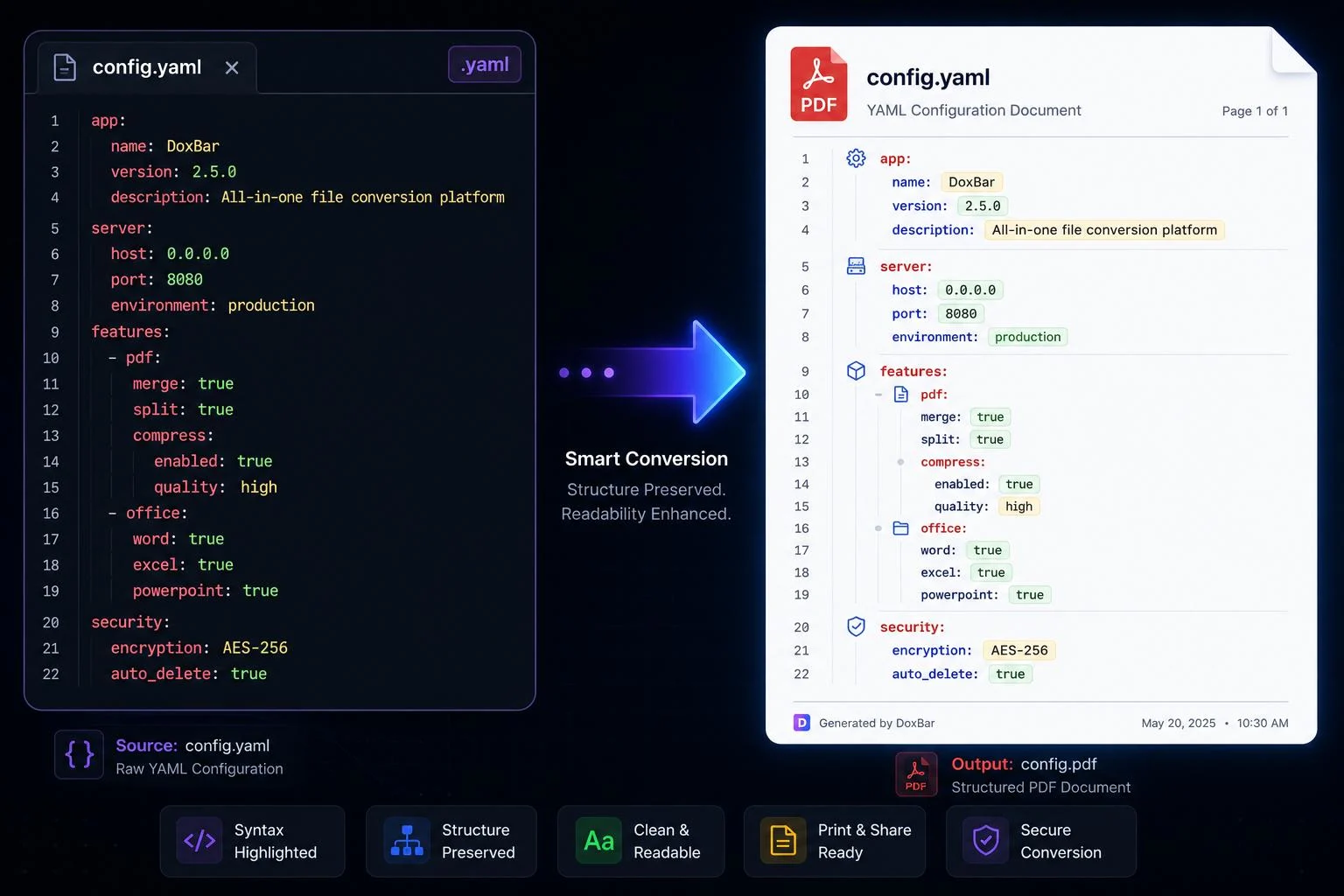

Table of Contents▼
Learn how to convert YAML configuration files into clear, printable PDF documents for code reviews, compliance audits, and team documentation.
The Silent Frustration of Sharing Configuration Files
Picture this: You are preparing for an end-of-quarter security audit, or perhaps you are handing off a complex Kubernetes infrastructure setup to a client who does not touch a code editor. You need to present your configuration files in a clean, readable format.
You open your terminal or IDE, grab a raw .yaml or .yml file, copy the content, and paste it directly into a standard word processor or standard email.
Then, disaster strikes.
The strict indentation vanishes. Nested structures flatten into an unreadable block of text. Spacing gets distorted, and syntax highlighting is completely gone. If anyone tries to print or review that draft, it looks like a formatting mistake rather than a structured production manifest.
server: host: 127.0.0.1 port: 8080 database: enabled: true
Without proper hierarchy, a single misplaced tab or missing space changes the entire logic of your configuration. Sharing raw technical files with non-technical stakeholders, auditors, or clients often leads to confusion, unnecessary back-and-forth, and miscommunication.
This is where transforming structured data like YAML into a stable, fixed-layout format like PDF becomes essential. Using dedicated tools like Doxbar allows you to bridge the gap between technical raw data and human-friendly documentation effortlessly.
Why YAML Files Are Hard to Share (And Why Formatting Breaks)
To understand why configuration files look broken when shared through standard apps, it helps to understand how YAML works under the hood.
What Makes YAML Unique?
YAML (which stands for YAML Ain't Markup Language) relies on indentation-based scoping. Unlike JSON, which uses curly braces {} and brackets [], or XML, which relies on explicit tags <tag></tag>, YAML uses precise whitespace to define data hierarchies.
According to the official YAML Specifications, space characters are the only valid form of indentation; tabs are explicitly forbidden in standard syntax parsing.
Why Standard Word Processors Fail
When you paste YAML code into general-purpose document editors or send it over instant messaging tools, two main issues occur:
Font Pitch Variances: Standard document editors default to proportional fonts (like Arial or Calibri), where the letter 'i' takes up much less horizontal space than the letter 'w'. Code requires monospace fonts (like Courier, Consolas, or Fira Code) where every character occupies the exact same width.
Auto-Formatting and Smart Quotes: Word processors automatically replace straight quotes (") with curly quotes (“), sanitize double spaces into single spaces, or auto-capitalize the start of lines. These subtle shifts destroy valid syntax and ruin code readability.
Fixed Layouts vs. Dynamic Text Flow
PDFs (Portable Document Format) behave differently than regular documents. Created as a fixed-layout standard maintained via ISO 32000 specifications, a PDF preserves the exact visual placement of every character, space, line break, and color rule across every screen, operating system, and printer.
Converting a dynamic YAML file into a PDF locks your indentation, preserves line numbers, maintains syntax highlighting, and guarantees that what you see on your screen matches what your auditor or teammate sees on theirs.
Essential Requirements for a Modern File Converter
When selecting an online conversion tool for developer configurations, infrastructure manifests, or internal documentation, security and visual integrity should be top priorities. Here is what you should evaluate:
Data Privacy and Local Processing: Configuration files frequently contain sensitive information—such as internal IP addresses, database schemas, environment variables, or service names. Always choose tools that process files securely or client-side in the browser rather than storing data on external servers. You can learn more about browser security standards on Mozilla Developer Network.
Layout and Indentation Preservation: The converter must honor fixed-width fonts and exact spacing so the nested structure remains crystal clear.
Syntax Highlighting Support: Color-coded keys, values, strings, and booleans make long configuration files much easier to scan during reviews.
Cross-Platform Accessibility: You should be able to convert files instantly whether you are working on Linux, macOS, Windows, or an iPad without installing heavy desktop software or CLI plugins.
Legacy Tools vs. Desktop IDES vs. Modern Web Conversion
Different workflows suit different situations. Here is how modern online converters compare to traditional alternatives:
Feature | Legacy Online Converters | Desktop IDEs / CLI Extensions | Modern Browser Conversion (Doxbar) |
Setup Time | Instant | Requires installation & plugins | Instant (No installation) |
Layout Integrity | Low (frequently strips spacing) | High (depends on print drivers) | High (optimized for web & print) |
Privacy & Security | Variable (often retains server logs) | High (local machine processing) | High (secure, ephemeral processing) |
Mobile & Cross-Platform | Poor mobile support | Desktop-only | Full mobile and desktop support |
Visual Styling | Plain text render | Editor-theme dependent | Clean, readable theme presets |
Step-by-Step: How to Export YAML to PDF Smoothly
Converting your raw configuration files into clean, shareable PDFs takes only a few seconds:
Step 1: Prepare and Validate Your YAML
Before converting, make sure your raw YAML file is syntactically correct. Ensure there are no mixed tabs and spaces. You can check standard syntax rules on open documentation hubs like Wikipedia's YAML Overview.
Step 2: Upload or Paste Your File
Navigate to the Doxbar Converter Platform. Upload your .yaml or .yml file directly from your system, or paste the raw configuration text into the editor input area.
Step 3: Select Your Conversion Settings
Choose your desired output layout. Ensure monospace code rendering and syntax highlighting options are enabled to preserve visual structure.
Step 4: Generate and Download
Click Convert. The platform processes the syntax structure and renders a formatted preview. Download your print-ready PDF file immediately.
Step 5: Verify the Output
Open the generated PDF to confirm that all nested keys, indentation levels, comments, and values are clean, readable, and intact.
Pros & Cons of Converting Configuration Files to PDF
Pros
Universal Readability: PDFs open identically on smartphones, tablets, laptops, and legacy enterprise workstations without needing a code editor or IDE.
Audit and Compliance Readiness: Fixed-layout documents prevent accidental editing, making them ideal for security sign-offs, SOC 2 compliance attachments, and change-management logs.
Clean Printing: Guarantees that code blocks do not break awkwardly across page margins when printed for physical review meetings.
Cons
Non-Executable Format: A PDF is designed for reading, reviewing, and archiving—it cannot be executed directly by tools like Kubernetes or Docker without extracting the text back out.
Manual Re-Sync Required: If your underlying code changes in your git repository, you must re-export the PDF to keep your documentation updated.
Frequently Asked Questions (FAQs)
1. What is a YAML file used for?
YAML is a human-readable data serialization language primarily used for writing configuration files in software development, DevOps workflows, infrastructure management (like Kubernetes and Ansible), and application settings.
2. Why should I convert a YAML file to a PDF?
Converting to PDF locks the formatting, preserves indentation, enables clean printing, and allows non-technical team members, auditors, or clients to view configurations without altering the original code or needing specialized software.
3. Will converting YAML to PDF break the indentation?
Using a dedicated converter like Doxbar maintains your code's exact spacing, hierarchy, and indentation by applying monospace typography and fixed layout structures.
4. Can I convert Kubernetes manifests to PDF format?
Yes. Kubernetes deployment files, service manifests, and ConfigMaps written in YAML can be converted to PDF for design reviews, compliance verification, or system documentation.
5. Is it safe to convert private configuration files online?
It depends on the platform. Tools like Doxbar prioritize data privacy by avoiding long-term file retention, rendering processing safely without exposing your sensitive configuration data.
6. Can I convert Docker Compose files to PDF?
Yes, Docker Compose files (docker-compose.yml) convert cleanly into PDF, making it easy to present multi-container application architecture setups to managers or clients.
7. How does YAML differ from JSON?
While both serialize data, YAML uses indentation and minimal punctuation to maximize human readability, whereas JSON relies on curly braces, brackets, and strict quote rules. YAML also supports comments, whereas standard JSON does not. You can read more about JSON standards at JSON.org.
8. Are comments in my YAML file preserved during PDF conversion?
Yes. Line comments starting with # are preserved and displayed inline, helping reviewers understand your documentation and notes.
9. Do I need to install software or CLI extensions to export YAML to PDF?
No. While desktop extensions exist, browser-based conversion via Doxbar allows you to generate PDFs instantly on any device without installing extra dependencies.
10. Can I convert large YAML files with hundreds of lines?
Yes. Converter platforms automatically paginate long configuration files into structured multi-page PDF documents while preserving clear page boundaries.
11. Why do text editors mess up YAML formatting when copying and pasting?
Standard text editors often use proportional spacing, convert double-spaces into tabs, or auto-apply smart punctuation, which alters the strict formatting required by YAML.
12. Can I view converted YAML PDFs on mobile devices?
Yes. PDFs open natively on iOS, Android, and desktop operating systems without requiring any specialized software or programming tools.
13. What happens if my YAML file has syntax errors before conversion?
Most converters will still render the raw text, but verifying your syntax beforehand ensures that structural indentation and block levels display accurately.
14. Can I print my YAML configuration directly from a PDF?
Yes. Converting to PDF guarantees that line lengths, margins, and code blocks print accurately without clipping off the edge of the page.
15. How do I convert Ansible Playbooks to PDF for documentation?
Simply upload your .yml playbook file to the converter, verify the preview layout, and download the resulting PDF for your team's operational runbooks.
16. What is the maximum file size for converting YAML documents?
Most browser-based web converters easily handle standard configuration files up to several megabytes, which covers even large infrastructure setups.
17. Does PDF conversion support dark mode or custom code themes?
Many modern file conversion tools offer customizable view options, allowing you to choose light or dark syntax themes depending on your presentation needs.
18. Why is monospace font important for configuration documents?
Monospace fonts ensure every character and space occupies equal width, making nested indentation levels easy to identify visually.
19. Can I convert continuous integration files like GitHub Actions to PDF?
Yes. CI/CD workflow configurations (such as .github/workflows/main.yml) convert cleanly into PDF for internal process audits and workflow reviews.
20. Is YAML to PDF conversion suitable for SOC 2 or ISO audits?
Yes. Providing static, fixed-layout PDF copies of production configurations helps satisfy auditing requirements by delivering clear, non-editable snapshots of system controls.
References
The technical concepts, file format details, and configuration management best practices discussed in this guide are based on publicly available documentation and industry standards.
YAML Language Specification – Official specification defining the YAML data serialization language and its syntax.
yaml.org Documentation – Official YAML documentation covering syntax, data structures, and implementation guidelines.
Kubernetes Documentation – Official documentation explaining how YAML files are used to define Kubernetes resources and configurations.
Docker Documentation – Official guides for Docker Compose and container configuration using YAML files.
Ansible Documentation – Official documentation covering YAML-based playbooks, inventories, and automation workflows.
Adobe Acrobat SDK Documentation – Technical documentation covering the PDF format and best practices for generating portable, consistent PDF documents.
Contextual Internal Resources
Working with other configuration files, development documents, or technical resources? These related Doxbar tools can help simplify your workflow:
JSON to PDF – Convert structured JSON data into clean, readable PDF documents for reporting, debugging, or documentation.
XML to PDF – Export XML files into well-formatted PDFs for data review, system documentation, or record-keeping.
Markdown to PDF – Turn README files, technical documentation, and project notes into professional PDF documents.
TXT to PDF – Convert plain text configuration files, logs, or notes into organized PDFs for easier sharing.
HTML to PDF – Save web pages, templates, or generated reports as high-quality PDF documents while preserving layout.
CSS to PDF – Export CSS stylesheets into printable PDFs for design reviews, documentation, or collaboration.
JavaScript to PDF – Convert JavaScript source code into searchable PDF documents for code reviews and technical documentation.
TypeScript to PDF – Preserve TypeScript formatting and readability when sharing source code with teams or clients.
TSX to PDF – Export React TypeScript components into clean, printable PDFs for documentation, peer review, and knowledge sharing.
JSX to PDF – Convert React JSX components into professional PDF documents while maintaining clear formatting and code readability.
Whether you're documenting infrastructure, reviewing configuration files, or sharing development resources, these related tools help you organize technical content into professional, easy-to-read PDF documents.
Maintaining Privacy & Trust in Developer Workflows
Handling configuration files requires careful attention to security. Infrastructure specs, environment variables, and deployment manifests often contain sensitive operational details.
When sharing documentation externally:
Sanitize Secrets: Always remove or mask active API keys, secrets, passwords, or internal tokens before exporting your configurations for public or third-party review.
Verify Ephemeral Handling: Ensure your conversion tools use safe end-to-end processing. Using reliable services like Doxbar ensures your files are converted efficiently without lingering on web servers.
Keep Code Local When Possible: For confidential internal systems, pair secure web tools with safe corporate data policies to protect your team's intellectual property.
Streamline Your Configuration Documentation Today
Technical documentation should never be painful to present. Whether you are preparing infrastructure manifests for a security sign-off, sharing Ansible playbooks with team members, or archiving system blueprints for future reference, converting your files into clean PDF documents ensures your formatting stays intact.
Try uploading your configuration files to Doxbar to generate clear, structured, and presentable PDFs in seconds.
Need to Convert Document Formats?
Try our secure, lightning-fast PDF conversion suite. Convert Word, Excel, Images, and more with zero formatting loss.

Doxbar Editorial
Security & Privacy Team
We specialize in secure document architectures, parsing engines, and modern developer utilities. Keeping your files safe, lightweight, and perfectly formatted.
Join the Conversation
Share your thoughts or ask a question about this topic. This is a privacy-first system.