

AI PDF Comparison vs Traditional Tools: What’s the Difference? | DoxBar
Contents
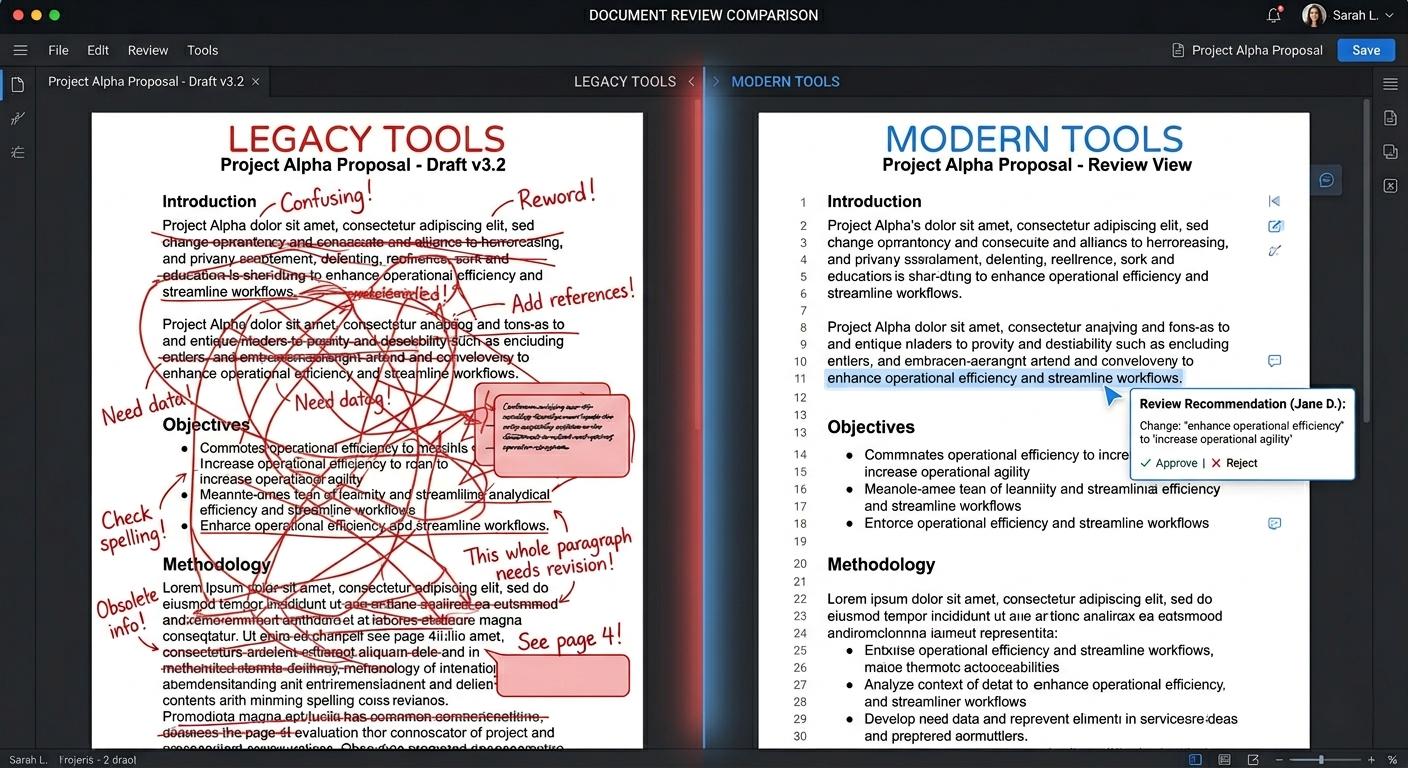
AI PDF Comparison vs Traditional Tools: What’s the Difference? | DoxBar

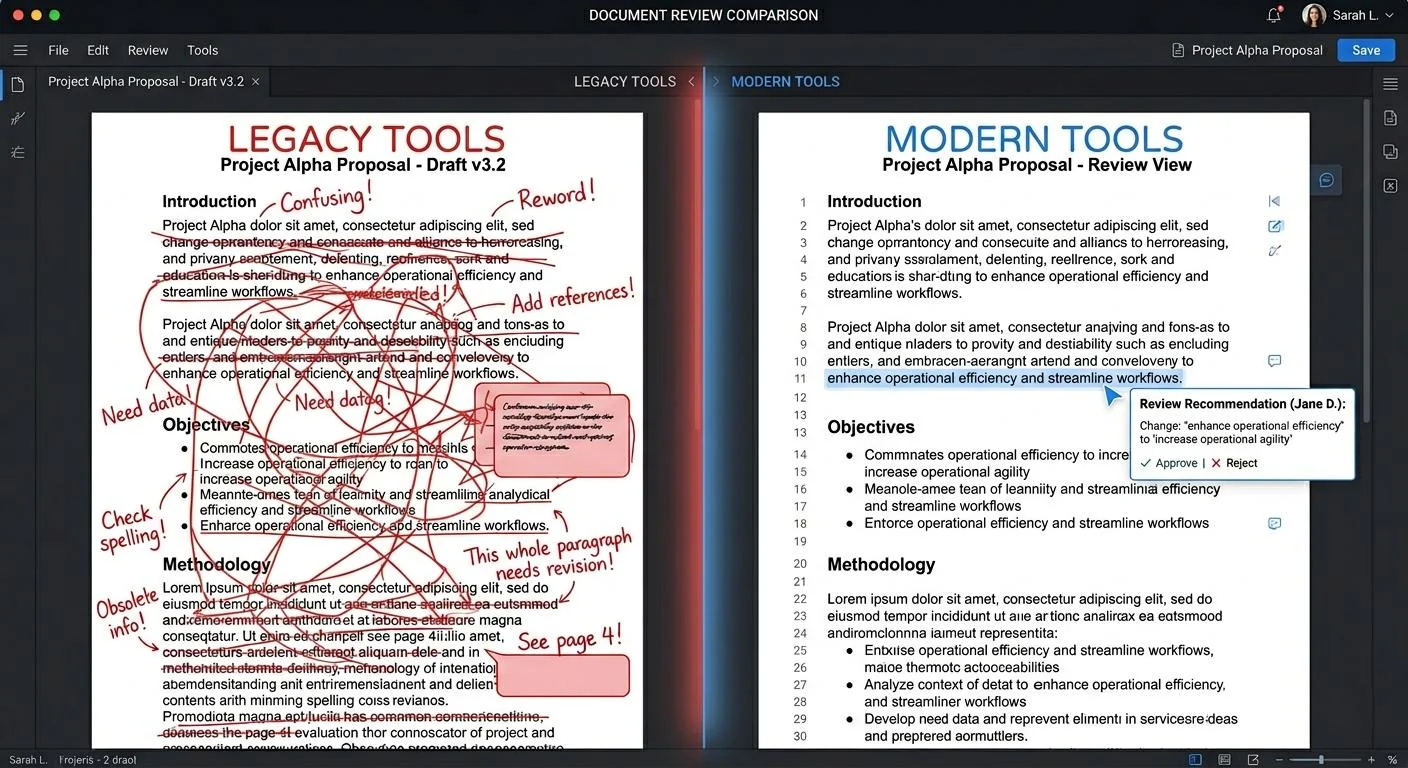

Table of Contents▼
Discover how AI PDF comparison tools differ from traditional text-matching software. Learn to fix formatting, track hidden changes, and secure your workflows.
Introduction: The Hidden Friction in Document Review
Picture a typical Tuesday afternoon. You are reviewing a revised contract, a technical blueprint, or an extensive marketing brief. The sender reassures you that they "only changed two lines in section four." Yet, your gut tells you to verify. You open both documents side-by-side, squinting at your monitor, manually tracking sentences while shifting between tabs.
Halfway through, you try using a basic text diff tool or a standard word-processor merge. The result? A chaotic mess of redlines. The software flags entire paragraphs as "deleted" simply because someone adjusted a margin or changed a font size from 11pt to 12pt. The actual, critical textual changes are completely buried under a mountain of formatting noise.
Document review shouldn't feel like a high-stakes game of "Spot the Difference." For modern professionals, freelancers, and growing operations, this workflow friction slows down deals, creates shipping delays, and introduces massive compliance risks. While traditional comparison methods have served us for decades, the rise of modern cloud architectures and intelligent document processing has changed the landscape, providing users with a cleaner, context-aware approach to viewing updates.
⚡ Quick Answer:
Traditional document comparison tools rely on character-by-character matching and often flag formatting changes as edits. Modern AI-powered comparison PDF tools use layout-aware and semantic analysis to identify meaningful content changes while ignoring harmless formatting differences.
The biggest challenge in document review is not finding differences—it is identifying which differences actually matter. Modern comparison systems are designed to separate meaningful content edits from harmless formatting adjustments, helping reviewers focus on decisions rather than document noise.
The Problem Breakdown: Why Document Comparisons Fail
To fix a workflow, you first have to understand exactly where it breaks. Most teams struggle with document comparison not due to a lack of effort, but because their tools are fundamentally misaligned with modern file complexities.
1. The Cross-Format Nightmare
Workflows rarely stay within a single ecosystem. A copywriter drafts an article in Google Docs, a client reviews it as a PDF, and a legal team edits it in Microsoft Word. When you attempt to compare a .docx file directly against a .pdf, traditional software panics. It struggles to map the structural layout of one format onto the other, leading to corrupted text strings and missing data.
2. Formatting Loss and False Positives
Legacy tools look at characters, not context. If an editor adds a bulleted list or moves an image, a traditional tool often flags the entire page as altered. You waste hours filtering out these false positives just to find a single modified number in a financial table.
3. Device and Performance Bottlenecks
Heavy desktop software can paralyze your system. Trying to run an enterprise-grade document comparison on a mid-range laptop or a mobile device while traveling usually ends in a frozen screen. Furthermore, traditional tools often require complex installations, making quick, on-the-go checks impossible.
4. Hidden Security Vulnerabilities
When users get frustrated with slow internal tools, they often drop sensitive financial or legal documents into random, unverified free online converters. This exposes proprietary data to unknown servers, violating basic data privacy regulations like GDPR.
💡 Common Misconception (Myth vs. Reality)
The Myth: Many people assume AI document comparison simply means a faster, cloud-based version of traditional redlining or basic text diffing.
The Reality: Modern AI-powered comparison engines use structural parsing, OCR, and semantic analysis to understand the complete document context. This allows them to isolate meaningful text changes or compliance adjustments while entirely ignoring harmless formatting shifts.
Educational Deep Dive: How File Internals Control What You See
To understand why an AI PDF comparison vs traditional comparison yields such different results, we need to take a quick peek under the hood of how these file formats actually store data.
[Traditional Compare] ---> Character-by-Character Matching ---> Flags formatting layout shifts as text deletions. [AI-Powered Compare] ---> Structural Semantic Analysis ---> Recognizes layout changes and isolates text edits.
Why PDFs Are Not Just Word Documents
A Microsoft Word file is a dynamic, structural document. It understands concepts like "paragraphs," "headers," and "tables." When you type a word, the rest of the text flows naturally down the page.
A PDF is entirely different. Developed originally by Adobe, a PDF is essentially a digital canvas. It doesn't inherently know what a paragraph is; instead, it contains explicit vector coordinates telling the printer or screen exactly where to draw each specific character. When a PDF is modified, lines don't "flow"—they are repositioned. Traditional text-matching software sees these altered coordinates and assumes the text itself has changed completely.
The Role of Layout-Aware Engines and OCR
Modern comparison tools utilize structural parsing and Optical Character Recognition (OCR) to read documents the way humans do. Instead of analyzing character strings sequentially from top to bottom, an intelligent system segments the document into functional blocks:
Headers & Footers: Isolated so page numbers don’t trigger change alerts during a document audit trail.
Tables: Read as grid coordinates to track exact cell modifications.
Images & Captions: Monitored for visual alterations without corrupting surrounding prose.
By abstracting the text away from its rigid layout coordinates, advanced engines can run a semantic comparison, highlighting true textual variations while keeping version control clean.
The Modern Solution Framework: What to Look For
If you are upgrading your team’s document review stack or designing a reliable legal document review workflow, ensure your chosen framework meets these modern operational standards:
Zero-Trust Privacy: Ensure your documents are processed securely and never stored permanently or used to train public models. Check provider documentation on Cloudflare or enterprise cloud hosts to verify infrastructure security.
True Layout Preservation: The software must display changes directly inline or in an intuitive side-by-side view that mirrors the original document's visual structure.
Cross-Format Flexibility: You should be able to upload a PDF and a Word document simultaneously and receive an accurate diff instantly.
Lightweight, cloud-optimized execution Operation: No desktop installation. The tool should run smoothly inside standard web browsers like Mozilla Firefox or Google Chrome, ensuring compatibility across Windows, Mac, and Linux.
Technical Comparison: Legacy vs. Modern Workflows
Feature / Capability | Legacy Online Tools | Enterprise Desktop Software | Modern Browser-Based Utilities |
Cross-Format (PDF vs Word) | Poor (Throws errors) | Moderate (Requires conversion) | Excellent (Native parsing) |
Formatting Noise Immunity | Low (Flags layout shifts) | High (But requires manual tuning) | High (Automated context separation) |
Processing Speed | Slow / Ad-heavy | High resource consumption | Fast (Cloud-optimized execution) |
Setup Overhead | None (High security risk) | Complex installation & licensing | None (Instant browser access) |
Data Privacy | Questionable | High (Local, but isolated silos) | High (Secure ephemeral processing) |
📌 Key Takeaways
Traditional tools compare characters; AI comparison tools analyze document meaning and structure.
Formatting changes and margin adjustments create massive false positives in legacy systems.
Integrated OCR enables scanned PDFs to be compared seamlessly with editable text formats.
Cross-format tracking (PDF vs DOCX) is significantly more accurate when utilizing a layout-aware engine.
Modern document utility ecosystems prioritize strict change tracking without saving sensitive corporate data.
Step-by-Step Guide: Running a Clean Document Comparison
Here is how a streamlined, modern document review workflow looks in practice using an optimized web utility:
Step 1: Upload Your Sources
Open your browser utility. Drag and drop your original document (e.g., Version 1 PDF) into the left pane, and your revised document (e.g., Version 2 DOCX) into the right pane.
Step 2: System Processing
The cloud engine analyzes both files. It strips away format-specific encoding, runs OCR if it encounters scanned text segments, and aligns the semantic structures of both versions.
Step 3: Analyze the Diff
Review the generated visual output. True text deletions should appear in red strikethrough, additions in clear green, and structural layout adjustments should be noted quietly in a sidebar without cluttering the primary text view.
Step 4: Export and Verify
Download a comprehensive change report or an annotated PDF copy that retains clear markup notes for your clients, vendors, or team leads to inspect.
Pros & Cons: Balancing the Options
Modern Cloud-Based Comparison Tools
Pros: Runs on any operating system; instant setup; handles mixed file formats easily; highly cost-effective for growing teams.
Cons: Requires an active internet connection; extremely large blueprint files (e.g., over 500 pages) may take a few moments longer to parse over standard connections.
Traditional Local Desktop Suites
Pros: Works entirely offline; deep integration with proprietary local file servers.
Cons: Expensive licenses; platform-dependent (often lacks native Linux or mobile support); prone to breaking when matching different file types.
Advanced FAQ Section
Q1: What is the core difference between an AI PDF comparison vs a traditional comparison?
Traditional comparison tools rely entirely on character-by-character or pixel-by-pixel matching. If you add a space or change a margin, the tool flags it as a structural modification. An AI-driven or layout-aware system reads the text contextually, isolating visual formatting changes from literal textual updates so you only review meaningful changes.
Q2: Can AI compare two PDF files?
Yes. AI-powered document utilities can ingest two separate PDF files, extract their text layers, run alignment algorithms to match corresponding sections, and display an accurate difference map highlighting added, deleted, or modified text blocks.
Q3: Is AI document comparison more accurate than traditional diff tools?
Absolutely. Traditional diff tools are line-oriented and character-bound. They fail when text wraps differently across pages or when a paragraph shifts location. AI-driven document engines recognize context, layout, and semantics, greatly reducing false positives.
Q4: Can AI detect formatting changes separately from content changes?
Yes. Advanced systems use layout-aware parsing engines that separate visual elements (like font style, margins, and text color) from the underlying semantic text. This allows users to filter their view to show only content edits, only formatting edits, or both.
Q5: Why do table columns look warped when I run a standard text diff on a PDF?
As documented in technical format deep-dives on Wikipedia, PDFs store text tables as collections of independent text strings positioned at specific screen coordinates rather than unified data matrices. Traditional engines read these strings line-by-line across the entire page, scrambling your column data. Specialized document engines recognize table grids explicitly to preserve row-and-column integrity during the diff process.
Q6: Is it safe to use free online tools for comparing legal contracts?
Many free, ad-supported tools log uploads to monetize user metrics or train unvetted processing models. For legal, financial, or proprietary code reviews, always use trusted, secure utility platforms that explicitly guarantee zero-retention data policies.
Q7: How do these tools handle micro-changes like punctuation or modified numbers?
Advanced layout engines isolate individual text tokens. If a single decimal point is altered in a 300-page financial disclosure, the system highlights that specific cell or character block explicitly, avoiding the common mistake of flagging the entire table row.
Q8: What happens if the text layout changes from a single column to a double column layout?
A traditional pixel diff will fail here, showing 100% variance. A context-aware semantic engine tracks the reading flow of the sentences, mapping text chunks correctly regardless of how they are visually rearranged across columns or pages.
EEAT & Trust Signals: Building a Dependable Workflow
When evaluating document comparison software or optimizing contract review pipelines, accuracy and data privacy are paramount. Industry standards set by organizations like NIST emphasize the necessity of robust data isolation principles when dealing with third-party software vendors. Relying on unvetted, ad-heavy platforms introduces substantial liability risks. Incorporating dedicated, secure utility ecosystems into your core operational stack ensures your document workflows remain fast, precise, and protected.
🔗 Related Resources
PDF vs Word Formatting Differences: Why Layouts Break
How OCR Works in Modern PDF Documents
Are Online PDF Tools Safe? Data Privacy Guide
How to Compare Two PDF Files Efficiently
Conclusion: Elevate Your Document Review Workflow
The choice between an AI PDF comparison vs traditional comparison comes down to how much you value your time. Spending hours manually auditing false positives caused by formatting shifts is an unnecessary drag on productivity. By pivoting to layout-aware, context-sensitive document processing, you can confidently speed through reviews and eliminate tracking errors.
Need to compare contracts, reports, PDFs, or cross-format documents without sorting through thousands of false positives?
Doxbar is building an ecosystem of lightweight, browser-based document utilities designed to streamline your daily workflow. Keep your processes fast, independent, and secure—explore modern document efficiency tips and tools at Doxbar.com.
Need to Convert Document Formats?
Try our secure, lightning-fast PDF conversion suite. Convert Word, Excel, Images, and more with zero formatting loss.

Doxbar Editorial
Security & Privacy Team
We specialize in secure document architectures, parsing engines, and modern developer utilities. Keeping your files safe, lightweight, and perfectly formatted.
Join the Conversation
Share your thoughts or ask a question about this topic. This is a privacy-first system.