

Flatten PDF Before Sharing or Printing: Keep Forms, Annotations, and Layers in Place
Contents
Flatten PDF Before Sharing or Printing: Keep Forms, Annotations, and Layers in Place

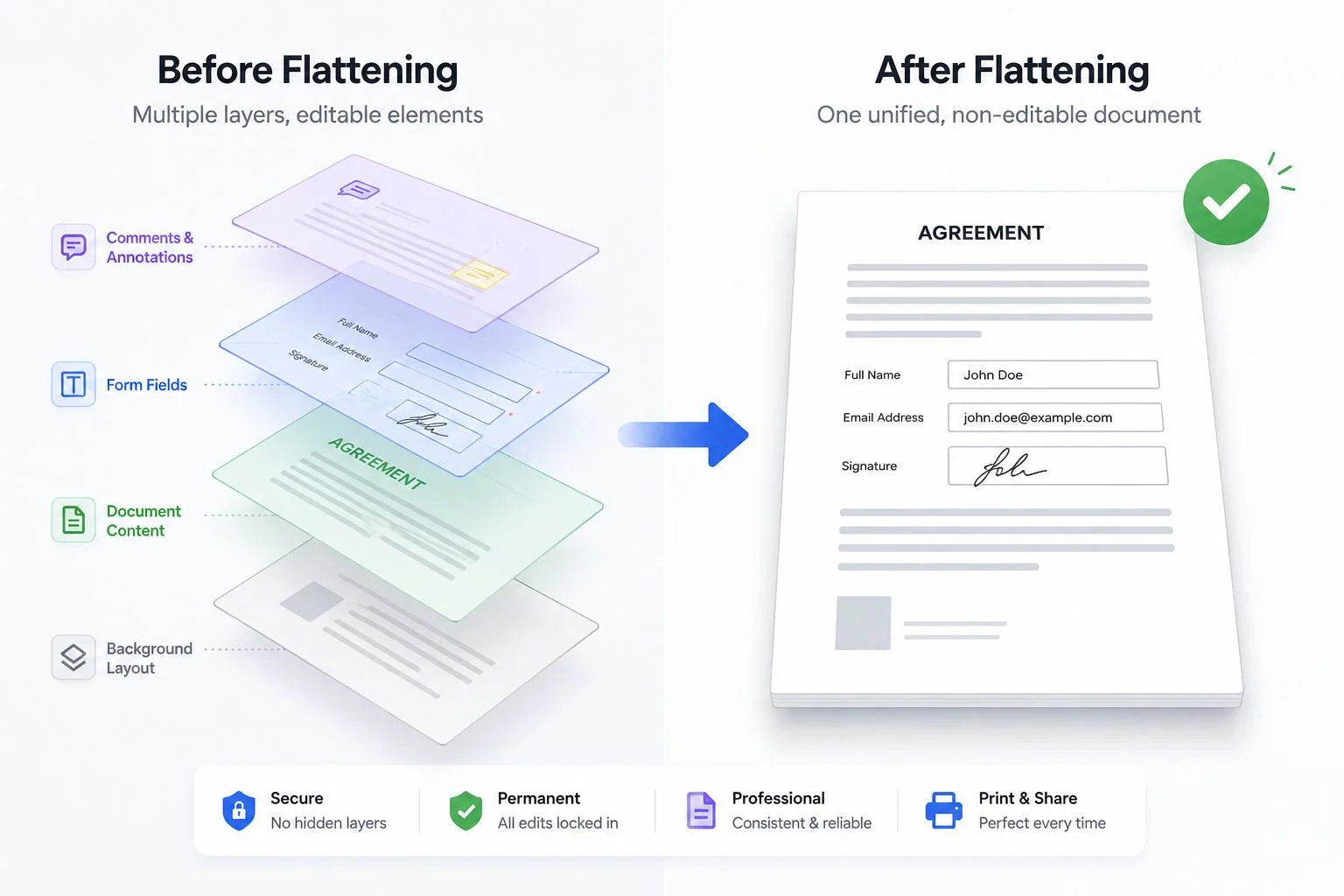

Table of Contents▼
Learn how to flatten a PDF to secure your form fields, permanentize annotations, and merge layers. Keep your document formatting intact across all devices.
Introduction: The Client Review Nightmare
You just spent three hours meticulously filling out a complex interactive PDF contract, adding detailed sticky notes for your design team, and adjusting the layered architectural blueprints embedded within the document. It looks pristine on your desktop. You hit save, email it over to your executive stakeholders, and close your laptop for the weekend.
Monday morning arrives, and your inbox is flooded with panicked messages.
The client is seeing completely blank form fields. The annotations you added have shifted three inches to the left, covering vital contract text. Worse, someone accidentally edited one of your calculated financial fields on their tablet, throwing off the entire budget proposal.
This isn't a rare glitch; it is one of the most common friction points in modern digital document workflows. When you share an interactive document, you are relying heavily on the recipient's software to render live, floating data layers correctly.
To prevent these formatting disasters, professionals rely on a process called "flattening." By using a reliable online utility like Doxbar, you can instantly transform dynamic, unpredictable elements into a single, permanent visual layer.
Why Interactive PDFs Break: The Problem Breakdown
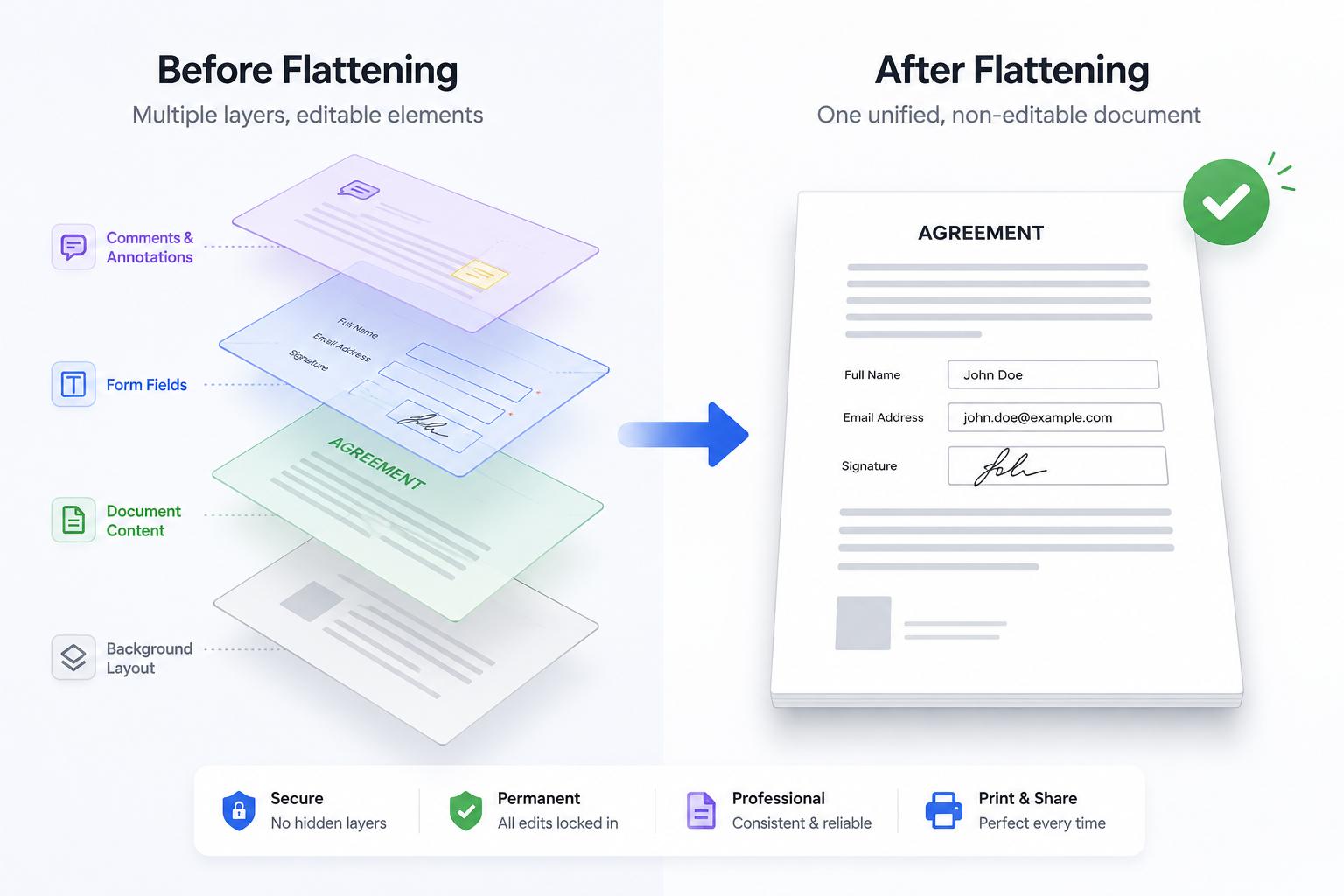
To understand why documents fail across different devices, we have to look under the hood of the Portable Document Format (PDF) structure. A standard interactive PDF is not a flat, singular image; it is built like a digital sandwich with multiple independent layers floating on top of one another.
Layer | Contains | Problem Before Flattening |
Layer 3 | Comments, annotations, signatures | May shift or disappear |
Layer 2 | Fillable form fields | Can remain editable or appear blank |
Layer 1 | Text, images, graphics | Base document structure |
When you encounter workflow issues, they typically stem from one of these structural vulnerabilities:
Dynamic Form Vulnerabilities: Fillable fields remain "live" by default. If a recipient opens the file in a basic web browser or an outdated mobile viewer, those fields can easily appear entirely blank or, worse, remain completely editable, risking unauthorized data tampering.
Shifting Annotations: Comments, digital signatures, and sticky notes live on a separate interactive overlay. Different PDF readers interpret the coordinates of this overlay differently, causing your notes to dance around the page or disappear entirely.
Complex Layer Complications: Graphic design files, blueprints, and CAD exports often contain dozens of distinct layers. Printing a layered file directly frequently causes slow print spooling, missing design elements, or strange color artifacts.
Software Bloat and Drag: Opening a massive, unflattened document with embedded form logic requires significant processing power. Old desktop software often crawls to a halt trying to parse it.
Educational Deep Dive: The Mechanics of Flattening
What actually happens when you flatten a PDF? It helps to think of the process as taking a snapshot of a complex web page.
When you use a PDF flattener, the rendering engine analyzes every floating element—whether it is a text box, a checkbox, a signature, or an annotation layer—and burns those pixels directly into the background layer (Layer 1). The interactive form fields become permanent, unselectable text characters, and the vector checkboxes become fixed graphics.
Why PDFs Behave Differently Than Word Documents
In a text processing program like Microsoft Word, the layout is fluid. If you change a font or open the document on a screen with a different resolution, the text reflows, often pushing images onto the next page.
A PDF is designed to enforce rigid, absolute positioning. However, interactive elements break this rule by remaining dynamic. Flattening forces the document back into a completely static state, ensuring absolute cross-platform visual fidelity.
The Role of OCR vs. Basic Flattening
It is important to note the difference between basic flattening and Optical Character Recognition (OCR), a technology extensively documented by organizations like Mozilla.
Basic Flattening: Merges visual layers together while retaining the underlying text searchability where possible.
Visual Flattening (Print Simulation): Re-renders the entire page as a high-resolution raster image, turning everything into pixels. If you choose this path to maximize security, you may need an OCR engine later if you want to make that document searchable or selectable again.
The Modern Solution Framework: What to Look For
If you are looking for a reliable way to finalize your files before sharing or printing them, you shouldn't just trust any random software utility. A broken conversion can permanently ruin your original layout. Keep these core pillars in mind:
1. Robust Privacy Protocols
Your documents contain sensitive data—contracts, financial records, or personal identification. Ensure that any web-based platform you use explicitly states its data handling policies. Look for platforms that use secure, encrypted transmission channels and automatically purge files from their servers shortly after processing.
2. High-Fidelity Layout Preservation
The primary goal of flattening is to keep things exactly where they belong. The conversion engine must accurately parse typography, transparencies, and overlapping vectors without downgrading the document's core resolution or shifting its margins.
3. Cross-Platform Speed and Mobile Accessibility
You shouldn't have to download a multi-gigabyte desktop software suite just to fix a single form. Modern workflows favor browser-native architectures that execute tasks rapidly, whether you are working from a high-powered office desktop or editing on a smartphone from an airport terminal.
Tool Architecture Comparison
Feature / Workflow Capability | Legacy Online Converters | Heavy Desktop Software | Modern Browser-Based Tools |
Processing Speed | Slow, server-dependent | High local resource usage | Rapid, optimized execution |
System Footprint | None (Ad-heavy) | Extremely heavy installation | Lightweight, zero install |
Mobile UX | Poorly optimized, clunky | Often requires a separate app | Native responsive design |
Data Privacy Assurance | Questionable, vague terms | Secure (Local processing) | High (Auto-purge protocols) |
Step-by-Step Workflow: How to Flatten Your PDF Safely
To ensure your document renders flawlessly for every single recipient, follow this clean production sequence:
1. Upload Your Interactive Document: Step 1.
Navigate to the Doxbar web workspace and drop your file into the processing area. The secure system initiates an encrypted link to handle the file layout safely.
2. Select Your Production Profile: Step 2.
Choose your target output objective. If you are preparing a document to make PDF form fields non-editable, select standard form flattening. If you are preparing a complex layered document for commercial printing, ensure layer merging is toggled on.
3. Execute the Conversion Engine: Step 3.
Click the convert button. The system parses the document layers, locks floating annotations permanently in place, and unifies the underlying layout elements seamlessly.
4. Download the Flattened File: Step 4.
Save the newly generated file to your local drive. Crucial tip: Always save it with a modified name (e.g., Document_FINAL_Flat.pdf) so you don't accidentally overwrite your original, editable template.
5. Verify Layout Integrity: Step 5.
Open the final document in a basic web browser window. Try clicking inside the form fields or highlighting the comments. If the fields are uneditable and the annotations are locked firmly in position, your document is perfectly optimized for safe distribution.
Balanced Pros & Cons of PDF Flattening
Every document management strategy involves architectural trade-offs. It is important to look at the practical realities honestly before modifying your file library.
The Advantages
Guaranteed Rendering Consistency: What you see on your monitor matches exactly what your client sees on their screen, regardless of whether they use iOS, Android, Windows, or Linux.
Eliminates Printer Failures: Commercial printers and standard office copiers can process the flattened, single-layer data stream significantly faster, completely preventing dropped graphics and font errors.
Tamper Prevention: Because interactive components are flattened into static graphics, casual users cannot modify your data, fillable inputs, or structural terms easily.
The Drawbacks
Irreversible Process: Once a document is flattened and saved, you cannot convert it back into an interactive form. The text boxes are no longer fillable drop-downs or active inputs.
Loss of Dynamic Logic: If your form contains internal mathematical scripts (such as auto-calculating tax totals), that live programming behavior is stripped away during the unification process.
Advanced FAQ Section
How do I flatten a fillable PDF form?
To flatten a fillable form, you need to run the file through a dedicated layout flattening utility. This takes the live digital entries typed into the fields and converts them into static vector typography that is embedded directly into the primary content layer of the page.
Will flattening a PDF reduce its overall file size?
In most standard corporate use cases, yes. It strips away interactive form elements, digital signature validation trees, structural metadata, and hidden calculation scripts. However, if your document contains highly intricate transparent graphic design layers that are rasterized into massive bitmap images during flattening, the file size can occasionally increase.
Can someone unflatten my document later to see my original inputs?
No. Once a document is fully flattened and saved, the underlying layout code changes permanently. The separate, floating interactive data arrays are deleted, leaving behind only a single visual layer. It acts like baking a cake—you cannot separate the eggs and flour from the finished product.
Why do my comments disappear when I share a PDF via email?
Many email clients use basic, built-in image preview tools to display attachments quickly. These basic viewers frequently lack the architectural framework required to read the separate interactive annotation layer. Flattening solves this by forcing the comments directly into the visible document background.
What is the difference between flattening layers and flattening annotations?
Layer Flattening: Merges overlapping structural content tiers (like distinct background colors, line drawings, or text columns) created in design programs like Adobe Illustrator into one primary layer.
Annotation Flattening: Takes user-generated overlays like sticky notes, highlight marks, stamps, and signatures, and anchors them permanently to that underlying artwork.
Will flattening a document ruin my digital signatures?
Yes, flattening will visually freeze a cryptographic signature image onto the document page, but it will break the active digital validation certificate wrapper. If you require formal, legally binding digital certificate tracking, you must finalize all flattening adjustments before applying the secure digital signature lock via platforms like DocuSign.
Why should I flatten a PDF before printing it?
Modern office and commercial printers process files line by line. When a printer hits a layered file or an unflattened form overlay, the printer memory often struggles to calculate the transparency interactions, resulting in printing delays, missing text boxes, or blocky black artifacts around your images.
Does flattening turn all my document text into an image?
It depends entirely on the settings you use. Standard flattening retains the structural vector coding of text elements, keeping the file searchable. Only extreme "rasterize-everything" security profiles transform the entire document canvas into a single, flat image.
Can I selectively flatten only specific form fields?
Standard web utilities flatten the entire document structure all at once for consistency. If you need to lock down specific fields while keeping others open, you must use complex desktop program configurations to individually toggle the read-only attributes of each specific interactive field element.
How does flattening protect my intellectual property?
By converting vector paths and hidden document text layers into simplified, unified elements, it prevents readers from easily extracting original asset structures, altering content terms, or scraping underlying document metadata arrays.
Is a flattened PDF considered AdSense safe for web publishing?
Yes. The automated crawler engines used by digital advertising providers look for clean, standardized document structures that display content reliably. Flattened documents prevent rendering scripts from crashing, ensuring your web assets comply with standard public indexing layout rules.
How do modern web browsers handle flattened documents?
Web browsers excel at reading flat visual assets. When you remove dynamic layers and scripts, browsers can render the pages near-instantly using their native rendering engines, providing a much smoother user experience.
Can I still highlight text after flattening a file?
If you use a high-quality utility that preserves structural typography vectors, yes. The text elements remain recognizable characters, allowing you to highlight them normally. If the tool converts the document into a full raster image, the text turns into pixels, making highlighting impossible without running OCR software first.
Why do some graphics look low-resolution after converting?
This happens if the conversion engine scales down your internal page resolution settings to compress the file size. High-quality systems maintain your document's original dots per inch (DPI) metrics, ensuring your graphics remain sharp and readable.
Does flattening remove hidden hyperlinks?
Standard hyperlinks are handled via an independent URL link layer. While basic flattening unifies your visual components, advanced processing blocks can be configured to either strip out active hyperlinks completely for maximum security or retain them so readers can still click web links safely.
Can I flatten a document directly on a mobile device?
Yes. By using responsive web platforms like Doxbar, you can upload documents directly from your iOS or Android device storage, execute the flattening command in the cloud, and download the secured file without needing a desktop computer.
What happens to hidden text layers during conversion?
Hidden structural text layers are usually removed or merged permanently into the main background, preventing hidden search keywords or sensitive metadata strings from remaining exposed in your shared files.
Does flattening ensure compliance with archival standards?
Yes, it is a core step toward achieving compliance with long-term archiving standards like PDF/A (as specified by the International Organization for Standardization). These standards require all font assets and color profiles to be fully self-contained and free of dynamic, external script dependencies.
Why do form checkboxes sometimes break when shared?
Unflattened checkboxes use variable font icons to display checkmarks. If a recipient's system doesn't have that exact font asset installed, the checkmark can turn into an unreadable square box or disappear entirely. Flattening fixes this by turning the checkmark into a permanent graphic element.
How long does it take to flatten a large document online?
Using optimized cloud infrastructure, a standard multi-page business document converts in just a few seconds. Massive, hundred-page architectural portfolios with dense graphic layers may take up to a minute to process completely.
Can I batch-process multiple files at the same time?
Yes. Modern document platforms let you queue up multiple documents simultaneously, applying identical flattening rules across your entire batch to streamline your administrative workflows.
Conclusion: Securing Your Digital Footprint
Sharing your work with colleagues, clients, or vendors shouldn't feel like a gamble. Relying on unflattened, interactive files leaves your carefully constructed layouts vulnerable to software incompatibilities, device limitations, and accidental modifications.
By taking a brief moment to stabilize your files through an intuitive system like Doxbar, you can lock your forms, annotations, and visual layers securely in place. It ensures that your documents look exactly the way you intended, no matter what device or software your recipient uses to open them.
Need to Convert Document Formats?
Try our secure, lightning-fast PDF conversion suite. Convert Word, Excel, Images, and more with zero formatting loss.

Doxbar Editorial
Security & Privacy Team
We specialize in secure document architectures, parsing engines, and modern developer utilities. Keeping your files safe, lightweight, and perfectly formatted.
Join the Conversation
Share your thoughts or ask a question about this topic. This is a privacy-first system.