

Edit PDF Metadata Online Free | Fix Titles & Author Names
Contents
Edit PDF Metadata Online Free | Fix Titles & Author Names

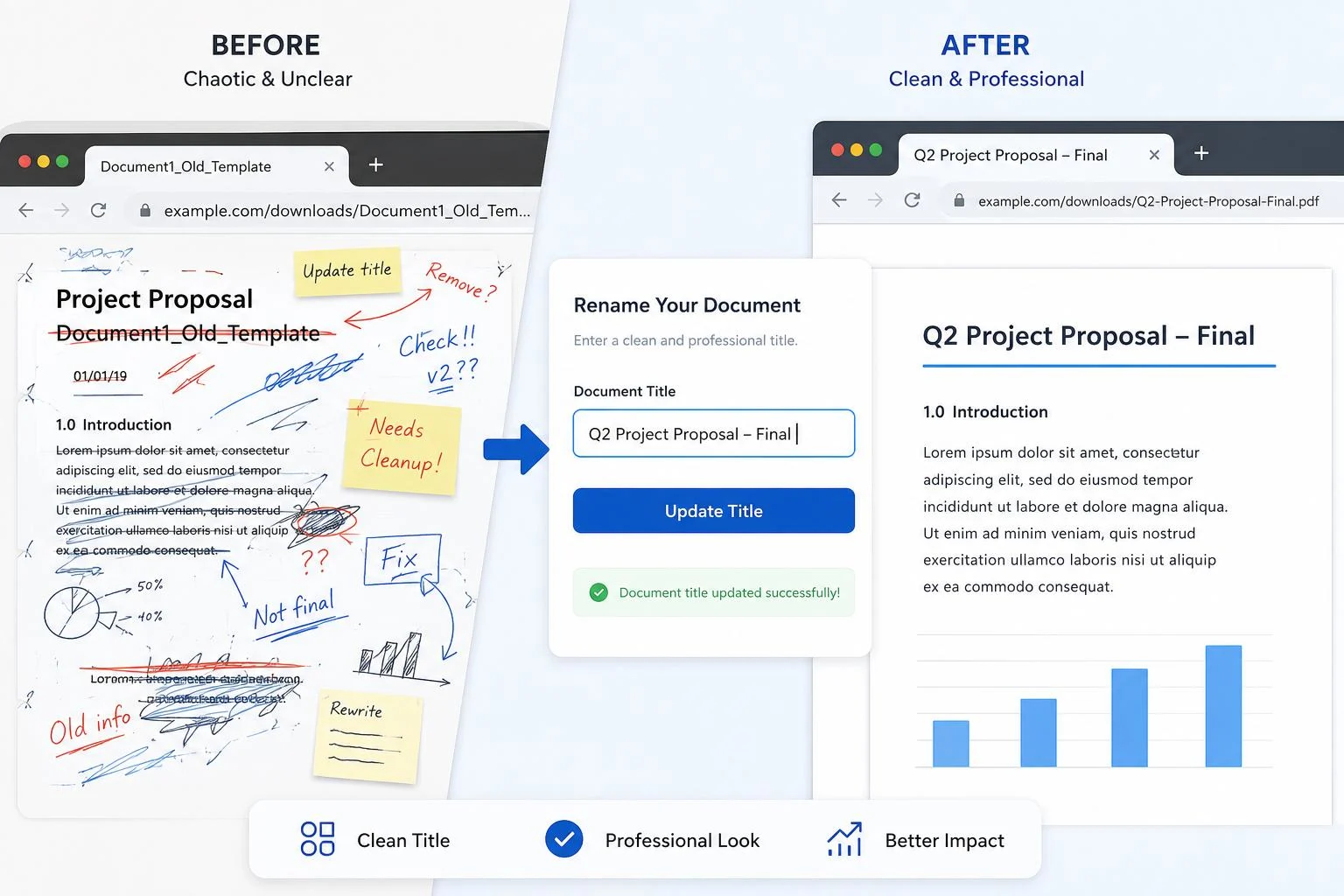

Table of Contents▼
Edit PDF metadata online free. Fix wrong PDF titles, author names, and document properties in seconds without installing Adobe Acrobat.
Quick Answer
You can edit PDF metadata online for free by uploading your file to a PDF metadata editor, changing the Title, Author, Subject, or Keywords fields, and downloading the updated PDF. This process does not change the visible content of the document.
The Hidden Ghost in Your Document: Why Your PDF Shows the Wrong Title
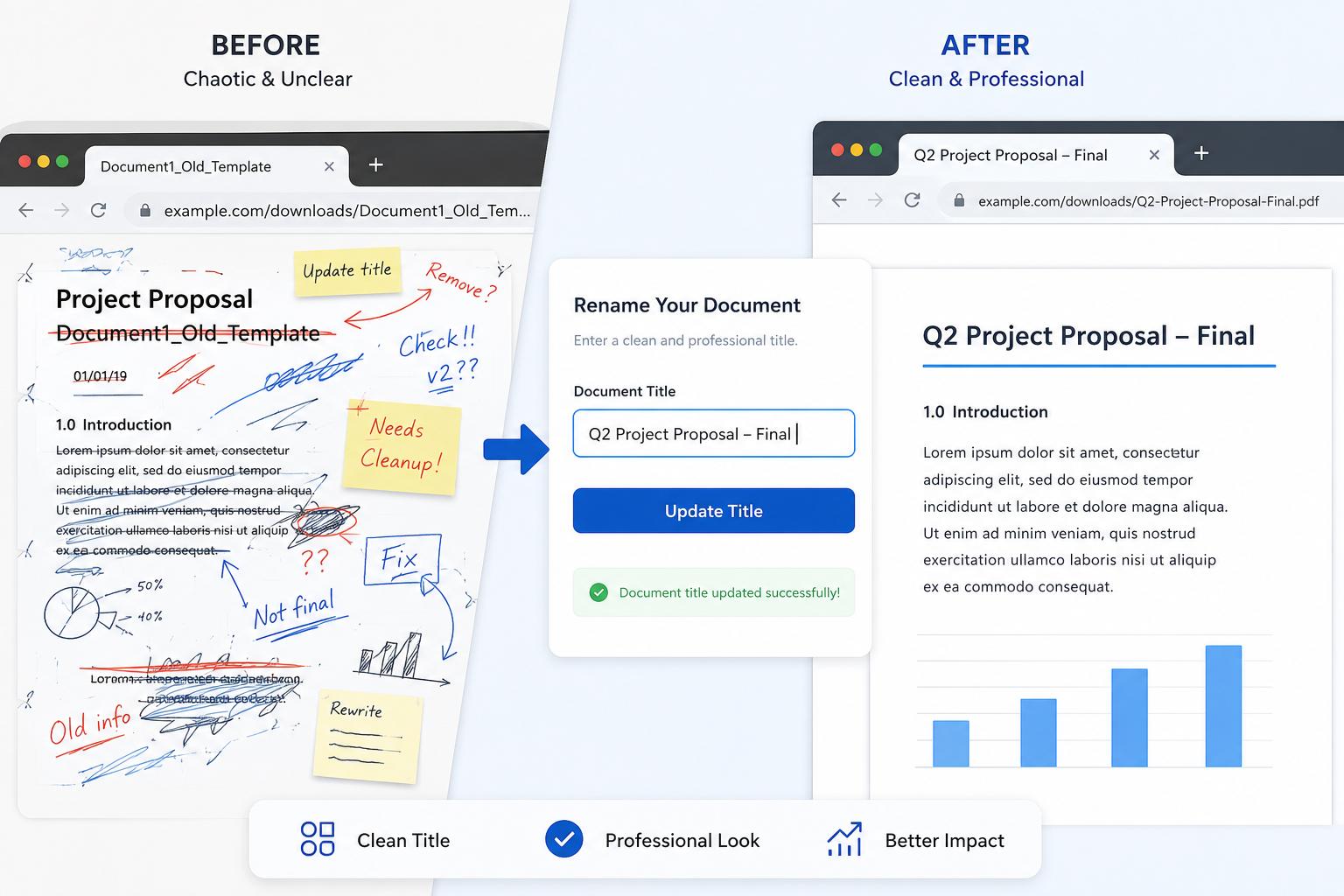
You finish a critical project proposal, spend hours perfecting the layout, and finally export it to a crisp, professional PDF. You email it to a high-value client. But when they open it in a modern web browser, the text in the tab doesn't read "Project Proposal Q3." Instead, it displays something messy, like "Microsoft Word - Document1" or "Draft_Version_2_Old_Partner_Final".
It is a deeply frustrating moment. Your document content is completely updated, but the hidden digital footprint tells a totally different story.
This happens because of embedded file properties, commonly known as metadata. When you convert a file from Word, Google Docs, or Excel into a PDF, the exporting software often carries over whatever internal title or author name was set when the file was first created. If you are using a shared template, that hidden data stays stuck inside the file. If you need to edit PDF metadata online free, this guide shows the fastest way to fix incorrect titles, author names, and document properties without installing desktop software.
Cleaning up this information used to mean buying expensive desktop software licenses. But keeping your public-facing files professional shouldn't break the bank. With a simple, browser-based tool like the Doxbar PDF Metadata Editor, you can update your document properties in seconds. It allows you to change PDF title shown in Chrome or any other modern browser instantly, ensuring your digital assets look exactly as intended.
When Should You Edit PDF Metadata? Real-World Use Cases
Before you hit send or upload a file to the web, checking your document properties is a crucial quality assurance step. You should specifically review and remove old author information from PDF files in these scenarios:
Before Sending Resumes: Don't let recruiters see that your resume was originally built using a friend's template or labeled as Resume_Draft_Version_12.
Before Client Proposals: Ensure your competitive edge by removing internal draft labels, older pricing version notes, or former employee names from the document structure.
Before Legal & Financial Documents: Maintain absolute confidentiality. Clean out internal system paths and author histories before files enter legal discovery or compliance reviews.
Before Publishing Public PDFs: If you are uploading resources to your website, you need to update PDF metadata before publishing to make sure the user experience is flawless.
Before uploading PDFs to Google, search bots index hidden text headers. Providing clean data directly helps your search engine optimization strategy.
Featured Snippet: How to Edit PDF Metadata in 5 Steps
Looking for the fastest way to fix your document properties? Here is how to edit PDF metadata online free using Doxbar:
1. Upload Your Document
Step 1: Go to the Doxbar PDF Metadata Editor and drop your file into the secure upload area.
2. Edit PDF Title
Step 2: Locate the Title input field and type in the exact name you want displayed on browser tabs.
3. Edit PDF Author
Step 3: Navigate to the Author field to update or change author name in PDF files to reflect your current brand.
4. Save Properties
Step 4: Click the Apply Changes button to let Doxbar update the internal document dictionary.
5. Download the File
Step 5: Download your newly optimized, clean PDF instantly to your local device.
Educational Deep Dive: What is PDF Metadata and Why Does It Break?
To understand why your files behave this way, we have to look under the hood at how document architectures handle identity tracking.
Inside the Structural Layer
A PDF is not just a static picture of your text; it is a complex container of structured components. According to the international standards detailed on Wikipedia, a PDF contains both the visual layout content and a dedicated Information Dictionary. This structural dictionary holds standard metadata fields: Title, Author, Subject, Keywords, Creator, and Creation Date.
Why Your Export Changes the Rules
When you write an article or report in an application like Microsoft Word or a spreadsheet in Excel, the software assigns an internal document identity. When you select "Save As PDF," the conversion engine maps those native properties directly into the PDF container. If the original text template was created five years ago by a former employee, that historic author name remains permanently attached to the new file until it is explicitly overwritten.
The Role of Search Systems and Parsers
When systems scan digital assets, they do not just read the surface words. Web indexers like Google and browser native scripts parse the internal header blocks first. This explains why does my PDF show a different title on screen—the browser gives priority to the explicit internal title element inside the document's metadata dictionary over the actual filename.
The Modern Framework: How to Safely Edit PDF Properties Online
You do not need to install an expensive, gigabyte-sized application suite just to adjust a couple of text strings in a document header. When selecting a platform to change metadata in PDF online, focus on these essential criteria:
Zero Installation Footprint: The application should run entirely inside your standard web browser using native engine resources, allowing you to edit PDF metadata without Adobe Acrobat.
Privacy-First Security Framework: Avoid tools that store copies of your documents on external servers. Look for platforms like Doxbar that process files securely and respect data privacy.
Comprehensive Dictionary Access: The utility must let you modify all primary attributes simultaneously, including the document title, author, subject, and search keywords.
Zero Visual Distortion: Modifying header text should never alter your embedded typography, spacing, or structural page layouts. If you need deeper structural adjustments later, you can seamlessly transition the file to a dedicated PDF Editor.
Comparing the Tools: Legacy vs. Modern Workflows
Capability | Heavy Desktop Software | Legacy Web Converters | Modern Doxbar Web Tools |
Startup Velocity | Slow; requires installation | Moderate; server queues | Instant; runs in the active window |
Data Protection | Local but requires local updates | High risk; files sit on external servers | Secure; rapid cleanup protocols |
Cost Profile | Expensive recurring contracts | Often free but filled with annoying ads | Free, lightweight utility access |
Visual Accuracy | High precision | Common layout shifts | Absolute layout retention |
Deep Dive Tool Workflow: Managing Your Asset Properties with Doxbar
When you use the Doxbar PDF properties editor, the user interface is built intentionally around speed and clarity. You don't have to sort through complicated drop-down submenus or technical property trees.
Step 1: Secure Ingest
When you upload your document, Doxbar reads the binary header blocks instantly. If your file is locked or encrypted, you can run it through the Unlock PDF tool first to clear restrictions before modifying parameters.
Step 2: Clear Property Configuration
The interface presents clear form fields showing your current embedded data. Here, you can add title, author, and keywords to PDF files systematically. If you are preparing public marketing content, you can easily insert target keyword strings to assist search engine discovery.
Step 3: Optimization and Compression
If your file contains high-resolution graphics that make it too bulky for email attachments, you can pair your property edits with our Compress PDF ecosystem to shrink the footprint while maintaining structural integrity. For scanned paper documents that lack selectable text strings, processing the file through the PDF OCR engine first will generate a fully searchable text layer alongside your new metadata profile.
Pros & Cons of Online Metadata Modification
The Benefits
Immediate Turnaround: Fix wrong PDF title issues in seconds right before an important meeting or public release.
Platform Agnostic: Works perfectly across Linux, macOS, and Windows without needing dedicated software versions.
Maintains Structural Integrity: Rewriting structural text parameters leaves the layout, visual fonts, and page elements untouched.
The Limitations
Requires Internet Access: Web-based utilities require an active connection to load the tool interface.
File Size Thresholds: Very large documents might take longer to upload depending on your local network connection bandwidth. If you are dealing with multiple separate files, merging them via a PDF Merger before applying universal tags can streamline operations.
Advanced FAQ Section
Why does my PDF show a completely different title in the browser tab compared to the filename?
Web browsers prioritize the internal structural title tag located inside the file's information header over the actual filename on your hard drive. If this internal field is filled out, the browser displays it on the tab label. You can fix PDF browser title issues easily by running the file through Doxbar's online modifier to match the text fields.
Can I change the author name in a PDF without altering the visual text?
Yes. Modifying properties only updates the hidden structural description block. The actual text, formatting, and images on the pages remain completely untouched.
How do I edit PDF metadata without Adobe Acrobat?
You can use a modern browser-based tool like Doxbar. These platforms allow you to upload your document, retype the header fields in a simple form, and save the updated file without needing any local desktop software installations.
Is it safe to upload my business files to online document modifiers?
It depends on the platform's security framework. Doxbar processes files using secure paths, clearing data right after download. If you need to secure your document completely before sharing it publicly, you can also add access restrictions using our Protect PDF utility.
Will modifying metadata affect the digital signatures on my file?
Yes. Changing any internal bytes—including hidden tags—breaks the validation chain of an officially signed cryptographic document. You should always change PDF document properties before applying official digital signatures.
Does Google read PDF metadata?
Yes. Search engine bots parse the internal metadata fields of indexed PDFs. Having a clean, keyword-optimized title tag inside your PDF can directly help its performance in search engine result pages.
Can I remove metadata from a PDF completely?
Yes. You can use an online editor to completely clear out the text inside the Title, Author, Subject, and Keyword fields, leaving them entirely blank.
Does editing metadata affect SEO?
Yes, positively. When you change PDF title metadata to align with your target keywords, search engines can better categorize your content, which improves your overall topical authority.
Can I edit PDF keywords and the subject field?
Yes. A comprehensive PDF properties editor gives you full control to add, modify, or remove strings from both the Subject and Keyword fields to improve internal file indexing.
Can Windows show PDF metadata?
Yes. If you right-click a PDF file in Windows File Explorer and select Properties > Details, you can view the embedded title, author, and other structural fields directly from your desktop.
How can I verify my metadata was updated successfully?
The easiest way is to drag your processed PDF file directly into a new browser tab in Chrome, Edge, or Safari. If the tab displays your newly written title, the update was successful.
Can metadata expose private information?
Yes. Unmanaged metadata can accidentally leak internal company file structures, usernames, email addresses, creation dates, and the specific software applications used by your team.
Ensuring Professionalism with Every File Share
Your documents represent your business, your brand, and your professional standards. Sending out a file with sloppy or outdated internal tags can undermine your hard work. Taking a few seconds to review, update, or remove incorrect metadata from PDF files ensures that your clients see a clean, polished presentation from the moment they click open.
With Doxbar, managing your document properties is seamless. Our web-native engine allows you to:
Edit PDF Metadata completely inside your active web browser tab.
Change Title and Author strings instantly without layout disruption.
Update Keywords to optimize your assets for search engine crawlers.
Remove Old Metadata left behind by outdated corporate templates.
Keep Original Layouts intact with zero font or spacing shifts.
Don't let hidden file histories compromise your delivery. Clean your files today using the Doxbar PDF Metadata Editor.
Need to Convert Document Formats?
Try our secure, lightning-fast PDF conversion suite. Convert Word, Excel, Images, and more with zero formatting loss.

Doxbar Editorial
Security & Privacy Team
We specialize in secure document architectures, parsing engines, and modern developer utilities. Keeping your files safe, lightweight, and perfectly formatted.
Join the Conversation
Share your thoughts or ask a question about this topic. This is a privacy-first system.