

POT to PDF: Convert Legacy PowerPoint Templates Online
Contents
POT to PDF: Convert Legacy PowerPoint Templates Online


Table of Contents▼
Learn how to convert legacy POT PowerPoint templates to PDF online or with desktop software. Preserve slide layouts, fonts, and design while making old templates easier to share and print.
That Old PowerPoint Template Sticking Point
You're digging through an old archive folder, an external hard drive from past projects, or a shared company drive that hasn’t been reorganized in years. You find an older slide deck template you need to reference. You double-click it, and your modern office suite flags it as an outdated format or struggles to render custom fonts and historical slide layouts properly.
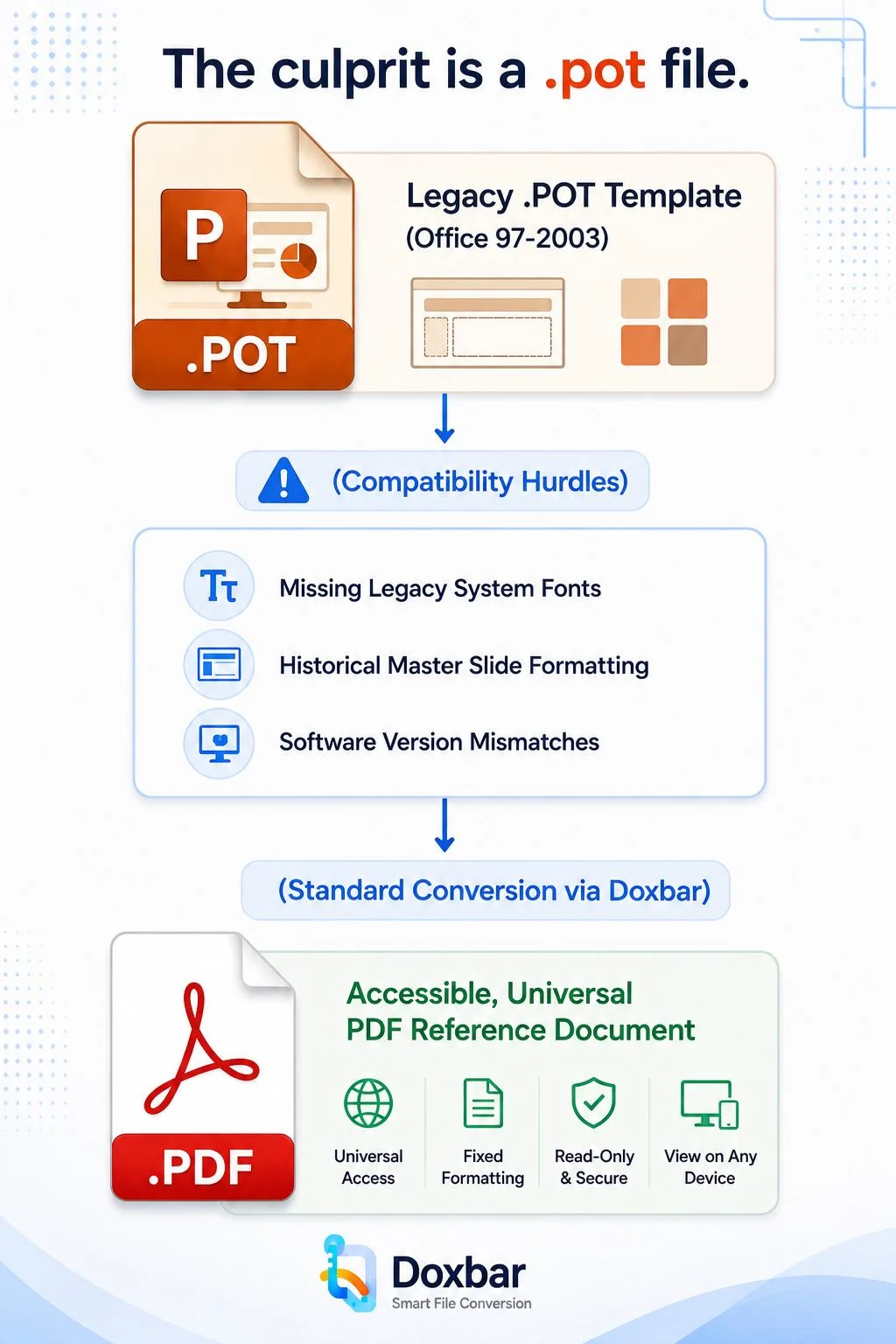
A visual workflow showing how legacy .POT PowerPoint templates can face font, formatting, and software compatibility issues before being converted into an accessible PDF reference document.
Before Microsoft adopted Open XML standards in Office 2007, PowerPoint templates were saved in a proprietary binary format using the .pot extension. Opening or distributing one today without altering the underlying master layout can be tricky. If you need to review the structure, extract slide guidelines, or print the design assets, turning that legacy template into a standardized PDF is the cleanest path forward.
Using a dedicated browser tool like Doxbar allows you to handle this conversion cleanly without requiring an older desktop installation.
(Note: If you are working with a modern Open XML template created in PowerPoint 2007 or later, refer to our guide on converting POTX to PDF.)
Why Legacy.POT Files Cause Compatibility Challenges
Working with templates created in legacy environments introduces specific technical considerations:
Legacy Binary Architecture: POT files use Microsoft's older binary Office file structure, while newer POTX templates use the Open XML format. Modern applications may handle these legacy files differently, particularly when older fonts, custom layouts, or unsupported legacy features are involved.
Master Slide & Placeholder Alignment: A .pot file stores master layouts, color palettes, and header/footer placeholders. Opening these files in modern tools can sometimes cause subtle shifts in custom shapes or text box boundaries.
Missing Local Typography: Older templates often rely on local system fonts that may not be installed on modern operating systems like Windows 11, macOS, or Linux distributions.
Mobile Compatibility: Mobile operating systems generally do not provide native support for opening legacy POT files without a compatible Office or document application.
Security Scrutiny: Some security systems and email filters may treat legacy Office binary files more cautiously because older binary formats have historically been associated with macro-based and other script risks.
How POT to PDF Conversion Handles Legacy Slides
Converting a legacy presentation template into a portable document requires accurate interpretation of structural slide data:
A converter must interpret the legacy presentation structure—including slide layouts, text blocks, vector shapes, embedded images, and fonts—before rendering those elements as PDF pages. The exact processing pipeline varies by software and conversion service.
Structure Parsing: The conversion tool reads the slide master hierarchies, shape coordinates, and text frames from the file.
Coordinate & Element Mapping: Legacy slide objects and standard shapes are mapped to fixed vector coordinates in accordance with the PDF Reference Standard.
Font Metric Handling: When legacy typefaces are not embedded, the conversion software calculates bounding boxes to avoid awkward line wraps or overlapping text blocks.
Visual Layout Generation: This produces a fixed-layout PDF that is generally less dependent on the original presentation software and installed local fonts.
What to Look for in an Online Document Converter
When selecting a conversion tool for older presentation files, prioritize the following criteria:
Clear Data Privacy: Look for clear file-retention policies and automated deletion practices so your uploaded files are not retained indefinitely.
Aspect Ratio Preservation: Standard legacy templates typically use a 4:3 aspect ratio. A reliable tool preserves these original dimensions without distorted stretching.
No Mandatory Desktop Dependencies: The service should process files without requiring local plugins or legacy compatibility packs.
Secure Data Transmission: File transfers should be protected using modern encryption standards, verifiable via security guidelines from Cloudflare or Mozilla Observatory.
Comparison: Conversion Methods
Feature / Scenario | Legacy Desktop Software | Generic Legacy Converters | Modern Web Workflow (e.g., Doxbar) |
Setup | Local software installation required | No installation | No installation |
Legacy Support | Depends on installed software version | Depends on service capabilities | Broad format support |
Data Privacy | Local processing | Check individual privacy policy | Clear temporary processing policies |
Mobile Access | Limited | Usually available | Mobile-responsive browser access |
Workflow Friction | High (version & license dependent) | Variable (often ad-heavy) | Clean, direct conversion |
How to Convert POT to PDF Without PowerPoint
If you do not have Microsoft PowerPoint installed, you can use a web-based converter:
Select your .pot file: Open Doxbar.com in your browser and upload your file to the converter.
Execute the conversion: Click Convert and wait for the PDF to be generated.
Download your PDF: Save the generated PDF document directly to your device or cloud storage.
Review the output: Open the document to verify that the slide hierarchy, text alignments, and aspect ratios rendered as expected.
Pros and Cons of Converting POT to PDF
Pros
Broad Accessibility: View slide designs across Windows, macOS, Linux, iOS, and Android without needing Microsoft Office.
Fixed Layout: The PDF preserves the exported visual layout and does not expose the original editable PowerPoint template structure.
Simpler Distribution: PDF files are generally easier to share, print, and review across devices than legacy editable templates.
Archival Readiness: Documents can be integrated into standard enterprise archiving workflows.
Cons
Loss of Native Editing: PDFs are static documents. If you need to edit slide masters or add slides, convert the file to .pptx instead.
Static Output: Slide transitions, animations, and sound triggers are flattened or discarded during the conversion to static pages.
Font Approximations: If the original file relied on proprietary or uninstalled fonts, minor typographic variations may occur.
Related PowerPoint Conversion Workflows
If you work with other formats within the Microsoft PowerPoint ecosystem, explore our related guides:
PPT to PDF – Convert standard legacy PowerPoint 97–2003 presentations.
PPTX to PDF – Convert modern Open XML presentations to universal PDF documents.
PPTM to PDF – Safely export macro-enabled PowerPoint decks into clean reference files.
POTX to PDF – Convert modern XML-based PowerPoint templates into static PDFs.
Frequently Asked Questions
What exactly is a .POT file?
A .pot file is a presentation template created by Microsoft PowerPoint versions 97 through 2003. It contains pre-configured master slides, color schemes, default fonts, and layout styles used to generate standard .ppt presentations.
How does a .POT file differ from a .POTX file?
.pot files use Microsoft's legacy binary format, whereas .potx files use the newer Open XML standard introduced in Microsoft Office 2007.
Can I convert POT to PDF online for free?
Yes. Some online converters offer free POT-to-PDF conversion, although file-size, usage, or feature limits may apply depending on the service.
How do I convert a POT file to PDF without PowerPoint?
You can use a web-based POT-to-PDF converter if the service supports the legacy POT format. Upload the file, convert it, download the PDF, and review the exported pages for font or layout consistency.
Can I open a .POT file directly in modern PowerPoint?
Yes, modern desktop versions of PowerPoint can open legacy .pot files in compatibility mode. However, web versions of Office and third-party tools may have limited support for older binary formats.
Why do slide layouts sometimes shift when converting old templates?
Older templates were often configured for specific local fonts and legacy display metrics. When converted without matching fonts, text boxes may wrap differently or shift relative to background shapes.
Is converting POT files to PDF secure on Doxbar?
Doxbar states that uploaded files are processed temporarily and automatically deleted according to its file-handling policy. Review the current privacy policy for the latest retention and security details.
Can I edit the text inside the resulting PDF?
The output is a standard fixed-layout PDF. You can annotate, highlight, or run OCR on the file, but it will no longer function as a dynamic presentation template.
Will converting to PDF preserve presentation macros?
No. A PDF does not preserve VBA macros as executable PowerPoint code. Any macro-driven behavior or automation should be completed in the source file before exporting to PDF.
Why did my slides render in 4:3 instead of widescreen 16:9?
PowerPoint 97–2003 defaulted to standard-definition 4:3 proportions. Converters preserve the document's original aspect ratio rather than distorting the canvas.
Do I need to install desktop software to convert POT files?
No desktop PowerPoint installation is required when you use a web-based converter. You only need a compatible browser and an internet connection.
Can I convert POT files on macOS or Linux?
Yes. Web-based conversion operates independently of your operating system, making it easy to process legacy Windows PowerPoint files on macOS, Linux, or ChromeOS.
How do I convert a .POT file into a modern POTX template?
To keep the template editable in modern workflows, open the file in a desktop version of PowerPoint and select Save As > PowerPoint Template (.potx).
Will background gradients in old templates render properly in PDF?
Standard conversion engines translate legacy fill patterns into standard PDF vector gradients, maintaining smooth transitions in the final document.
Why can't I open my .POT file natively on a mobile device?
Mobile operating systems generally do not provide native support for opening legacy POT files without a compatible Office or document application. Converting the template to PDF provides immediate mobile accessibility.
What is the typical file size for POT conversions?
Most legacy .pot templates are relatively small (often under a few megabytes) because they primarily store layout structures and lightweight vector shapes.
Can I convert multiple POT files at once?
Batch conversion depends on the converter. Some services support multiple uploads, while others process one POT file at a time.
Does converting to PDF retain speaker notes?
Template files (.pot) typically contain master layouts rather than slide-specific speaker notes. If notes are present on master slides, export settings dictate whether they appear in the final PDF.
Why does a legacy template sometimes look low-resolution on high-density displays?
While vector shapes and text scale cleanly, raster images embedded inside older templates may have been compressed for lower-resolution displays (such as $800 \times 600$ or $1024 \times 768$).
How do I share a .POT design with someone who does not have Office?
Converting the template to PDF is the most reliable method. The recipient can view the layout on any desktop or mobile browser without extra software.
What happens to embedded audio or legacy sound triggers?
Legacy audio clips and transition sounds are discarded during PDF export, as standard PDF formats focus on static document presentation.
Can I print the converted PDF directly onto standard paper?
Yes. The PDF can be printed via any standard system print dialog, maintaining consistent page boundaries on A4 or Letter-sized paper.
Archival Best Practices for Legacy Office Files
For organizations managing legacy presentation archives, standardizing old assets mitigates long-term accessibility challenges.
Better Archival Options: For long-term preservation, consider exporting or converting the final document to an appropriate PDF/A (ISO 19005) profile where formal archival standards apply.
Audit Legacy Storage: Identify older .pot, .ppt, and .dot files across shared repositories and evaluate whether active templates should be upgraded to modern Open XML formats (.potx, .pptx).
Safe Handling Practices: Exercise caution when opening untrusted binary files containing legacy macros. Converting unverified template files to standard PDF documents provides a safe way to inspect layouts visually.
Converting your older .pot templates into clean, standardized PDFs removes software friction, protects your layout geometry, and makes historical slide assets immediately accessible across modern platforms. When you need to turn a legacy template into an easily shareable document without extra software overhead, upload your file to Doxbar to complete the conversion.
Need to Convert Document Formats?
Try our secure, lightning-fast PDF conversion suite. Convert Word, Excel, Images, and more with zero formatting loss.

Doxbar Editorial
Security & Privacy Team
We specialize in secure document architectures, parsing engines, and modern developer utilities. Keeping your files safe, lightweight, and perfectly formatted.
Join the Conversation
Share your thoughts or ask a question about this topic. This is a privacy-first system.