


Invert PDF Colors: The Master Guide to Digital Dark Mode
Combat digital eye strain and revolutionize your reading experience. Discover the science of visual ergonomics through structural PDF color inversion.
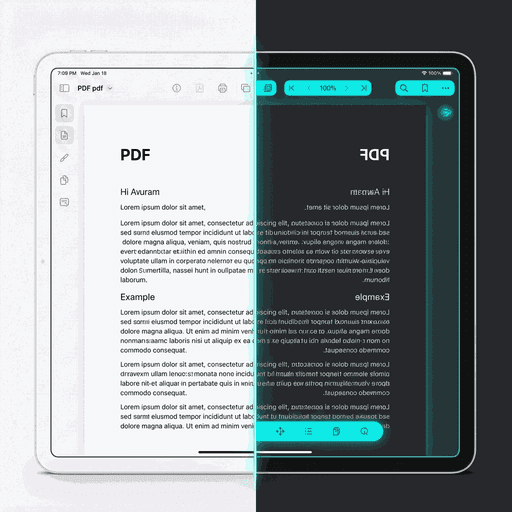
Standard White-on-Black vs Premium Dark Mode Inversion
01The Biological Case for Dark Mode
Humans were never meant to stare at backlit white surfaces for hours at a time. The evolution of our optical nervous system happened under natural, reflected light. Digital screens, however, emit light directly into the retina. This direct emission is the primary cause of modern ocular fatigue.
When you read a standard PDF, your screen is essentially a 15-inch flashlight aimed at your face. The Invert PDF process flips this paradigm. By displaying white text on a black background, you reduce the total light entering the eye by over 80%. This allows the iris to relax and the blinking reflex to remain natural, preventing the "burning" sensation known as dry eye.
Symptoms of "Screen Fatigue"
- Accommodation SpasmsTemporary nearsightedness caused by internal eye muscles staying contracted to focus on bright light.
- Contrast Sensitivity LossDifficulty distinguishing objects after long exposures to blindingly bright background text.
- Reduced Blink RateConcentrating on bright text causes us to blink 40% less, leading to corneal drying.
OLED Energy Efficiency
Modern smartphones and high-end laptops utilize OLED (Organic Light Emitting Diode) technology. Unlike traditional LCD screens that have a constant backlight, every single pixel on an OLED panel is its own light source.
When you invert a PDF using DoxBar, the vast white background becomes pure black (#000000). In OLED terms, this means those pixels are physically turned off. No electricity flows through them. Studies have shown that utilizing true Dark Mode on mobile devices can extend battery life by as much as 30% to 60% depending on brightness levels.
For students and professionals working remotely or traveling, inverting a 200-page textbook can be the difference between finishing a chapter or having a dead device mid-flight.

Behind the Pixels: The Inversion Engine
Most users think inversion is a simple toggle. In reality, PDF structures are incredibly complex, composed of vector points, bezier curves, and embedded raster streams.
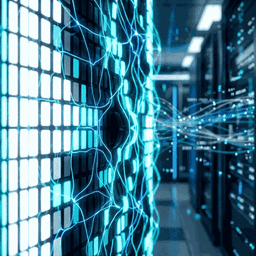
Vector Transformation Matrix
PDF documents store colors in various "Space" types: RGB, CMYK, and GrayScale. Our engine doesn't just "paint over" the document. It traverses the PDF Object Tree (the structural hierarchy) and updates the internal color definitions.
// Simplified Transformation Logic
pdf.getObjects().forEach(obj => {
  if(obj.type === 'Color') {
    obj.red = 1.0 - obj.red;
    obj.green = 1.0 - obj.green;
    obj.blue = 1.0 - obj.blue;
  }
});
Raster Image Compensation
Advanced rendering prevents photos from looking like negatives by identifying image-heavy zones.
Bitwise Integrity
Structural metadata and internal cross-references remain intact for PDF/A compliance.
Who Benefits the Most?
Academic Researchers
Analyzing 50-page White Papers and academic journals at 2 AM is a recipe for ocular burn. Converting research papers to dark mode allows for deep focus without the "halo effect" often caused by bright screens.
Legal Professionals
Reviewing contracts, discovery documents, and transcripts requires reading thousands of words. DoxBar's inversion ensures that even the smallest 8pt legal text remains hyper-clear against a dark backdrop.
Manga & eBook Readers
PDF eBooks often miss out on the native "Night Mode" of ePUB formats. Our tool gives PDF readers the same luxury, transforming any digital book into a Kindle-like low-light masterpiece.
Expert Q&A
Will this affect my PDF fonts?
No. Our tool modifies the document's internal color space without touching the font substream. Your typography remains exactly as the designer intended, just inverted.
Can I invert specific pages?
Currently, our tool offers a global document inversion. If you need specific pages, we recommend using our PDF Split tool, inverting the target pages, and merging them back.
Does inversion reduce file quality?
Not at all. Since we are changing vector definitions, there is zero pixel degradation. The document remains as sharp as the original.
Is it safe to use for sensitive bank statements?
Yes. DoxBar uses client-side processing wherever possible. For the Invert tool, your device handles the heavy lifting, meaning your sensitive financial documents never touch our logs.










