


Mastering Document Dimensions: How to Resize PDF Pages for Print
From the ISO A-series to US Letter, understanding digital paper sizes is key to professional printing. Learn how to rescale your PDFs without losing quality or layout integrity.
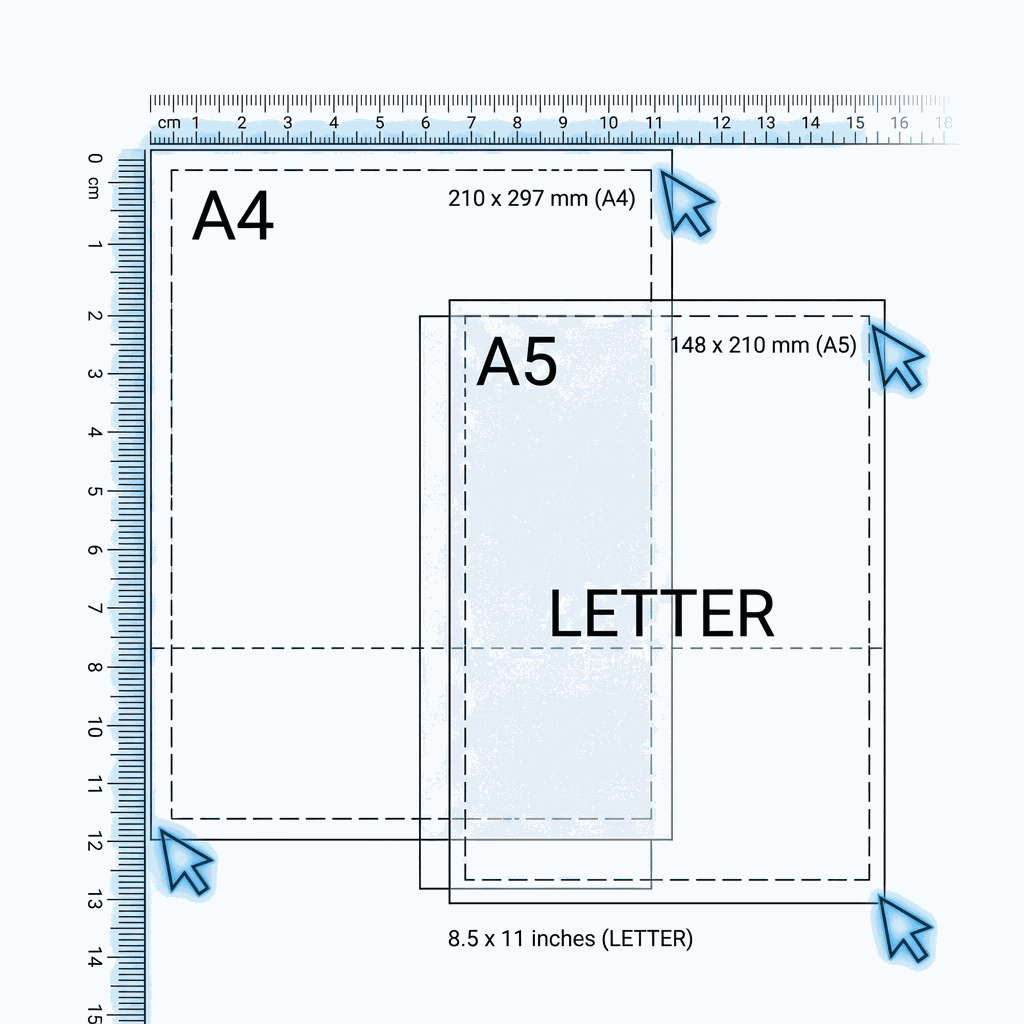
The "Page Size" Conflict in Digital Documents
You might think a PDF is just a digital file with no physical size, but every PDF page has defined dimensions in "points" (1/72 of an inch). If you send an A4 PDF to a printer expecting US Letter paper, machines will either shrink it (leaving ugly white borders) or crop it (cutting off your header).
The Common Problem: A colleague in Europe sends you a report in A4 format (210mm x 297mm). You are in the US using Letter paper (8.5in x 11in). A4 is taller and narrower than Letter. Printing it directly results in scaling issues.
Vector Scaling vs. Raster Stretching
DoxBar uses Vector Scaling via transformation matrices.
- Bad Way (Raster): Turning the page into an image and stretching it. This makes text blurry and pixelated.
- Good Way (Vector): Our engine tells the PDF reader: "Draw this text 94% smaller and move it 10 points right." The text remains crisp, selectable, and searchable at any zoom level.
Paper Size Cheat Sheet
ISO Standard (International)
- A4: 210 x 297 mm (Standard Office)
- A3: 297 x 420 mm (Double A4 - Posters)
- A5: 148 x 210 mm (Half A4 - Notebooks)
North American Standard
- Letter: 8.5 x 11 in (Standard Office)
- Legal: 8.5 x 14 in (Perforated Contracts)
- Executive: 7.25 x 10.5 in (Stationery)
How to Resize PDFs with DoxBar
- Upload: Select your PDF. Our tool analyzes the current page geometry.
- Select Target Size: Choose your desired output format from the dropdown (e.g., "Rescale to A4").
- Process: Our algorithm calculates the aspect ratio difference. If the aspect ratios don't match (e.g., A4 to Square), it centers the content to fit the new bounds without distortion.
- Download: Get a perfectly sized document ready for your printer tray.
Use Cases
- Printing
Ensure your document fits the paper in the tray perfectly.
- Booklet Making
Convert A4 pages to A5 to print two pages per sheet for folding.
- Standardization
Convert mixed formats (some pages Letter, some A4) into a uniform A4 document.
Did you know?
"The 'A' series is mathematically based on the square root of 2. Cutting an A3 page in half gives you exactly two A4 pages with the same aspect ratio!"
Scaling Assistance.
Will my content be stretched?
No. We perform 'proportional scaling'. If the aspect ratios differ between your original and target size, we center your content and may leave small, balanced margins to preserve the original shape of your text and images.
Can I resize just the first page?
Yes. Using our selective processing feature, you can target specific pages—like just the cover (Page 1)—while leaving the rest of the document at its original dimensions.
Does resizing increase the file size?
Generally, no. Adjusting page boundaries is a metadata calculation in the PDF structure. The file size remains consistent unless the document requires specialized rasterization for complex background elements.
Are the resized pages still high-quality?
Absolutely. Because we use vector-based transformation matrices rather than image-stretching, your text stays crisp and your graphics remain sharp regardless of the new page size.










